Synthesia alternatives for software videos (2026)
Synthesia alternatives fall into two camps: avatar-led tools like HeyGen, Colossyan, DeepBrain AI and Elai, and screen-led tools like Guidde, Trupeer, Clueso and Clevera. A decision table by job, what each outputs besides video, US prices as of Nov 2026, and what to check before you switch.
 Berkay Akpolat20 min read
Updated 2026-11-04
The best Synthesia alternatives depend on one question: does your video need a presenter's face, or your product's screen? For avatar-led training and outreach, look at HeyGen, Colossyan, DeepBrain AI and Elai. For software how-tos and onboarding, screen-led tools such as Guidde, Trupeer, Clueso and Clevera fit better, because they start from a recording of the product. Descript, a text-based video editor, sits between the two camps.
In this article
- Avatar-led or screen-led: the real choice
- Which Synthesia alternative fits which job?
- Synthesia alternatives compared
- What Synthesia costs now
- What to check before you switch from Synthesia
- Avatar-led alternatives: HeyGen, Colossyan, DeepBrain AI, Elai
- Screen-led alternatives: Guidde, Trupeer, Clueso, Clevera
- In between: Descript
- Can you make training videos without an avatar?
- How Clevera does software videos
- How we compared these tools
- FAQ
Avatar-led or screen-led: the real choice
Most lists of Synthesia alternatives are written by AI video vendors, so they list each other. That works if you want a talking head. It helps less if your video is mostly a product screen with a voice over it.
Split the field in two before you compare features:
- Avatar-led tools start from a script. An AI presenter reads it on camera, in front of slides, stock footage or a screen capture. Synthesia, HeyGen, Colossyan, DeepBrain AI and Elai work this way. They are strong for policy and compliance training, internal announcements and personalized outreach, where a face carries the message.
- Screen-led tools start from a recording of the software. The tool writes the narration from what happens on screen, adds an AI voice, zooms and captions, and often a written guide. Guidde, Trupeer, Clueso and Clevera work this way. They are strong for how-tos, onboarding and help center videos, where the viewer needs to see where to click.
Most teams already use AI for video: 63% of video marketers have, up from 51% a year earlier (Wyzowl State of Video Marketing 2026, vendor survey, 266 respondents). The choice that matters is which kind.
For instructional content, viewers lean towards people over avatars. In TechSmith's 2024 viewer study, 87% preferred a real person to an animated character or AI avatar in instructional and informational videos; 6% chose an AI-generated person (TechSmith Video Viewer Trends 2024, vendor study, nearly 1,000 participants). The study didn't test screen-only videos, but it suggests an avatar adds little to a software tutorial, where the screen carries the steps.
Two more things to compare that most lists skip:
- What you get besides the video. Some tools stop at a video file or an LMS package. Others also give you a written guide, and a few publish it to a help center. If your team maintains a knowledge base, that output column matters as much as the price.
- What happens when your product's UI changes. With an avatar tool, the script survives a release, but any screen capture inside the video has to be replaced and the scenes rendered again. With a screen-led tool, you re-record the changed steps, or, where the tool supports it, fix the affected narration line and regenerate it. Ask each vendor how a one-button change in your product reaches every place the video is embedded.
Which Synthesia alternative fits which job?
| Job | What the viewer needs | Better fit | Good options |
|---|---|---|---|
| Compliance and policy training | A consistent presenter, quizzes, LMS export | Avatar-led | Synthesia (SCORM on Enterprise), Colossyan (SCORM on Professional), HeyGen (SCORM on Business), DeepBrain AI and Elai (SCORM on Enterprise) |
| Software how-tos and help center videos | To see each click on the real product | Screen-led | Guidde, Trupeer, Clueso, Clevera |
| Customer and employee onboarding in an app | Step-by-step screens, an article to come back to | Screen-led | Guidde, Trupeer, Clueso, Clevera |
| Sales outreach and personalized videos | A face and a name, short length | Avatar-led | HeyGen, Synthesia |
| Translating an existing library | Many languages, voice-over and captions in sync | Either | HeyGen, Synthesia, Clueso, Trupeer, Clevera |
| Editing recorded talks and podcasts | Text-based editing of real footage | In between | Descript |
If your job is a software how-to or in-app onboarding, a screen-led tool is usually the shorter path: you record the task once instead of writing a script and assembling scenes around it.
Synthesia alternatives compared
Prices are the lowest paid plan for one person on each vendor's own pricing page, as of 2026-11-04, in USD. "Monthly" means billed monthly; yearly billing is cheaper where noted. Synthesia shows different prices by country; these are the prices it shows US visitors.
| Tool | Best for | Presenter or screen | Recording needed? | Output besides video | Languages (vendor's count) | Free plan | Entry paid price (as of 2026-11-04) |
|---|---|---|---|---|---|---|---|
| Synthesia (baseline) | Enterprise training at scale | Presenter | No, script-first (screen recorder available) | Interactive videos on Pro; SCORM on Enterprise | 140+ languages and voices; dubbing into 70+ below Enterprise | Yes: about 10 min of video a month, watermarked | Starter $19/mo ($14/mo yearly); US prices, vary by country |
| HeyGen | Lifelike avatars, outreach, translation | Presenter | No, script-first | SCORM export on Business | 175+ on paid plans, 30+ on Free | Yes: 3 videos a month, up to 1 min, watermarked | Creator $29/mo ($24/mo yearly) |
| Colossyan | Training courses with SCORM | Presenter | No, script-first (screen recorder available) | Courses and SCORM (5 exports a month on Professional) | 120+ | Yes: 20 min a month | Professional $59/mo billed yearly |
| DeepBrain AI Studios | Long avatar videos and dubbing | Presenter | No, script-first (screen recorder available) | SCORM on Enterprise | 73 languages and dialects for dubbing | Yes: 3 videos a month, up to 1 min, 720p | Personal $24/mo billed yearly ($288/yr) |
| Elai | Slide and URL to avatar video | Presenter | No, script-first (screen recorder available) | SCORM on Enterprise | 75+ on the pricing page (its feature text says 100+) | Yes: 1 min | Creator $29/mo |
| Descript | Editing recorded footage by text | Either | Yes, or upload | Audio and podcasts | 25 for transcription, 30+ for dubbing | Yes | Hobbyist $24/mo ($16/mo yearly) |
| Guidde | Quick browser how-to guides | Screen | Yes (browser; desktop on Business) | Step-by-step guide; PDF and PPT export from Pro | 50+ AI voice languages | Yes: up to 25 videos | Pro $29/creator/mo ($19 yearly) |
| Trupeer | Product videos and docs from a browser recording | Screen | Yes (browser extension or upload) | Document (DOC, PDF, Markdown export); knowledge base as a paid add-on ($120/mo yearly) | 100+ | Yes (the page labels it "for 10 days") | Pro $49/mo ($40/mo yearly) |
| Clueso | Product videos and articles from a browser recording | Screen | Yes (browser extension or upload) | Articles; SCORM on Enterprise | 150+ for video translation | Yes: 10 min of video exports a month | Solo $40/mo billed yearly |
| Clevera | Software how-tos, articles and a help center from one recording | Screen (AI presenter on social clips, Starter+, Beta) | Yes, or the AI records a public web app | Help article + hosted help center, on every plan | 74 | Yes: 100 credits a month, videos up to 3 min, no MP4 download | Starter $36/mo ($29/mo yearly) |
A note on Hour One, which used to appear on these lists: Wix announced it was acquiring Hour One in May 2025 (Times of Israel), and its public pricing page showed no plans on 2026-11-04, so it's left out here.
What Synthesia costs now
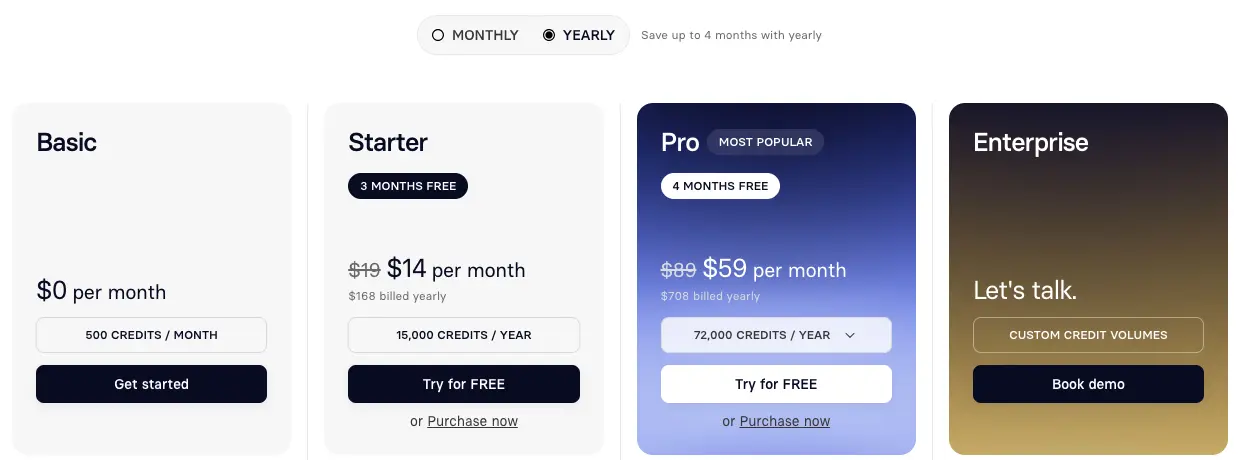
Before switching, check what you would be leaving. Synthesia has moved to credits and prices by country. As of 2026-11-04 its pricing page shows US visitors:
- Basic, $0: 500 credits a month, about 10 minutes of video a month, 9 AI avatars, and a Synthesia watermark.
- Starter, $19 a month ($9 for the first month) or $14 a month billed yearly: downloads, no Synthesia logo, 125+ avatars.
- Pro, $89 a month ($49 for the first month) or $59 a month billed yearly: 180+ avatars, five personal avatars, branded video pages and interactive videos.
- Enterprise, custom: unlimited video minutes, 1-click translation into 140+ languages, SCORM export and SAML/SSO.
Where Synthesia is strong: a large avatar library, an LMS path through SCORM on Enterprise, and enterprise controls. Where teams look elsewhere: SCORM and the full 140+-language translation are Enterprise features (lower plans dub into 70+ languages within a capped allowance), the free plan is watermarked, and a script-first workflow means someone writes and maintains every script.
What to check before you switch from Synthesia
- Download your videos first. Per Synthesia's billing help article, you keep access until the end of the billing period after you cancel; after that you lose access to the account and all its videos. Downloads need Starter or higher, so a Basic account can't export MP4s.
- Copy your scripts out. Script-first tools such as HeyGen, Colossyan, DeepBrain AI and Elai can take the same scripts. Screen-led tools start from a fresh recording of the product instead, so for software tutorials plan to re-record the task.
- Personal avatars stay behind. A personal avatar is built inside your Synthesia account. Budget for creating a new one on the new tool's plan, or drop the presenter for screen-only videos.
- Re-export SCORM on the new tool's plan. Packages already in your LMS keep working, but new or updated ones must come from the new tool, and SCORM is gated: Professional on Colossyan, Business on HeyGen, Enterprise on DeepBrain AI, Elai and Clueso.
- Check where translation sits. On Synthesia, AI dubbing into 70+ languages is on every plan with a capped allowance of dubbing minutes; 140+ languages and 1-click translation are Enterprise. Elsewhere it ranges from every plan (Clueso lists translation on all plans) to add-ons (Guidde) or higher tiers (Trupeer from Scale).
Avatar-led alternatives: HeyGen, Colossyan, DeepBrain AI, Elai
HeyGen
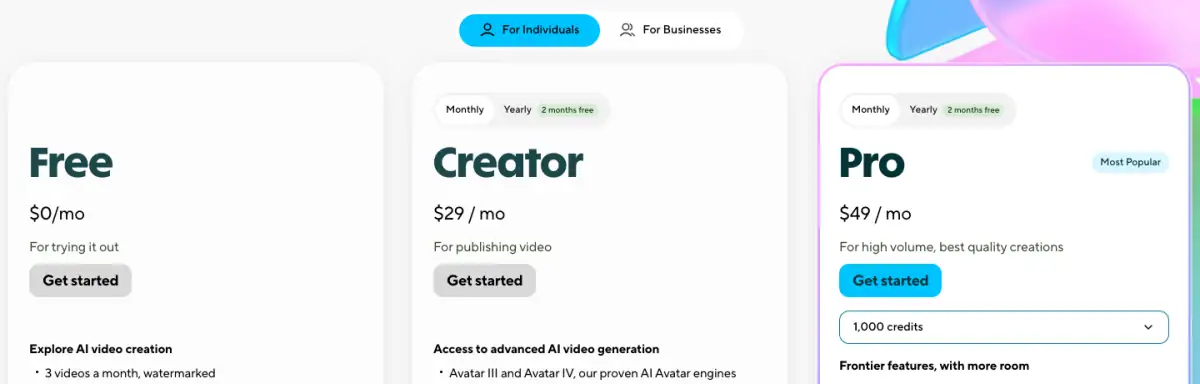
HeyGen is the closest like-for-like swap. Its pricing page lists a Free plan with 3 watermarked videos a month up to 1 minute each, Creator at $29 a month ($24 a month billed annually) and Pro at $49 a month with 4K export and videos up to 30 minutes. Paid plans list 175+ languages and dialects; Free lists 30+.
- Choose it for: outreach and marketing videos with a lifelike presenter, and translating talking-head videos.
- Watch for: paid plans run on credits, and SCORM export and LMS integrations sit on Business, which starts at $149 a month plus $20 per seat, per HeyGen's own FAQ.
Colossyan
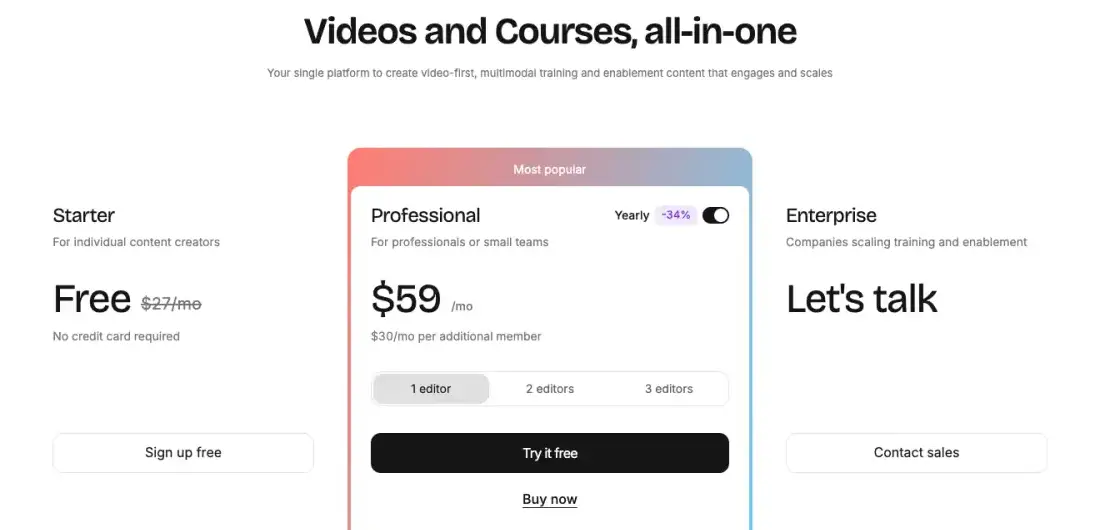
Colossyan positions itself for training teams: "Videos and Courses, all-in-one". Its pricing page shows a free Starter plan (20 minutes a month) and Professional at $59 a month on an annual plan, with $30 a month for each extra member. Professional includes five SCORM exports a month and removes the watermark; the comparison table lists 120+ supported languages and a screen recorder.
- Choose it for: course-style training with quizzes, branching and SCORM on a mid-tier plan.
- Watch for: watermark removal and SCORM start on Professional; unlimited SCORM, SSO and data residency are Enterprise.
DeepBrain AI Studios
DeepBrain AI's AI Studios makes avatar videos from a script and dubs existing ones. Its pricing page lists Free (3 videos a month up to 1 minute per its plan card, 720p export), Personal at $24 a month billed annually ($288 a year) with videos up to 30 minutes and 120 minutes of AI dubbing a month, and Team at $55 per seat a month billed annually. It lists 73 languages and dialects for dubbing and a screen recorder; SCORM export and interactive quizzes are Enterprise.
- Choose it for: longer avatar videos and dubbing with lip-sync on an entry plan.
- Watch for: the price shown is for annual billing, interactive videos start on Team, and LMS export needs Enterprise.
Elai
Elai turns text, slides or a URL into an avatar video. Its pricing page lists Free with 1 minute, Creator at $29 a month for 15 minutes, and Team at $125 a month. It lists 75+ languages (its feature text elsewhere on the page says 100+), a built-in screen recorder and URL-to-video; SCORM export is on Enterprise.
- Choose it for: turning existing slide decks into narrated avatar videos.
- Watch for: monthly minutes are tight on the entry plan.
Screen-led alternatives: Guidde, Trupeer, Clueso, Clevera
Guidde
Guidde captures a workflow in the browser and turns it into a narrated step-by-step video. Its pricing page lists Free for up to 25 how-to videos, Pro at $29 per creator a month ($19 billed yearly) with PDF and PPT export, and Business at $59 ($39 yearly), which adds desktop app capture. It lists AI voices in 50+ languages; a virtual avatar is an add-on.
- Choose it for: fast click-by-click guides of web apps, made by many people across a company.
- Watch for: desktop capture starts on Business; automatic translation is an add-on and multi-language translation and SCORM are listed under Enterprise. See also our Guidde alternatives and Clevera vs Guidde.
Trupeer
Trupeer records the browser and generates a polished video and a document. Its pricing page lists a free plan (1,000 AI credits a month, recordings up to 5 minutes; the page labels it "for 10 days"), Pro at $49 a month ($40 billed yearly) and Scale at $249 a month ($199 yearly) for three creators. It lists 100+ languages and document export as DOC, PDF or Markdown; AI translation in videos starts on Scale, an AI avatar costs extra credits per minute, and a hosted knowledge base is a paid add-on ($120 a month billed yearly, $150 monthly; included on Enterprise).
- Choose it for: product videos and docs from a quick browser recording.
- Watch for: recordings are capped at 10 minutes on Pro and 15 on Scale. Compare in Clevera vs Trupeer and Trupeer alternatives.
Clueso
Clueso turns a browser recording or an uploaded video into an edited product video and a step-by-step article. Its pricing page lists Free (10 minutes of video exports and 10 article exports a month), Solo at $40 a month billed yearly and Business at $120 a month billed yearly for two users. Translation is listed on every plan, and its translate page says 150+ languages; interactive video and SCORM export are Enterprise.
- Choose it for: product videos plus written articles from a quick browser recording, with translation on every plan.
- Watch for: export minutes are capped per month or year on each plan, and recording is through the browser extension or an upload. Compare in Clevera vs Clueso and Clueso alternatives.
Clevera
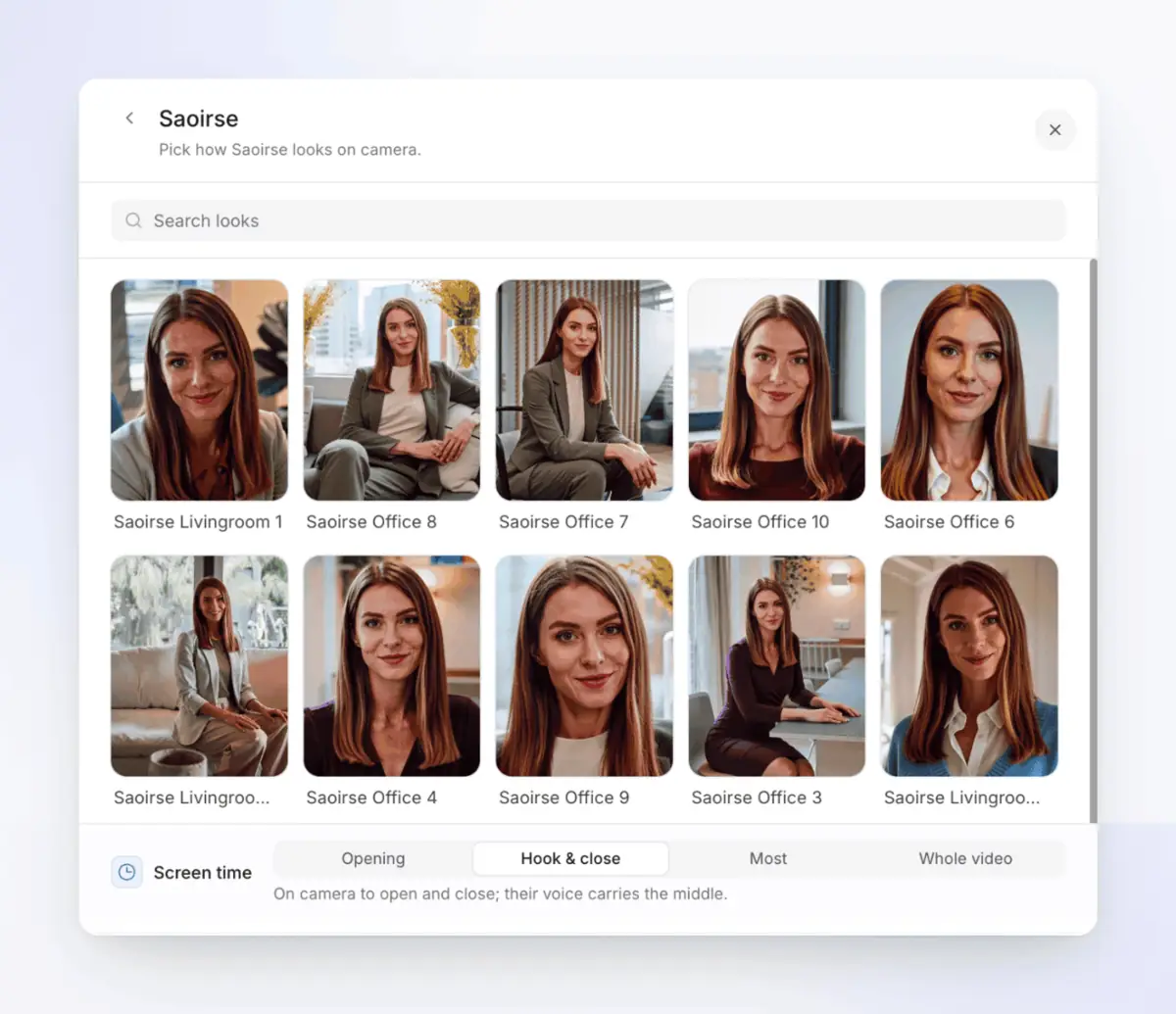
Clevera is screen-led: you record the product, and it writes, narrates and edits the video, then writes the help article from the same recording. It also has an AI presenter, but only on social and promo clips (Starter and up, Beta), not on how-to videos.
- Choose it for: software how-tos and onboarding where you also want the written article and a hosted help center from the same recording, in 74 languages.
- Watch for: the Chrome extension records video, not clicks (click-based zooms and screenshots come from the Mac, Windows or Linux app), so Guidde, Trupeer and Clueso are quicker for one-off browser guides. Free caps videos at 3 minutes and has no MP4 download. The AI presenter is only on social clips (Starter and up, Beta). More detail in How Clevera does software videos below.
In between: Descript
Descript edits audio and video by editing a transcript. Its pricing page lists a Free plan, Hobbyist at $24 per person a month ($16 billed annually) and Business at $65 ($50 annually). Custom avatars and dubbing are on Hobbyist and up (limited on Free); Business adds translation proofreading and lists dubbing in 30+ languages.
- Choose it for: cleaning up recorded talks, webinars and screen recordings where your own voice and face matter.
- Watch for: it is an editor first, so a how-to still takes manual cutting and narration. See our Descript alternatives.
Can you make training videos without an avatar?
Yes. For software training, the screen is usually the better presenter. The method works with any tool, and it's also how to make tutorial videos without showing your face:
- Record the task once on a clean test account, at a steady pace. Skip narration while you record.
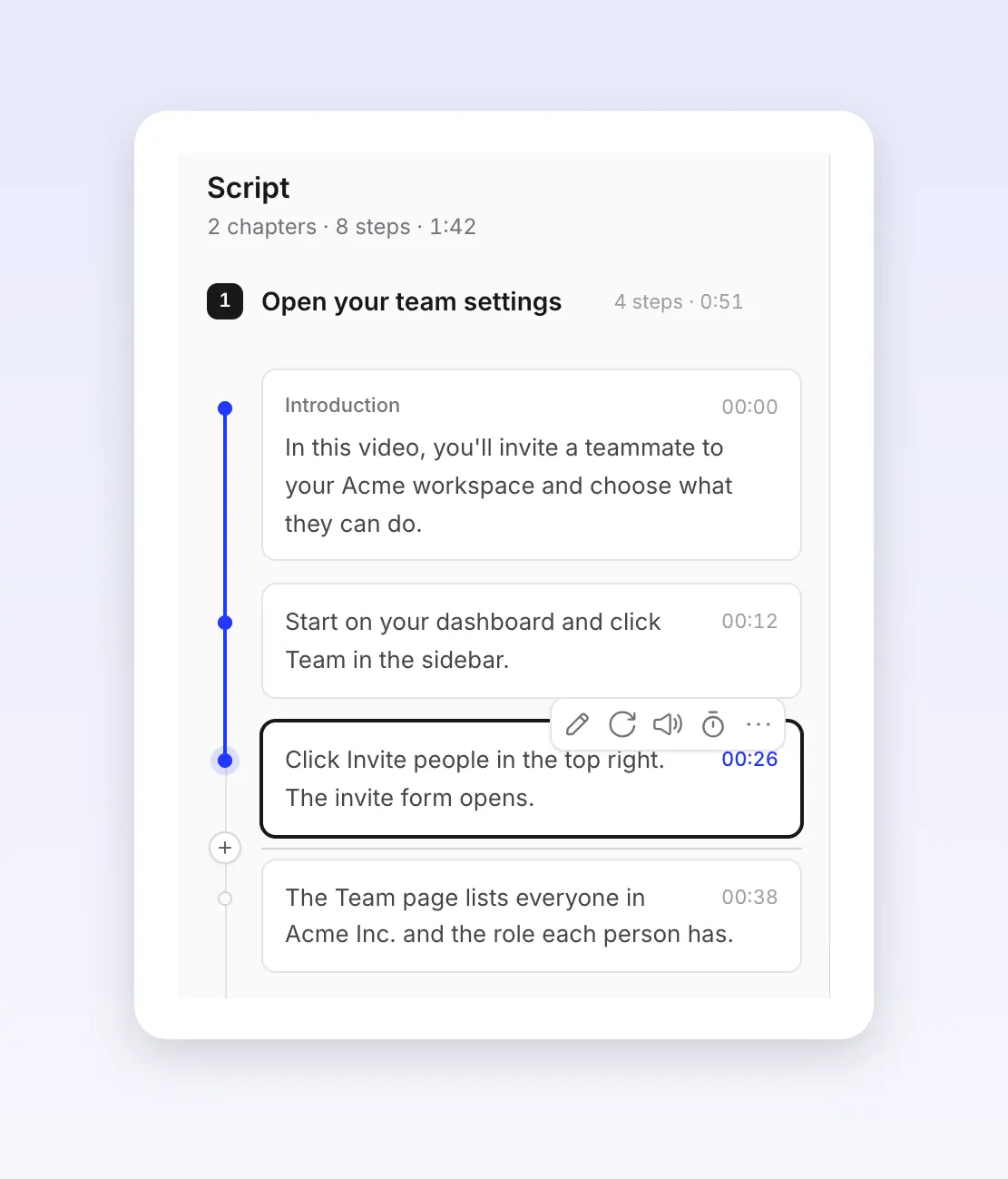
- Write the narration from the steps, one short line per action: "Click Invite people in the top right."
- Add a voice. Use your own, an AI voice, or captions only for silent viewing.
- Zoom in on each click and blur anything private.
- Publish where people look: your help center, the LMS or an in-app link, with a written version next to it.
People do want video for this: 63% would most like to learn about a product by watching a short video (Wyzowl 2026, vendor survey). For a full walkthrough, see how to create a tutorial video, how to create training videos for software and turning a screen recording into a how-to video.
How Clevera does software videos
Clevera is an AI platform that turns a screen recording into a narrated how-to video, a step-by-step help article and a page on your hosted help center, in 74 languages.
It fits the screen-led jobs in the decision table. It is not an avatar studio: if a presenter's face is the point of your video, the avatar tools above fit better.
1. Start from a recording. Clevera's AI tutorial maker starts from a screen recording: pick How-to or Product demo and record with the Mac, Windows or Linux desktop app or the Chrome extension, or upload a video. For a public web app, Record with AI can click through the steps itself from a sentence (use a test account).
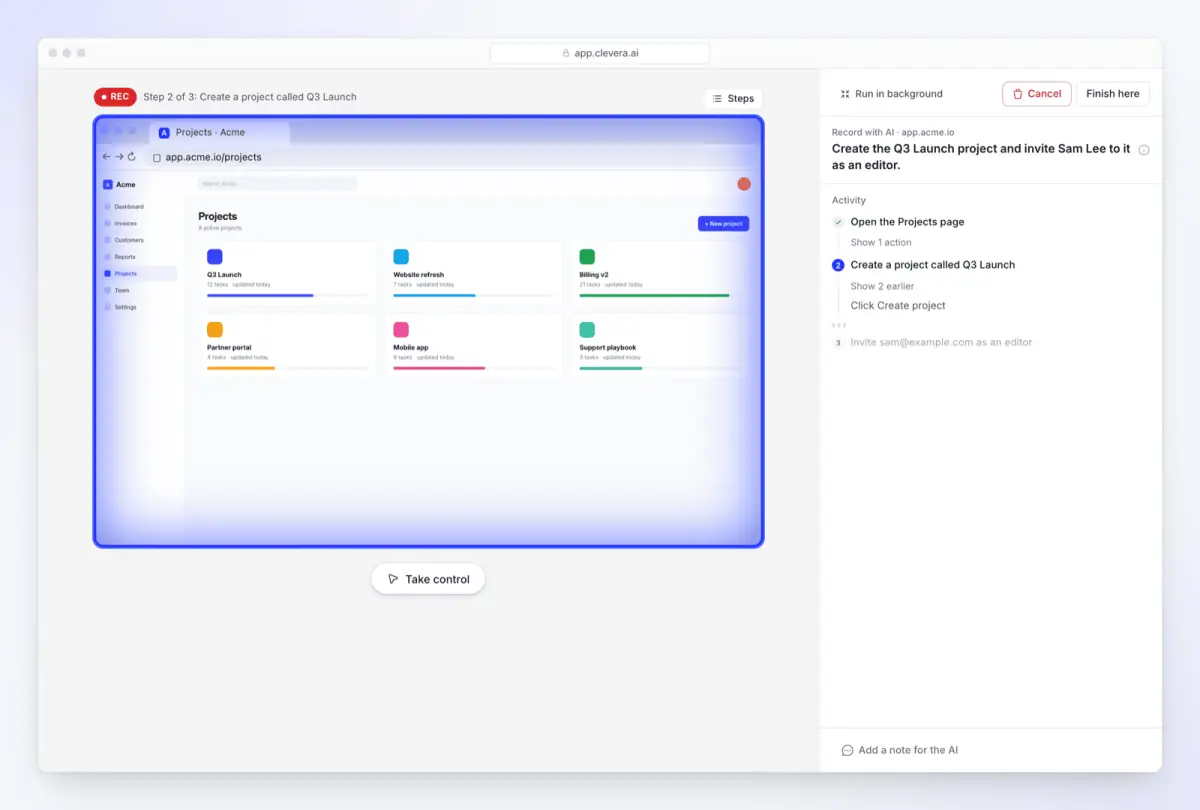
2. Fix a line, not a whole video. The AI writes the narration from what happens on screen and reads it in one of 30 built-in voices, or your own ElevenLabs voice with your own key. When the UI changes, edit the line in the Script tab and Clevera records it again in the video's voice (how to edit the script). Share links, embeds and help-center pages play the new version (LiveSync); downloaded MP4s stay as they were.
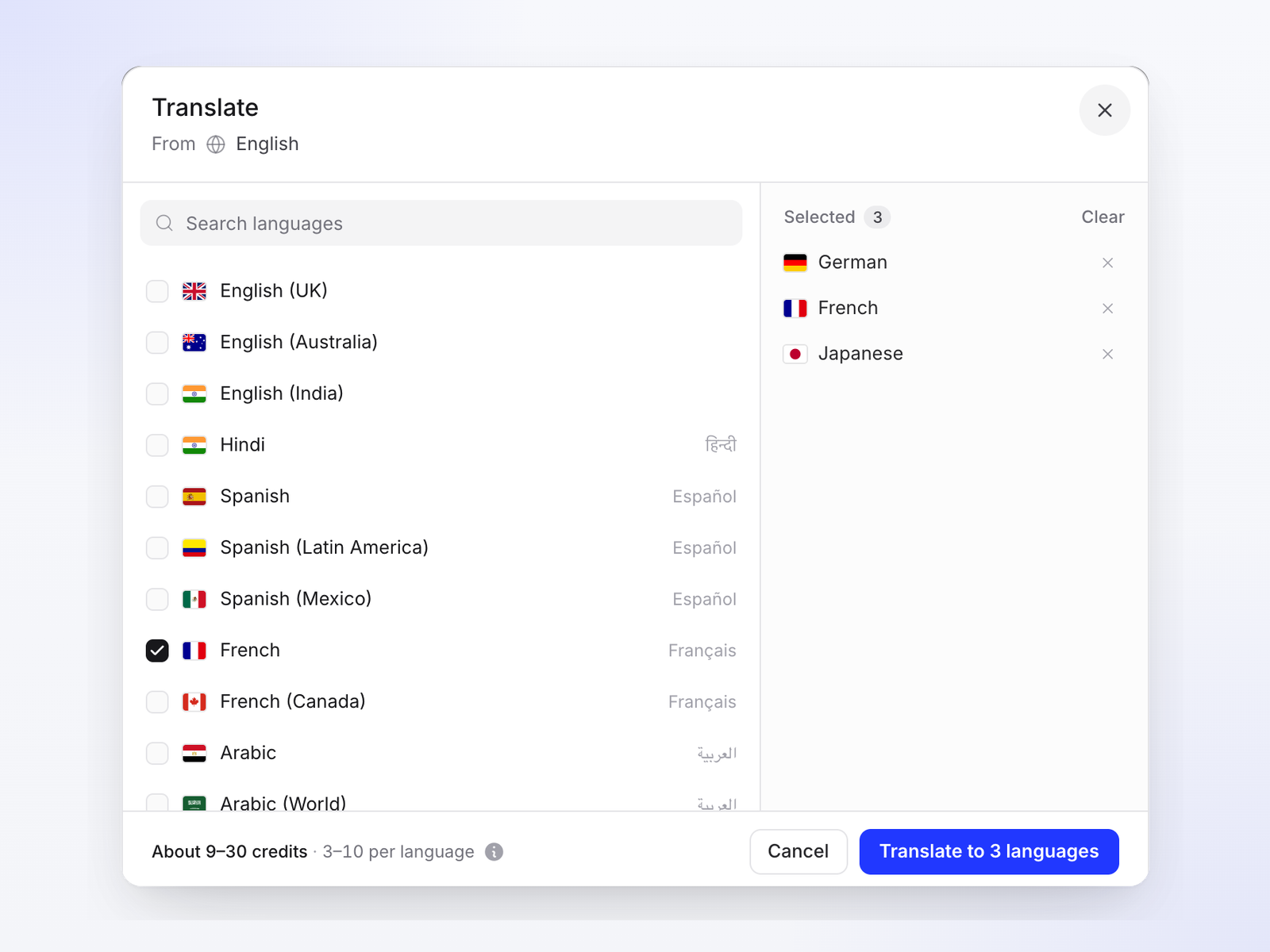
3. Translate the finished video. Pick languages in the Translate dialog; each becomes its own version with a new voice-over, usually 3 to 10 credits per language (how to translate a video). See also how to translate tutorial videos.
4. Get the article and the help center too. The same recording can produce a step-by-step article with screenshots, published to a hosted help center that every plan includes, Free too.
5. When you do want a face. Social and promo clips can add an AI presenter with a Screen time setting, from the opening only to the whole video. It is on Starter and up, in Beta, and priced by time on screen (how to add an AI avatar). For avatar-style marketing clips, see AI UGC video generators for B2B.
Plans (as of 2026-11-04, pricing): Free is $0 with 100 credits a month, videos up to 3 minutes, a share link and embed but no MP4 download. Starter is $36 a month, or $29 a month billed yearly, and adds MP4 downloads up to 2K, social clips and the AI presenter. Pro is $124 a month for two creators, or $86.80 a month billed yearly. More on the training use case: AI training video maker for software teams.
How we compared these tools
- Selection: tools that rank as Synthesia competitors today or are named in the top results for "Synthesia alternatives", plus screen-led tools software teams evaluate for the same budget. D-ID was considered and left out to keep the list at nine; DeepBrain AI covers the same avatar-led use and appears on more of the top results. We also left out text-to-video generators such as Runway and InVideo: they make footage and b-roll, not presenter or product-screen videos, so they don't replace Synthesia for training or how-tos.
- Sources: each vendor's own public pricing and product pages, captured on 2026-11-04 while logged out. Synthesia prices by country, so we recorded the prices it shows US visitors. We have no accounts on these tools and didn't run hands-on tests, so this compares what vendors publish.
- Prices: the lowest paid plan for one person, monthly billing unless noted, in USD. Vendors change plans often; check their pages before you buy.
- Bias: Clevera is our product. We placed it where it fits (screen-led jobs), listed its limits next to the others, and said where avatar tools are the better choice.
FAQ
Is there a free alternative to Synthesia? Several tools have free plans as of 2026-11-04: HeyGen (3 watermarked videos a month up to 1 minute), Colossyan (20 minutes a month), DeepBrain AI (3 videos a month up to 1 minute), Elai (1 minute), Guidde (up to 25 how-to videos), Clueso (10 minutes of video exports a month), Descript and Clevera (100 credits a month, videos up to 3 minutes, no MP4 download). Synthesia's own Basic plan is also free, with a watermark.
What apps are most like Synthesia? HeyGen is the closest: script-first, a large avatar library, and translation. Colossyan, DeepBrain AI and Elai work the same way and lean towards training content.
What happens to my Synthesia videos if I switch? Per Synthesia's help center, after you cancel you keep access until the end of the billing period, then lose access to the account and its videos. Download what you need first (downloads need Starter or higher), and re-export SCORM packages from the new tool.
Which Synthesia alternative is best for software tutorials? A screen-led tool, because viewers need to see the product. Guidde, Trupeer and Clueso start from a browser recording; Clevera starts from a desktop, Chrome extension or uploaded recording, or its AI records a public web app for you, and can also produce the article and help center page.
Can I make training videos without an AI avatar? Yes. Record the task, narrate it with your own or an AI voice, zoom on each click and add captions. Viewers don't need an avatar: in TechSmith's 2024 study, only 6% preferred an AI avatar in instructional video.
Which tools handle the most languages? By the vendors' own counts as of 2026-11-04: HeyGen 175+ on paid plans, Clueso 150+ for video translation, Synthesia 140+, Colossyan 120+, Trupeer 100+, Elai 75+ on its pricing page, Clevera 74, DeepBrain AI 73 for dubbing and Guidde 50+ for AI voices. Check which plan includes translation: on Synthesia, plans below Enterprise dub into 70+ languages with a capped dubbing allowance, and 140+ languages with 1-click translation are Enterprise.
Turn one screen recording into a video, an article and a help page
Record your product once. Clevera writes the narration, adds the voice and zooms, and when the UI changes you fix one line instead of re-recording.
Or see how teams use it for employee training videos.