Best AI UGC video generators for B2B

Most AI UGC tools were built to put a serum bottle in an actor's hand. That works for skincare. It falls flat for a workflow tool, because a B2B buyer doesn't want to watch someone hold your product. They want to see the screen where their problem gets solved. So this list of the best AI UGC video generators for B2B judges every tool on one question: can the avatar show and talk through a real software UI, or can it only hold something up to the camera?
Prices and features below were checked on each vendor's official site in October 2026.
The test: three levels of UI handling
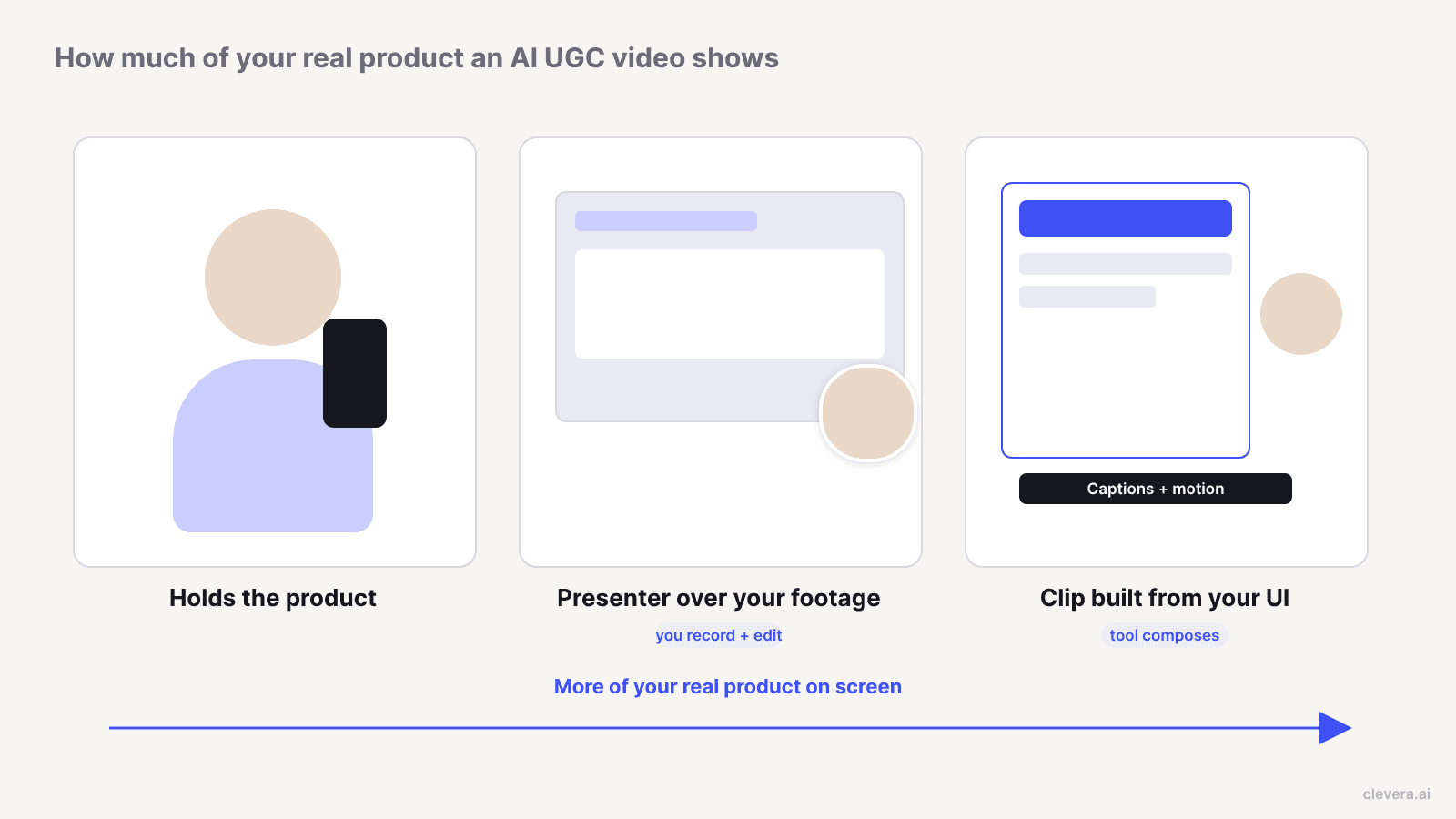
Every AI UGC ad tool on this list can make a person talk. The difference is what sits next to that person.
Level 1: the avatar holds the product. The actor holds a box, a bottle or a phone showing your app. Fine for a mobile app with one hero screen. Weak for a dashboard with 6 panels.
Level 2: the avatar sits on top of footage you bring. You record the walkthrough somewhere else, then lay a presenter over it. The UI is real, but you do the capture and the cut.
Level 3: the tool builds the clip around your UI. The tool takes your product's screenshots, a screen recording or a link, writes the script, composes the scenes and puts the presenter in front of them. One job, one tool.
For a feed ad or a launch clip about a SaaS feature, level 3 saves the most hours. For a 20-minute training course, level 2 is often enough.
Quick picks
Tool | Best for | UI handling | Starting price (checked Oct 2026) |
|---|---|---|---|
Clevera | SaaS feature, launch and promo clips with a presenter in front of your real UI | Level 3: builds scenes from your screenshots, footage or link | Starter $29/mo billed yearly, $36 monthly (AI presenter on paid plans) |
HeyGen | Realistic presenters, founder digital twins, lip-synced translation | Level 2: presenter over footage you bring | Free; Creator $29/mo monthly, $24/mo yearly |
Synthesia | Training and enablement walkthroughs at enterprise scale | Level 2: built-in screen recorder plus avatar | Free; Starter $29/mo billed monthly |
Creatify | URL-to-ad variants with ad tracking and launching | Level 1 | Free; Starter $39/mo |
Arcads | High-volume hook testing with a large actor library | Level 1 | Not published; free trial |
MakeUGC | Cheap batch variations plus API automation | Level 1 | Starter $29/mo billed yearly |
Captions | Founders who film themselves and want an AI twin for extra takes | Your own footage, edited by AI | Max $24.99/mo (iOS pricing) |
1. Clevera: best for presenter clips built around your actual product
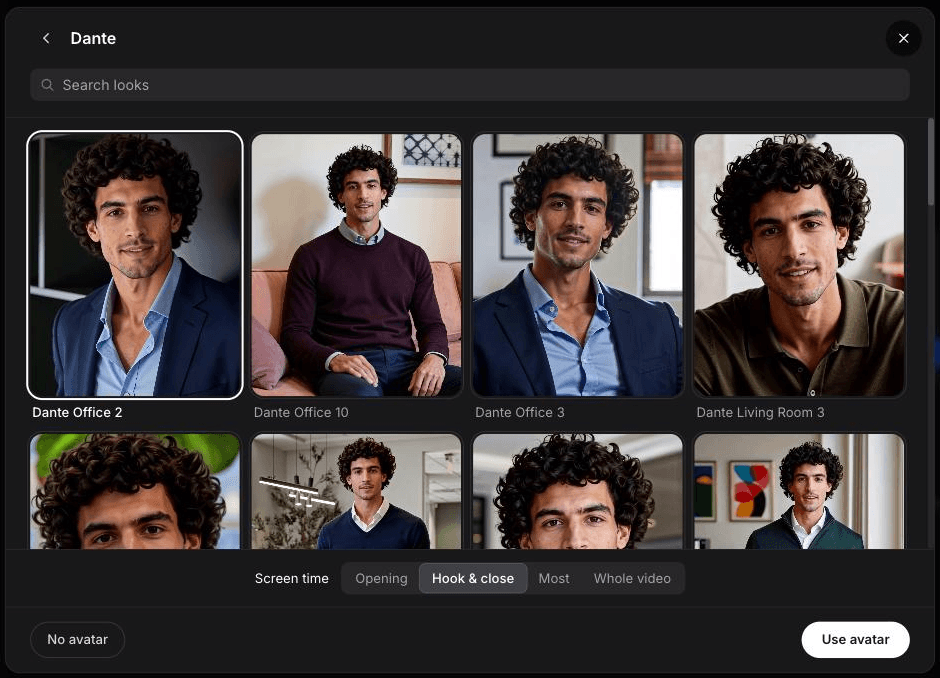
Clevera is an AI content platform for product education and product marketing. AI avatar is one of its social and promo video types: an avatar you pick talks the viewer through the product, and the clip around it is built from your product's own screenshots, footage and logo.
How it passes the UI test. You can start from a link (Clevera reads the page and pulls facts, screenshots, media and your logo), a PDF or slide deck, images, a screen recording, or a few sentences with nothing attached. If you want real interface footage, Clevera's AI recorder captures a website or web app in a cloud browser from a written instruction, so nobody has to sit and click through a take. AI writes and directs the clip, builds each scene as motion graphics around your UI, records the voiceover and picks music. If the brief is missing a fact the video depends on, Clevera asks before generating.
Editing. The clip editor has an AI assistant that makes targeted edits from a prompt ("make the hook shorter," "zoom on the export button"), a revision history, and an add-elements palette (text, highlight, blur, images, video, a UGC character and more). The Look is chosen before generating. Clips export as MP4 in 9:16, 4:5, 1:1, 16:9 or other sizes.
Pricing. The Free plan doesn't include social clips or the AI avatar. Starter is $29/month billed yearly ($348/year) or $36 monthly, with 900 credits. Pro is $86.80/month billed yearly for 2 creators, or $124 monthly. The pricing page lists a medium-effort social clip at about 30 to 60 credits, with AI presenter credits added on top by time on screen.
Why it's first for B2B. The presenter is one type in a workspace that also makes product demos, how-to videos and help articles from the same source material. If your product marketing team already records a feature for the help centre, the same capture can feed the presenter clip. See how this fits a wider AI workflow for product marketing teams.
2. HeyGen: best for realistic presenters and lip-synced translation
HeyGen is an avatar video platform with stock avatars, custom digital twins, a prompt-driven Video Agent and a text-based editor called AI Studio. Its strongest feature for B2B is video translation with lip sync in 175+ languages and dialects.
UI test: level 2. HeyGen is the presenter layer, not the capture tool. Its own Trupeer integration page describes the workflow: record and polish the walkthrough in Trupeer's Chrome extension, then hand it to a HeyGen avatar to narrate. That works, but it's 2 tools and 2 subscriptions.
Pricing. Free covers 3 videos a month up to 1 minute. Creator is $29/month monthly or $24/month billed yearly ($288), with 600 credits and 1080p. Pro is $49/month monthly ($41 yearly) with 4K. Business is $149/month plus $20 per extra seat.
Best for: a founder digital twin, or one spokesperson who needs to speak 10 languages with matching lips.
3. Synthesia: best for training-style walkthroughs at enterprise scale
Synthesia is an avatar platform aimed mainly at learning and development, HR and enablement teams, with product videos listed as a use case too.
UI test: level 2, built in. Its AI Screen Recorder is a Chrome extension that records a tab, turns your speech into an editable script, splits the recording into scenes and removes filler words. You can then add an AI avatar paired with your voice clone. That's closer to a narrated walkthrough than a UGC ad, and the default look is closer to a corporate presenter than a phone-shot creator.
Pricing. Basic is free with a watermark and about 10 minutes of video. Starter is $29/month billed monthly with 1,250 credits and 125+ stock avatars. Pro is $89/month billed monthly with 6,000 credits and 5 personal avatars. Enterprise adds SSO, SCORM and 1-click translation into 140+ languages.
Best for: onboarding courses and internal training where length and translation matter more than scroll-stopping hooks.
4. Creatify: best for URL-to-ad variants with ad ops built in
Creatify turns a product URL into a video ad: it pulls your assets, writes the script, and you pick an avatar. Around that it adds ad operations, including a competitor ad tracker covering 10M+ Meta ads and an ad launcher for Meta, TikTok and AppLovin on Pro.
UI test: level 1. The workflow is product-page first. Creatify's site doesn't document a screen-recording input for walking an avatar through a software interface.
Pricing. The free plan gives 10 credits a month (around 2 video ads, watermarked). Starter is $39/month with 100 credits and 300 AI actors. Pro is $99/month with 300 credits, 1,500 actors, 3 custom avatars and videos up to 10 minutes. Annual billing saves up to 50%.
Best for: growth teams that test many ad angles per week and want tracking and launching in the same tool.
5. Arcads: best for high-volume hook testing
Arcads is built specifically for AI UGC ads. It offers a library of 1,000+ AI actors, the option to create your own, emotion control written into the script, translation into 30+ languages and a canvas called Create Workflow for teams testing ads together.
UI test: level 1. Arcads says its generated actors can "hold your product, show your app, and wear your clothes." For a mobile app, a phone in hand is a credible shot. For a desktop SaaS product, we couldn't find a documented way to feed in a screen recording and have the actor talk through it.
Pricing. Arcads doesn't publish prices on its site. The homepage advertises a free trial and demo bookings.
Best for: performance teams in consumer apps or D2C who need dozens of different faces delivering dozens of hooks.
6. MakeUGC: best for cheap batch variations and API automation
MakeUGC generates UGC-style ads from a script and an actor, with a "product in hand" mode, motion control, an ad-remake feature and Batch Mode for 10 variations at once. API and MCP access are included on every plan, so you can wire generation into your own pipeline.
UI test: level 1. The product is built around actors holding physical products. No documented screen-walkthrough input.
Pricing. Every plan starts with a $1 trial. Billed yearly, Starter is $29/month (500 credits, exports at 480p or 720p), Growth is $39/month (1,000 credits, up to 4K) and Pro is $79/month. Credits don't roll over.
Best for: a small team that wants many low-cost variants and plans to automate generation through the API. Check the Starter export resolution before you budget for it.
7. Captions: best for founders who already film themselves
Captions, built by Mirage, is an AI editing app first. AI Edit cuts your footage, adds B-roll and captions, and a chat-based editor handles changes. It also makes AI twins and avatars, and prompts can change their outfits, backgrounds and "even product inserts".
UI test: depends on your footage. Captions edits what you give it. If a founder films a phone-shot take and you add screen footage, it can produce a strong real-UGC clip. It doesn't capture or compose your UI for you.
Pricing. Max is $24.99/month with 500 credits; Frontier tiers run from $69.99 to $279.99/month. Captions notes that listed prices reflect iOS plans.
Best for: founder-led content where the real person is the asset and AI fills in extra takes and edits.
Where Clevera is not the right fit
Pick another tool if your job is high-volume consumer ad testing. Arcads, Creatify and MakeUGC are built for it, with batch generation, ad remakes, competitor ad tracking and, in Creatify's case, launching straight to Meta and TikTok. Clevera doesn't offer those ad-ops features.
Pick another tool if you need many avatar personas, such as 20 different faces for 20 audience segments. Arcads, MakeUGC and Creatify advertise libraries of 1,000 or more actors and custom avatars. Clevera's AI presenter lets you pick an avatar, but persona volume isn't what it's built around.
Pick HeyGen if you need a lip-synced spokesperson in many languages, or a digital twin of your founder. Clevera translates videos into 74 languages, but HeyGen's lip-synced video translation is the more specialised tool for one face speaking every market's language.
We made an AI avatar clip: 135 credits and no visible presenter
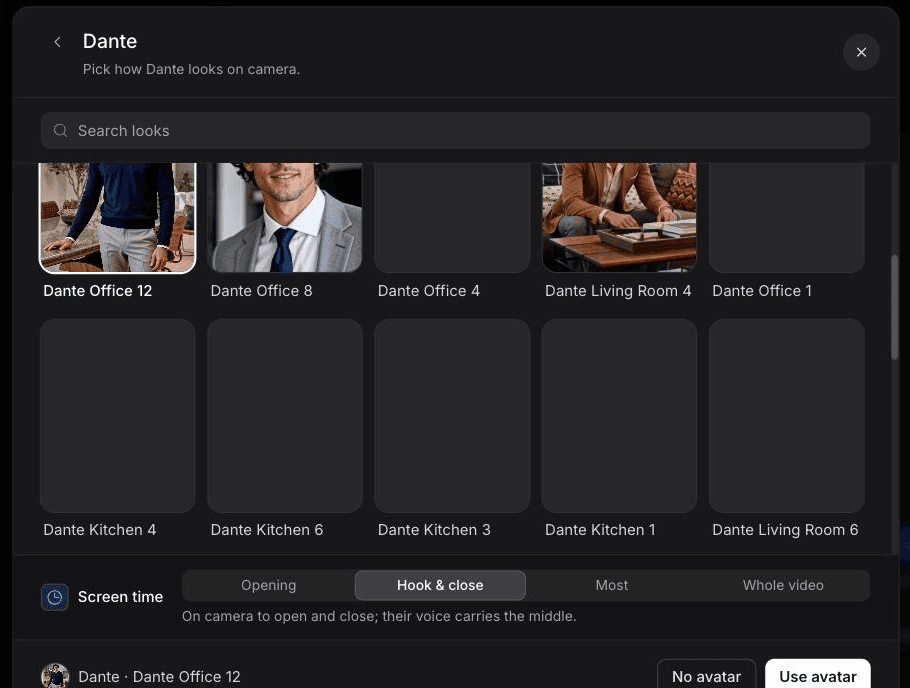
In October 2026 we ran Clevera's AI avatar type on our own product. The input was our homepage, clevera.ai, through Research a website, plus a one-line brief: "Explain in 20 seconds how Clevera's AI recorder works." We picked the avatar Dante and left screen time on "Hook & close", so he'd open and close while the voice carries the middle. Once we chose an avatar, the cost estimate went from about 50 to 120 credits to about 130 to 305.
Generation took 11 to 12 minutes and used 135 credits, 6 of them for the avatar. The script was on brief, and the scenes followed the real flow: a written instruction, the agent clicking and recording, narration, then one recording turning into several outputs. The presenter wasn't there, though. Dante didn't appear in the editor preview or in frames we checked from the exported video, and the avatar layer on the timeline carried a "Hidden" badge. This run didn't produce a usable avatar clip.
2 more things needed fixing. The clip ran 1:00, not 20 seconds, because we left the Format menu at its 60-second default and the brief's "20 seconds" didn't change it. And the closing overlay added "Trusted by 3,000+ companies" from the site research, a claim that wasn't in the brief.
Before you post an avatar clip from any tool, play the hook and the close to confirm the presenter renders, check that no avatar layer is hidden, and verify every stat the tool added.
Label AI-generated people: what the platforms require
An AI presenter is a synthetic person. The big ad platforms now treat that as something viewers should know about, and the rules are specific.
TikTok. TikTok's ad policy on misleading and false content allows significantly edited media and AI-generated content only if you apply the AIGC label or add your own clear disclaimer, caption, watermark or sticker. Fully AI-generated video or audio counts. TikTok states that undisclosed AI-generated content will get the ad rejected or restricted.
Meta. Meta labels ads made or significantly edited with its own generative AI tools with "AI info," and when the tools add an AI-generated photorealistic human, the label sits next to "Sponsored." In a June 2026 update, Meta said it would also begin detecting ads made with third-party AI tools through industry-standard signals and apply the same label inside a new "About this ad" menu. Assume an avatar made elsewhere can still get labelled.
YouTube. For uploads, YouTube requires creators to disclose realistic AI content, including content "making it appear as if someone gave advice that they did not actually give." You set it under "AI use" in YouTube Studio. Using AI to write a script or cloning your own voice for a voiceover doesn't need disclosure on its own.
The practical rule: disclose by default. A small "AI presenter" caption costs you nothing with a B2B audience, and a rejected ad or a screenshot of an undisclosed avatar in a competitor's Slack costs a lot.
Consent, likeness and fake testimonials
Stock avatars come licensed from the vendor. Custom avatars of real people are where the risk sits. HeyGen requires a consent video for every video-based digital twin, recorded by the person themselves. Synthesia requires a live consent recording with an on-screen passcode and rejects submissions where identity can't be matched. Treat those checks as the minimum. Get written sign-off from any employee whose face you clone, and agree in advance what happens to the avatar when they leave.
Never script an avatar as a customer. "As a RevOps lead, this saved me 10 hours a week" spoken by a synthetic person is a fake testimonial, whatever the label says. TikTok's policy also removes content that uses a private person's likeness without permission. If you want customer proof, use real quotes from real customers, attributed. Clevera's customer story type, for example, is built from real testimonials or reviews, not invented ones.
When a real customer or founder beats an avatar
AI presenters win on speed and repeatability: a feature spotlight for every release, the same clip in 5 languages, 10 hooks tested in a week. They lose where trust is the whole point.
Late-stage deals. A buyer comparing 2 vendors in the final week wants a peer who runs the same stack. A 40-second clip of a named customer showing their own dashboard beats any avatar.
Founder-led launches. On LinkedIn, the founder's face is the distribution. An AI twin of the founder saying launch-day words they didn't record risks the exact authenticity the post depends on.
Category-defining claims. If the clip makes a claim a sceptic will challenge ("we replaced our BI tool"), put a real person's name on it.
A workable split for most B2B teams: avatars for top-of-funnel hooks, feature updates and localisation, and real people for proof and launches. For bottom-funnel assets, a narrated product demo built from a screen recording often does more than either, because the product itself is the presenter. If you're deciding between a recorded walkthrough and a clickable tour for that stage, our breakdown of interactive demos versus product videos covers the tradeoff.
A 30-second AI UGC ad script for a SaaS feature
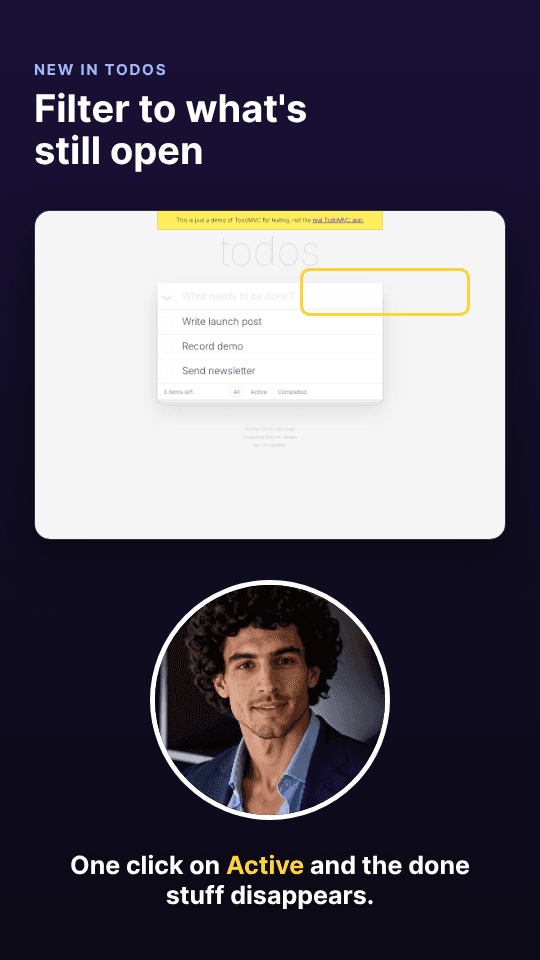
Use this structure with any tool above. The timings assume a 9:16 feed ad.
1. 0 to 3 seconds, the pain in the buyer's words. "Still exporting CSVs to build your weekly churn report?" Presenter on camera, no UI yet. 2. 3 to 15 seconds, the UI doing the work. Cut to your real interface: the click, the result. The presenter narrates one action, not five. 3. 15 to 24 seconds, the outcome. One concrete number or before/after the product can back up. No invented stats. 4. 24 to 30 seconds, one next step. "Try it free" or "See the 2-minute demo." Add the AI disclosure caption here if it isn't on screen already.
Step 2 is where most AI UGC ads for software fail. If the tool can't put your interface on screen, the ad becomes a person describing a product the viewer never sees.
Start with the screen, then choose the face
The avatar is the easy part now. Every tool here can make a convincing person talk. What separates them for B2B is whether your product is on screen while they do it, and how much capture and editing you do yourself to get it there. Write down the one screen that sells your feature, then pick the tool that gets that screen in front of a buyer in the fewest steps. For a broader view of where presenter clips sit next to demos, launch teasers and docs, see how product marketing teams use Clevera.

