Best AI promo video makers in 2026

The best AI promo video makers in 2026 for a SaaS team are Clevera for promo clips built from your real screenshots, UI and logo, HeyGen for avatar-led ads, and Trupeer if you already record product demos. Most AI promo video tools on generic "best of" lists were built for e-commerce and creator content, so they fill your video with stock clips of people smiling at laptops. For software, that's the one thing a promo video can't afford.
Quick picks
Tool | Best for | Real product or stock? | Starting paid price |
|---|---|---|---|
Clevera | Launch, feature and social clips for software, from a link or a promptReal product: pulls screenshots, media and logo from your site; uses your footage | $29/mo billed yearly | |
Trupeer | A promo cut from product demos you already record | Real product when you record; prompt mode for the rest | $40/mo billed yearly |
HeyGen | Avatar-presented ads and UGC-style creative | Page images plus an AI presenter | $29/mo (Creator) |
Synthesia | Avatar videos at enterprise scale | Your screen recordings plus avatars and templated graphics | $29/mo billed monthly |
Pictory | Turning blog posts into narrated videos | Stock by default (18M+ clips) | $25/mo billed yearly |
Creatify | High-volume ad variants for paid social | Product-page assets plus AI actors | $39/mo |
InVideo | Cinematic, generative brand ads | Generative models and stock; you upload screenshots | $10/seat/mo billed yearly |
Canva | Template-based edits inside a design tool you already use | Whatever you upload, plus stock | Free plan; Pro priced on Canva |
Kapwing | Hand-editing your own recordings into social cuts | Your footage, edited by you | $16/member/mo billed yearly |
Prices are from each vendor's official pricing page, checked on 12 October 2026. Canva's pricing page blocked our checks, so we've left its Pro price out rather than guess.
The one test for a SaaS promo video: real product or stock?
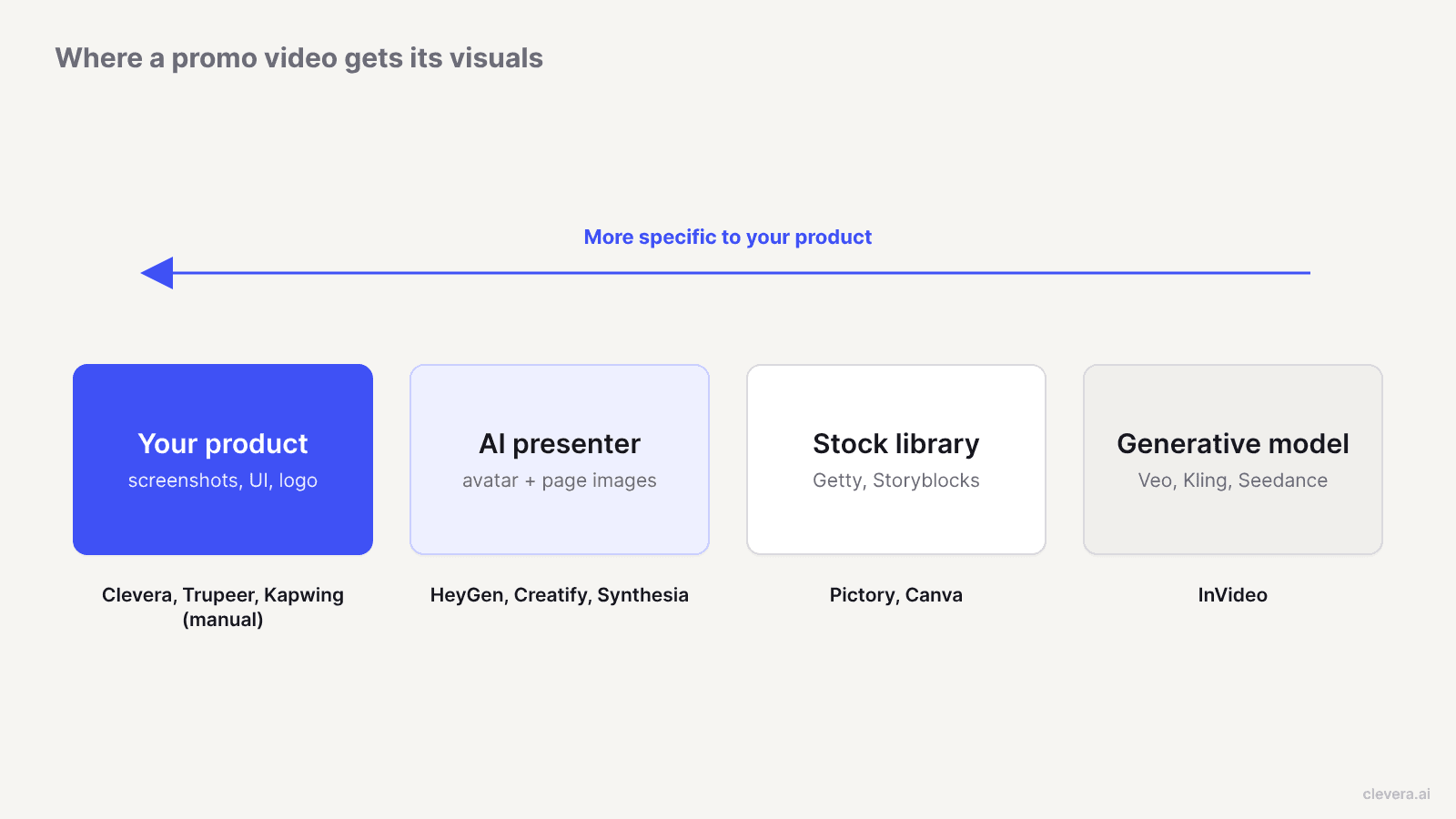
A consumer-brand promo sells a feeling, so stock footage works fine. A software promo sells a screen: viewers want to see the dashboard and the before and after. Show them a generic office with an "AI-powered" caption and they scroll.
Every AI promo video tool gets its visuals from 1 of 4 places:
1. Your product. Screenshots, UI footage and the logo, pulled from your site or uploaded by you. 2. An AI presenter. An avatar talks to camera while your page images sit behind or beside it. 3. A stock library. Getty, Storyblocks or the tool's own clips, matched to keywords in the script. 4. A generative model. Veo, Kling, Seedance and similar models invent the scene from a prompt.
Sources 3 and 4 are why so many SaaS promo videos look interchangeable. Source 2 can work for paid social. Source 1 is the only one that shows what you built.
So the question to ask in every demo or free trial is: if I paste my own URL, does my product show up on screen?
How we chose
We started from tools that rank for "best promo video maker" and kept the ones a software team could use for launch clips, feature spotlights and social ads. For each, we checked the official site and pricing page for 5 things:
Input: link, prompt, images, PDF or recording?
Visual source: your product, an avatar, stock or generative footage?
Formats: 9:16, 4:5, 1:1 and 16:9, plus other sizes, for feeds, ads and your website.
Editing: can you fix a scene by asking, or do you go back to a timeline?
Price to make promo clips: the cheapest plan that includes them without a watermark.
We didn't run a scored bake-off. Where a vendor's claim matters, we link to the page that makes it.
The 9 best AI promo video makers in 2026
1. Clevera
Best for: product marketing, growth and founder-led teams at software companies who want launch and social clips that show the actual product.
Clevera's social & promo videos start from whatever you have: a link, images, a PDF, a screen recording or a text prompt alone. Paste a feature page and Clevera reads it, pulls the product facts, screenshots, media and brand logo, and builds the video around them.
The AI writes and directs the whole clip. It builds each scene as motion graphics using your screenshots, footage and logo, records a voiceover where the type has one, and picks music and sound effects. If a type needs a fact you didn't give, such as the discount in an offer promo, Clevera asks before it generates instead of making one up.
You pick from types that map to real SaaS marketing jobs:
Social promo: feature spotlight, hook reel, and music & motion with no voiceover for muted feeds.
Launch (see the product launch video maker): feature announcement, launch teaser, mystery teaser.
Product tour, customer story, offer promo, event promo and brand film.
AI avatar: a UGC-style avatar you pick talks the viewer through the product.
Clips come in 9:16, 4:5, 1:1 or 16:9, plus other sizes, from the Format menu, each with a pre-built design system and motion style you can change in the prompt.
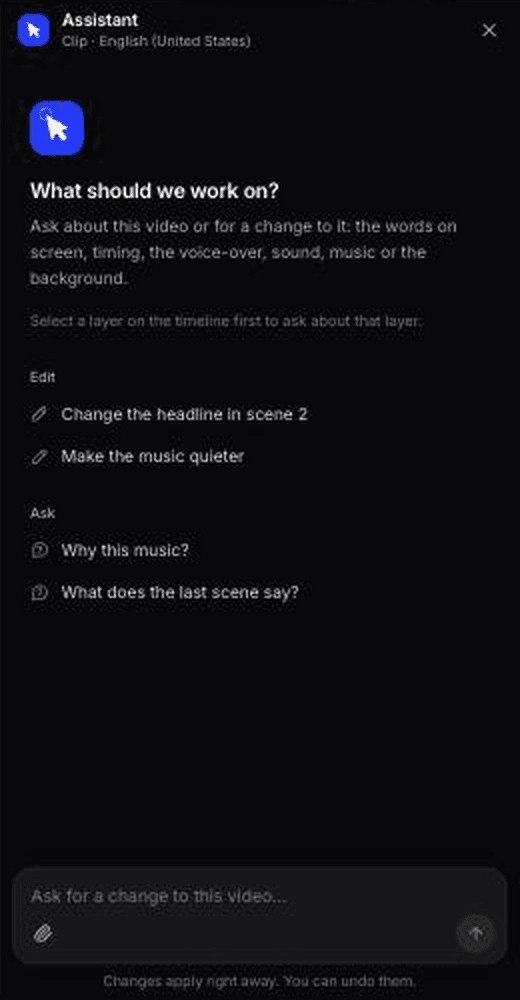
Editing works by asking. The clip editor's AI assistant makes targeted changes from a prompt, so "make the hook shorter" doesn't send you back to a timeline. Before generating you pick a Look (Automatic, or one of 7 styles such as Poster Punch or Signal Grid, with adjustable colours), and after it you get a revision history you can preview and restore.
Two more things matter for a software team. The same workspace makes your how-to videos, AI product demos and help articles, so a launch can ship as a teaser, a narrated demo and a written update from the same material. And if you need fresh footage of a web app, Clevera's AI recorder captures it in a cloud browser from a written instruction. It's read-only by default, you can take over mid-recording, and it covers websites and web apps, not desktop software. Narration translates into 74 languages.
Real product or stock? Real product. Visuals come from your site, your uploads and your footage. In our own test, some scenes reused an unrelated example video from our site, so check every scene (more below).
Pricing: social & promo clips and the AI avatar are on paid plans. Starter is $29/month billed yearly ($36 monthly) with 900 credits; Clevera's pricing page estimates that covers about 15 to 30 medium-effort social clips a month. Pro is $86.80/month billed yearly for 2 creators, with 4,000 shared credits and 4K export. The Free plan doesn't include social clips.
For how promo clips fit next to demos and launch content, see Clevera for product marketing teams.
2. Trupeer
Best for: teams that already record product demos in Trupeer and want a promo cut from the same recordings.
Trupeer's core product turns a screen recording into a narrated product video plus step-by-step documentation. Its free AI promo video maker page adds a prompt box: describe the video and it generates a promo with AI voiceover, animations and transitions. The page also positions it as a way to turn raw screen recordings into promo content.
Real product or stock? Real product when you start from a recording. Prompt-only output is described in terms of animations and transitions, with no documented step that pulls screenshots from your site.
Pricing: per the pricing page, the free plan lasts 10 days. Pro is $40/month billed yearly ($49 monthly) for 1 creator with 2,000 AI credits and recordings up to 10 minutes. The brand kit with logos, backgrounds and music starts on Scale at $199/month billed yearly.
Watch out for: if consistent branding across clips matters, budget for Scale, not Pro.
3. HeyGen
Best for: avatar-presented promo videos and UGC-style ads, localised into many languages.
HeyGen's URL to Video reads a landing page, product page or case study, extracts the headlines, body copy and images, and writes a scene-by-scene script you can edit before rendering. Each scene can carry an AI presenter, and the brand kit pulls your logo, fonts and colours. Output is MP4 in 16:9, 1:1 or 9:16, with voiceover, subtitles and music. HeyGen's own FAQ notes that pages behind a login or built as single-page apps often need extra input, which describes most SaaS dashboards.
Real product or stock? Partly. You get images from your public page plus an avatar, not motion-graphic scenes built from your logged-in UI.
Pricing: per the pricing page, Free gives 3 videos a month up to 1 minute. Creator is $29/month with 600 credits and 1080p; Pro is $49/month with 4K; Business is $149/month plus $20 per extra seat.
Watch out for: for a B2B audience that wants to see the feature, test an avatar cut against a product-only cut before you commit.
4. Synthesia
Best for: enterprise teams producing avatar-presented product and training videos at volume.
Synthesia is built around AI avatars, with a Chrome-based AI screen recorder that transcribes your recording, splits scenes and removes filler words. Its AI motion graphics generator turns a script into an animated graphic using 16 templates, such as funnels, timelines, checklists and a stat hero. A newer feature, Syren, directs a video from a description plus attached links or docs.
Real product or stock? Your screen recordings plus avatars and template graphics. The motion graphics animate your script, not your screenshots.
Pricing: per the pricing page, Basic is free with 10 minutes of video and a watermark. Starter is $29/month billed monthly for about 12 minutes of video; Pro is $89/month for about 60 minutes.
Watch out for: Synthesia is pointed at training and internal comms, not feed-ready social promo.
5. Pictory
Best for: content teams turning blog posts and articles into narrated videos.
Pictory's URL to Video reads a blog post, product page or help article, writes a script you review first, then builds the scenes with voiceover and captions. It also starts from an idea, a script, a PDF, slides or a recording, and lists dedicated promo and product video makers.
Real product or stock? Stock by default. Pictory says every scene gets a matched visual from 18M+ clips and images, including Getty Images. You can swap visuals for your own uploads, scene by scene.
Pricing: per the pricing page, Starter is $25/month billed annually ($29 monthly) for 1 user. Professional is listed at $35/month billed annually as a promotional price, and Team at $119/month billed annually for 3+ users.
Watch out for: a launch video assembled from stock says the right words over the wrong pictures.
6. Creatify
Best for: performance marketers producing many ad variants for Meta and TikTok.
Creatify's URL to video takes a product link, pulls its assets, writes the script and pairs it with an AI actor. Around that sits real ad tooling: a competitor ad tracker, Ad Clone to remake any ad from a URL, and an ad launcher and performance agent for Meta, TikTok and AppLovin on the Pro plan.
Real product or stock? Product-page assets plus AI actors. It's built for product photos, not software walkthroughs.
Pricing: per the pricing page, the free plan gives 10 credits a month for up to 2 watermarked video ads. Starter is $39/month with 100 credits and 300 AI actors; Pro is $99/month with 300 credits, 1,500 actors and up to 5 seats. Annual billing saves up to 50%.
Watch out for: purpose-built for volume-testing avatar hooks, not for "show the new feature".
7. InVideo
Best for: cinematic, mood-led brand ads where the product isn't a screen.
InVideo's agent can read a product URL, write a brand read, a brief and a shot list, then route generation to models such as Veo, Kling and Seedance. Its own guidance on product-URL ads tells you to upload product images and brand PDFs where the page can't carry the information. Every plan includes a full timeline editor and a premium stock footage allowance.
Real product or stock? Generative scenes and stock. Your UI appears only if you upload it.
Pricing: per the pricing page, Starter is $10/seat/month billed annually ($20 monthly) with 400 credits. Plus is $30/seat/month and Max $75/seat/month, both billed annually. Unused credits don't roll over.
Watch out for: generative models make convincing scenes, which is the problem. A model asked to show your dashboard will invent one.
8. Canva
Best for: marketing teams already designing in Canva who want template-based promo edits.
Canva's promo video maker is a drag-and-drop editor with templates, stock media and Magic Studio. Magic Video turns a text prompt into a video and is marked free; Magic Animate and Beat Sync are Pro features. You can upload your own clips and images, up to 1GB per video file.
Real product or stock? Whatever you put in. Canva doesn't read your site or capture your product, so a UI-led clip means you export the screenshots and place them yourself.
Pricing: there's a free plan. Canva's pricing page blocked our checks, so see Canva Pro for current pricing in your region.
Watch out for: you build every scene by hand each launch.
9. Kapwing
Best for: hands-on editors cutting their own recordings into social clips.
Kapwing is a browser video editor with AI tools: subtitles, dubbing, smart cut and Kai, a prompt-based video generator that routes to Seedance for video and ElevenLabs for voice. You can record your screen and camera inside the editor, then resize for 9:16, 1:1 or 16:9.
Real product or stock? Your own footage, edited by you. Generated scenes come from a generative model.
Pricing: per the pricing page, Free exports carry a watermark at 720p. Pro is $16/member/month billed annually ($24 monthly) with 4K export and a brand kit; Business is $50/member/month billed annually.
Watch out for: Kapwing speeds up editing. It doesn't make the creative decisions for you.
Where Clevera is not the right fit
Clevera is built for software teams that want their product on screen. It's the wrong pick for a few jobs:
E-commerce or DTC ads at scale. If you need dozens of avatar ad variants a week, launched and tracked inside Meta and TikTok, Creatify's ad tracker, Ad Clone and launcher do work Clevera doesn't attempt.
Lifestyle and stock-footage videos. If the promo should show people, places and moods rather than a screen, Pictory's stock library or InVideo's generative models give you that footage. Clevera doesn't offer a stock library.
Avatar-first video programmes. Clevera has an AI avatar type, but if every video your team makes is a talking avatar in many languages, HeyGen and Synthesia are deeper on avatars, voice cloning and lip sync.
Free promo clips. Clevera's social & promo videos need a paid plan. If your budget is zero, Canva's free plan or Kapwing's watermarked free tier will get a rough clip out.
What happened when we ran Clevera on our own homepage
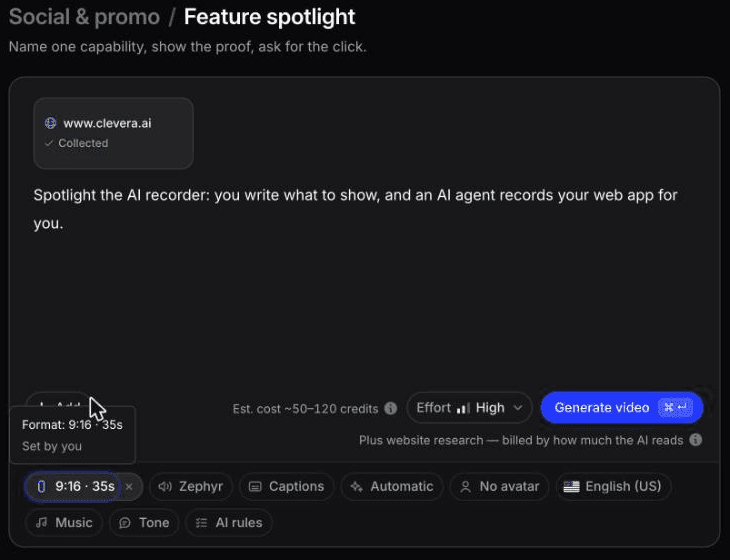

In October 2026 we pointed Clevera at clevera.ai. "Research a website" read 2 pages and pulled 6 screenshots, about 39 pictures and 4 videos in about 3 minutes. We added a one-line brief for a 9:16, 35-second feature spotlight about the AI recorder.
The clip took about 7.4 minutes and, with the research and 1 AI assistant edit, cost 96 credits. The structure was tight and it used real brand and UI imagery from the site. We asked the assistant to make the opening line shorter; it rewrote the voiceover line and told us it had left the on-screen text as it was.
The honest part: the spotlight, a launch teaser and a feature announcement made from the same research all reused a Google Sites example from our own showreel in the scene meant to show the AI recorder. It's on our site, so the research picked it up, but it's the wrong footage for this feature, and you'd swap it in the editor. An AI avatar clip from the same research also put "Trusted by 3,000+ companies" on its closing frame, a claim that wasn't in our brief. Verify any claim like that before you post.
A 30-minute test before you buy
Every tool looks good on the vendor's sample link. Run your own:
1. Paste the same feature page into 2 or 3 tools. Pick a page with a real screenshot of the feature, not your homepage hero. 2. Count the scenes that show your product. If fewer than half do, you'll be replacing scenes by hand every launch. 3. Ask for one change in plain words. "Shorten the hook to 3 seconds" or "end on the logo." Note whether the tool does it or sends you to a timeline. 4. Export a 9:16 and a 16:9. Check that the UI stays readable on a phone and isn't cropped to an unreadable strip. 5. Price your real volume. Work out how many clips a month your plan's credits buy at the effort level you'll use, not the headline number.
If you're also choosing a tool for narrated walkthroughs, compare the shortlist against our best product demo software guide, since promo clips and demos often come from the same material. For general-purpose editors, see the best AI video editing tools.
Pick the tool that puts your product on screen
The most common failure in SaaS promo video isn't a robotic voice. It's a 30-second clip about your new feature that never shows the feature. Start every trial with your own URL, count the frames that show your UI, and let that number decide. If you want to see what a clip built from your own screenshots and logo looks like, try Clevera's paid plans on your next feature launch.

