LinkedIn video for SaaS: a 4-week playbook

LinkedIn video for SaaS works best when you stop treating it as one channel. Your company page, your founder's profile, document posts and paid video ads each do a different job, have different specs and report different numbers. This guide covers all 4, with the specs taken from LinkedIn's own help pages, example post structures you can copy, and a 4-week plan that one marketer can run alongside everything else.
Company page or founder posts: who posts what
Your company page is where product content lives: feature spotlights, launch clips, demo cut-downs and customer stories. Page posts can be sponsored as ads straight from the page, and every admin can see the analytics.
Your founder's and employees' profiles are where opinions live: why you built the product, what you got wrong, what you think the category gets wrong. A person talking carries something a logo can't. One practical catch: on a member's own post, video analytics are private to the author, so agree up front that your founder sends you the numbers each week.
Content | Page | Founder or employee |
|---|---|---|
Feature spotlight, launch clip | Yes | Repost with 1 line of personal context |
Product demo cut-down | Yes | Only if they narrate it themselves |
Customer story | Yes | Yes, if they ran the account |
Opinion, lesson, behind-the-build | Rarely | Yes |
Hiring clip | Yes | Yes, from the hiring manager |
Native video or a document post
A document post takes PDF, PPT, PPTX, DOC or DOCX files up to 100 MB and 300 pages. Videos and animations inside a document display as static images, viewers can download the file as a PDF, and you can't edit the document after posting. For document ads, LinkedIn recommends under 10 pages.
Use a document when the reader will want to keep it, like a setup checklist or migration plan. Use video when the point is movement, like a workflow getting shorter or a person explaining a decision. If you find yourself animating slides to make a video, it should probably be a document. If you're screenshotting 12 steps of a flow for a document, it should probably be a video.
Organic video on LinkedIn has wide limits. The share videos help page lists 3 seconds to 15 minutes, 75 KB to 5 GB and aspect ratios from 1:2.4 to 2.4:1. You can add auto captions (supported in 10 languages) or upload a caption file, and LinkedIn asks you to keep the top, bottom and side edges free of key text and logos. You can't post straight into the full-screen immersive video feed; LinkedIn picks videos for it.
B2B LinkedIn video post structures you can copy
Each structure includes the post text, because the copy above the video decides whether anyone presses play. For more ideas sorted by job, see 20 SaaS social video ideas.
1. Founder "the decision behind it" (60 to 90 seconds, filmed on a phone)
Opening line of the post: "We almost shipped approvals as a Slack bot. Here's why we didn't."
Video: founder to camera. 10 seconds on the problem, 40 seconds on the 2 options and why one lost, 15 seconds showing the result on screen, 5 seconds on who it's for.
Post copy below the hook: 3 short lines restating the decision, then a question you actually want answers to: "If you run approvals today, where do they get stuck?"
2. Feature spotlight from the page (20 to 30 seconds, square)
Opening line: "Month-end used to start with exporting 4 reports. Now it starts with 1 click."
Video: hook text on the first frame, the feature doing 1 job, the outcome as on-screen text, logo and URL on the last frame. No voice needed, because LinkedIn says some videos autoplay without sound as people scroll.
Post copy: who the feature is for, 1 line on how to turn it on, a link to the help article.
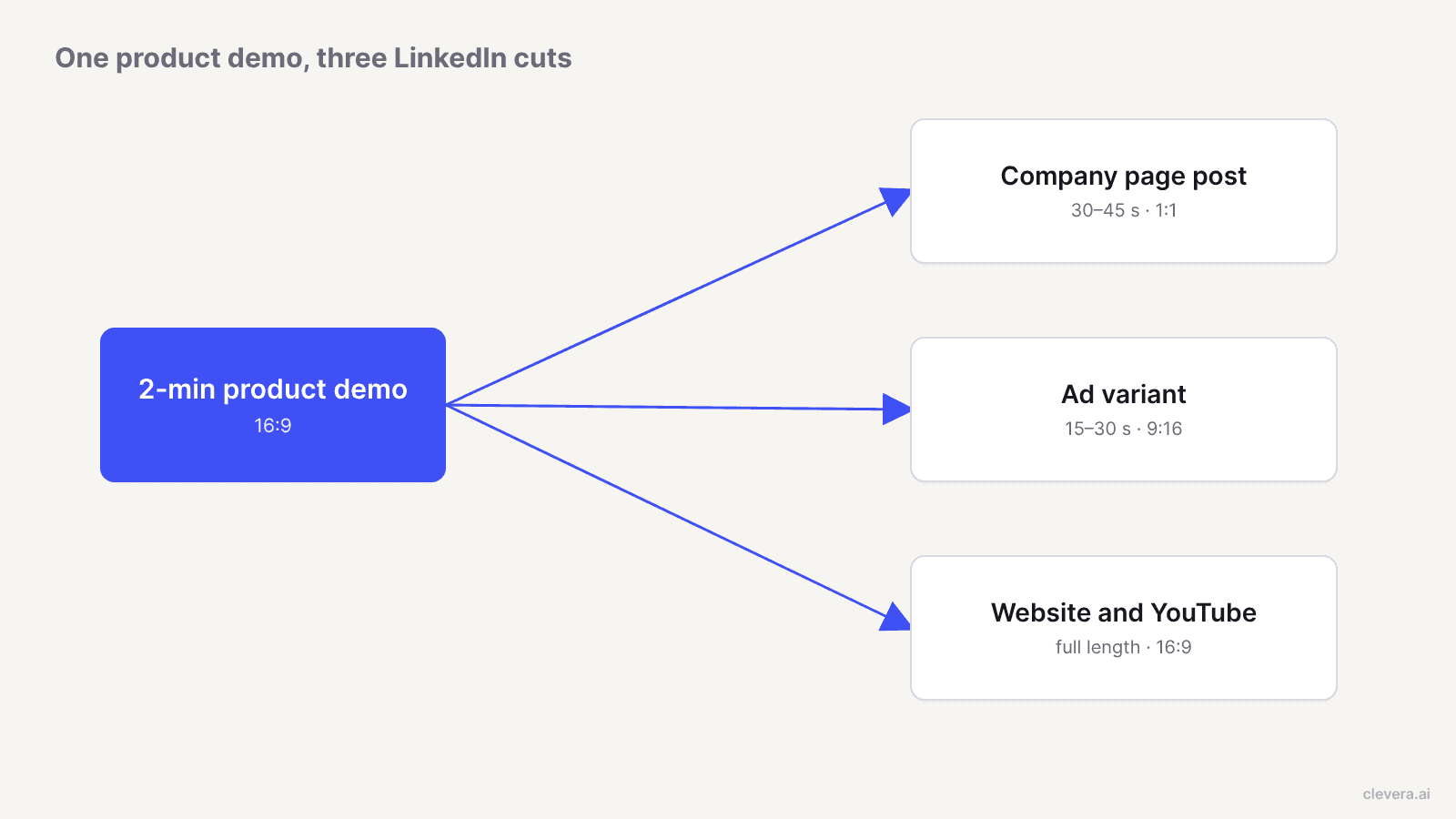
3. Demo cut-down (30 to 45 seconds, cut from a 2-minute demo)
Opening line: "The 3 screens a new admin sees in their first 10 minutes."
Video: take your existing 16:9 product demo, keep the 3 strongest moments, reframe to 1:1 or vertical, and add a title card per moment. Link the full demo in the post for people who want the whole thing. If you're deciding which demo format to build in the first place, see interactive demo vs product video.
4. Customer story (30 to 45 seconds)
Opening line: the customer's problem in their words, from a review or testimonial they've approved for use.
Video: their before, the change, the after. Logo only with permission. Tag the customer so they can reshare it.
LinkedIn video ads for SaaS: formats and specs
All figures below come from LinkedIn's video ads advertising specifications, checked in October 2026.
Spec | Requirement |
|---|---|
Aspect ratios | 16:9 (1920 x 1080 recommended), 1:1 (360 x 360 to 1920 x 1920), 4:5 vertical (720 x 900, LinkedIn's recommended vertical ratio), 9:16 (720 x 1280) |
Length | 3 seconds to 30 minutes. LinkedIn recommends 15 to 30 seconds so the ad qualifies for every placement in the feed and the Audience Network |
File | MP4, H.264 or VP8, 75 KB to 500 MB, frame rate under 30 fps, AAC or MPEG4 audio |
Captions | SRT file, text only, no custom formatting |
Thumbnail | Optional, JPG or PNG, up to 2 MB, same aspect ratio as the video |
Introductory text | Up to 150 characters before truncation, 3,000 maximum |
Headline | Up to 70 characters before truncation, 200 maximum |
A few rules on the same page change how you edit. Videos under 30 seconds loop until there's at least 30 seconds of playback, so a 10-second clip plays 3 times. Make the last frame lead back into the first. Ads must be uploaded to LinkedIn directly, not linked from YouTube or Vimeo, and uploads only work from desktop, with a cap of 25 videos in 24 hours. In-stream video ads, which can run up to 90 seconds, are still in testing and may not be in your account.
For a SaaS account, a sensible first test is the same message in 2 lengths: a 15-second feature spotlight and a 30-second version with one extra beat of proof. Keep the hook, the audience and the budget identical so the length is the only variable.
Thought leader ads: sponsoring your founder's best post
Thought leader ads let your company page sponsor a post from a person's profile. LinkedIn lists employees, industry experts, customers and content creators as eligible sources. They run on the Brand Awareness, Engagement and Video Views objectives, and you choose "Video ad" as the content type when the post contains a video. You request permission in Campaign Manager, and the author approves or denies it.
The specs page sets 2 limits that shape the original post. You can't add a headline, introductory text, URL or call-to-action button, and only the author can edit the post. So if you want a link in the ad, it has to be in the founder's organic post before you sponsor it.
For a small team: the founder posts organically, you wait a week, then sponsor the post that drew the most relevant comments, not the most reactions. LinkedIn suggests the author saves their organic numbers before the campaign starts so you can see what the spend added.
What to measure, using LinkedIn's own definitions
Here's what LinkedIn means by each ad metric, from video metrics in Campaign Manager:
Views: 2 or more continuous seconds of playback while at least 50% of the video is on screen.
View rate: views divided by impressions. This is your hook score.
Views at 25%, 50% and 75%: how far people got, including people who skipped ahead. The drop between 25% and 75% tells you where the middle sags.
Completions: plays that reached 97 to 100% of the length.
Completion rate: completions divided by impressions. LinkedIn changed this in March 2025 from completions divided by plays, so older benchmarks you find online may use the old formula.
Average watch time: seconds watched per view. Data isn't available before 6 January 2026.
Since August 2024, video ad impressions and clicks only count when the video started to play, which makes older click-through comparisons unreliable too.
For organic posts on a member profile, LinkedIn's video analytics are simpler: video views (watched for more than 2 seconds), watch time, average watch time, and viewer demographics by job title, location and company once the post passes 25 impressions. Those demographics are the most useful number a founder's post produces. If the viewers are your buyers' job titles, the post worked, whatever the reaction count says.
Judge each format against its own last 4 posts: a 15-second clip and a 90-second founder post will never have similar completion rates.
LinkedIn video for SaaS in 4 weeks: a plan for 1 marketer
This plan assumes 1 marketer, a founder who'll give you 20 minutes a week on camera, and a small paid budget in week 3. It uses 3 slots a week: a company page video on Tuesday, a founder post on Wednesday and a document or customer post on Thursday.
Week | Page video (Tue) | Founder post (Wed) | Thu slot | Paid |
|---|---|---|---|---|
1 | Feature spotlight, 20–30s, 1:1 | "The decision behind it", 60–90s | Document: 6-page setup checklist | None. Record baselines |
2 | Demo cut-down, 30–45s, from your existing demo | Reaction to a question a prospect asked on a call | Hook reel version of week 1's spotlight, 15s | None |
3 | Customer story, 30–45s | Lesson from a failed experiment | Document: comparison or migration guide | Sponsor week 1 or 2's best founder post as a thought leader ad; test 15s vs 30s spotlight as video ads |
4 | AI avatar or demo walk-through of the feature that got the best view rate | Founder answers the best comment from weeks 1–3 on camera | Recap document: what you shipped this month | Keep the winning ad, pause the loser |
Your weekly time budget: about 1 hour to brief and generate the page clips, 30 minutes to edit the founder's footage and write their post copy, 1 hour for the document, and 30 minutes on Friday pulling view rate, 25% to 75% drop-off and viewer job titles into one sheet.
Where Clevera fits, and where you should film the founder
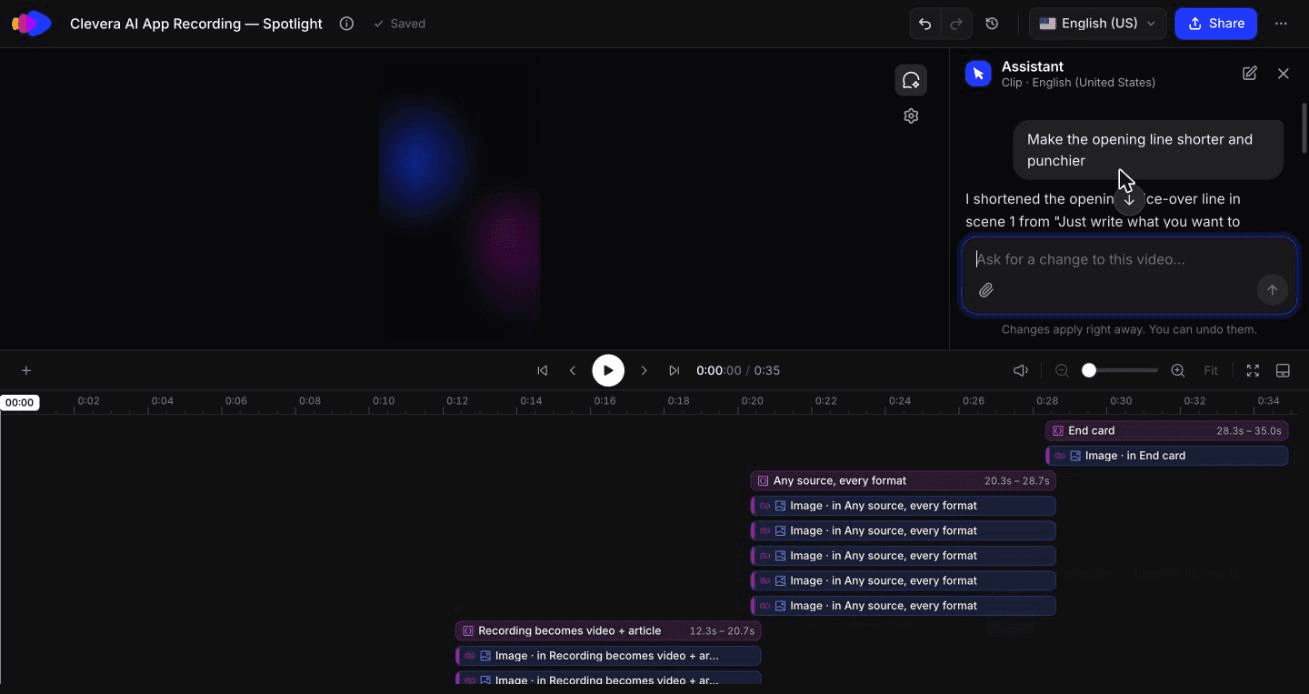
Clevera covers the page column of that plan. Its social & promo types include a feature spotlight, a hook reel, an AI avatar video and a customer story, and you can start them from your product page link, screenshots, a PDF or a few sentences. Clevera pulls your product's facts, screenshots and logo from the link, builds the scenes as motion graphics and adds a voiceover or music depending on the type. Clips come out in 9:16, 4:5, 1:1 or 16:9 from the Format menu, with length presets starting at about 35 seconds, and the clip editor's AI assistant makes targeted changes from a prompt, such as shortening an opening line.
For demo cut-downs, Clevera's product demo type turns a screen recording into a narrated demo with an AI-written script, and the timeline editor changes the aspect ratio, so the 16:9 original and a 1:1 feed cut come from the same project. If your demo needs fresh footage, the AI voiceover tool and narrated product demo guide cover the recording side. See how these pieces fit a wider launch and content calendar on the product marketing page.
Two spec gaps to plan for. Pick the ratio before you generate: Clevera's Format menu includes 4:5 portrait, LinkedIn's recommended vertical ratio, as well as 1:1 and 9:16. And for ads, add captions with an SRT file or LinkedIn's auto captions in the upload flow.
Social & promo clips and the AI avatar are on paid plans, starting with Starter at $29 a month billed yearly (pricing). Product demos and how-to videos are on the Free plan.
Now the honest part. The founder column of the plan shouldn't come from Clevera or any other generator. An opinion post, a reply to a comment or the source post for a thought leader ad works because it's a real person on their own profile, and an AI avatar there reads as a stand-in at best and misleading at worst. Keep the AI avatar for the company page, where viewers expect a branded voice. The same goes for event footage and hiring managers describing their own team: a phone and 20 minutes beat any generated clip.
What our feature spotlight run showed about formats and edits
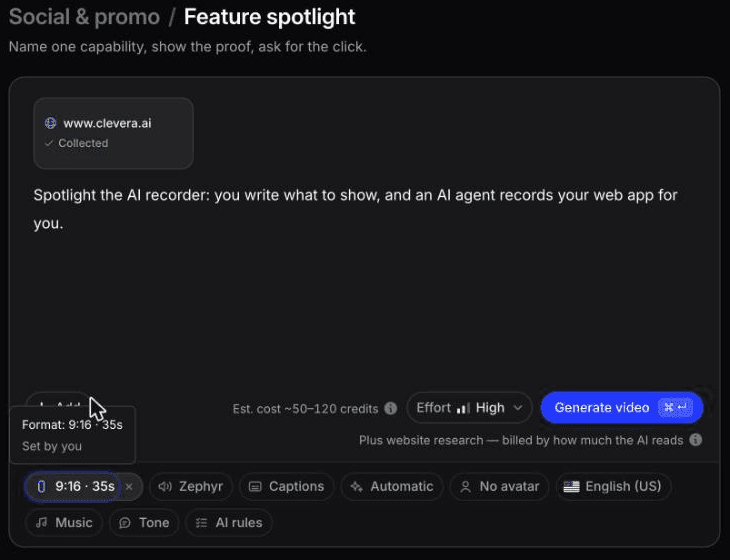
In October 2026 we made a feature spotlight for Clevera's AI recorder from the clevera.ai homepage. "Research a website" read 2 pages and collected 6 screenshots in about 3 minutes, for 4 credits.
The Format menu offered 9:16 vertical, 4:5 portrait, 1:1 square and 16:9 widescreen, plus more sizes. 4:5 is LinkedIn's recommended vertical ratio for ads, so pick it for a sponsored post. We chose 9:16 at 35 seconds, the shortest length preset we saw. Generation took about 7.4 minutes and 88 credits.
We then asked the AI assistant to "Make the opening line shorter and punchier." In seconds it changed the voiceover from "Just write what you want to show." to "Just type what you want." That cost 3 credits plus 1 to re-record the voiceover. It left the on-screen text alone and said so, and revision history kept both versions.
Two things to plan for. The opening frame reused an unrelated Google Sites example from our showreel, which we'd swap in the editor before posting. And we didn't test whether the assistant can cut a clip down to 15 seconds, so check that before you build the 15 vs 30-second ad test around it.
Start with the post you'd pay to promote
Before week 1, write down which single post you'd put money behind if it did well. That one post sets the standard for everything else in the plan: if a page clip or founder video isn't something you'd sponsor, it isn't worth the slot. After 4 weeks you'll have view rates, drop-off points and viewer job titles for 12 posts, which is enough to know which format earns your next month's budget.

