How to keep product tutorial videos up to date (2026)
Four ways to keep product tutorial videos current when your UI changes, and the tools that offer automatic updates today, compared for support and education teams.
 Roozbeh Firoozmand10 min read
Checked November 2026. Vendor features and prices change, so confirm on each vendor's own page before you buy.
There are four ways to keep product tutorial videos up to date when your UI changes: re-record by hand on a schedule, edit the narration and on-screen text in place when only labels changed, automate screenshots and clips from your test suite, or use a tool that watches your releases and proposes updates. Most teams need a mix. The deciding questions are who notices a release, who decides what is out of date, and how much a re-record costs.
This guide compares those approaches and the tools that offer automatic updates today, including Clevera's Autopilot and Clueso's Auto Updates. It's written for support, customer education and enablement leads who own a library of 20 to 500 videos and don't have an engineer to spare. If you want the release-day process itself (inventory, triage levels, owners), read how to keep documentation up to date when your UI changes first. This post is about the tooling choice.
Why tutorial videos go out of date faster than articles
An article with a renamed button needs one word changed. A video with a renamed button shows the old label on screen, says it in the narration and may repeat it in a caption, a title card and three translations. Three things make video upkeep expensive:
- Footage can't be edited like text. If the layout moved, the recorded pixels still show the old layout. No caption fix changes that.
- Copies spread. One video lives in the help center, an onboarding email, an in-app widget and an LMS. Downloaded MP4s don't update.
- The original creator is busy. A re-record that needs the person who made the first take tends to wait until a customer complains.
So the cost of a stale library comes from two places: finding out which videos a release touched, and producing the new take. Every approach below attacks one or both.
The four approaches compared
| Approach | Who notices the release | Who decides what's outdated | Re-record cost | Best for |
|---|---|---|---|---|
| Manual review on a schedule | A person reading release notes | A person | Full re-record by a person | Small libraries, infrequent releases |
| Edit in place (narration, text, highlights) | A person | A person | None for label changes; still a re-record for layout changes | Libraries on a host that updates embeds in place |
| Screenshots and clips from automated UI tests | Your CI pipeline | Your test code | Low once built; needs engineering time to build and maintain | Engineering-led docs teams, docs-as-code |
| Release-watching update tools | The tool, from your repo or changelog | The tool proposes, a person approves | Low for text fixes; an AI re-record for changed screens | Support and education teams with frequent releases and no spare engineers |
1. Manual review on a schedule
The default. Someone reads each release, opens the affected videos next to the live product and re-records what changed. It works, costs no software, and keeps a person's judgment on every change.
It breaks down on frequency. If you ship every two weeks and own 150 videos, the review never finishes. Two habits make it survivable: keep each video to one task and one to three minutes, so a change hits one short clip, and keep an inventory that maps every video to the screens it shows. The documentation upkeep guide linked above has a template for that inventory.
2. Edit in place when only words changed
Many releases only rename things. If your video's narration is generated from a script, a renamed label is a one-line script edit and a regenerated voice line. On-screen text, highlights and title cards change the same way.
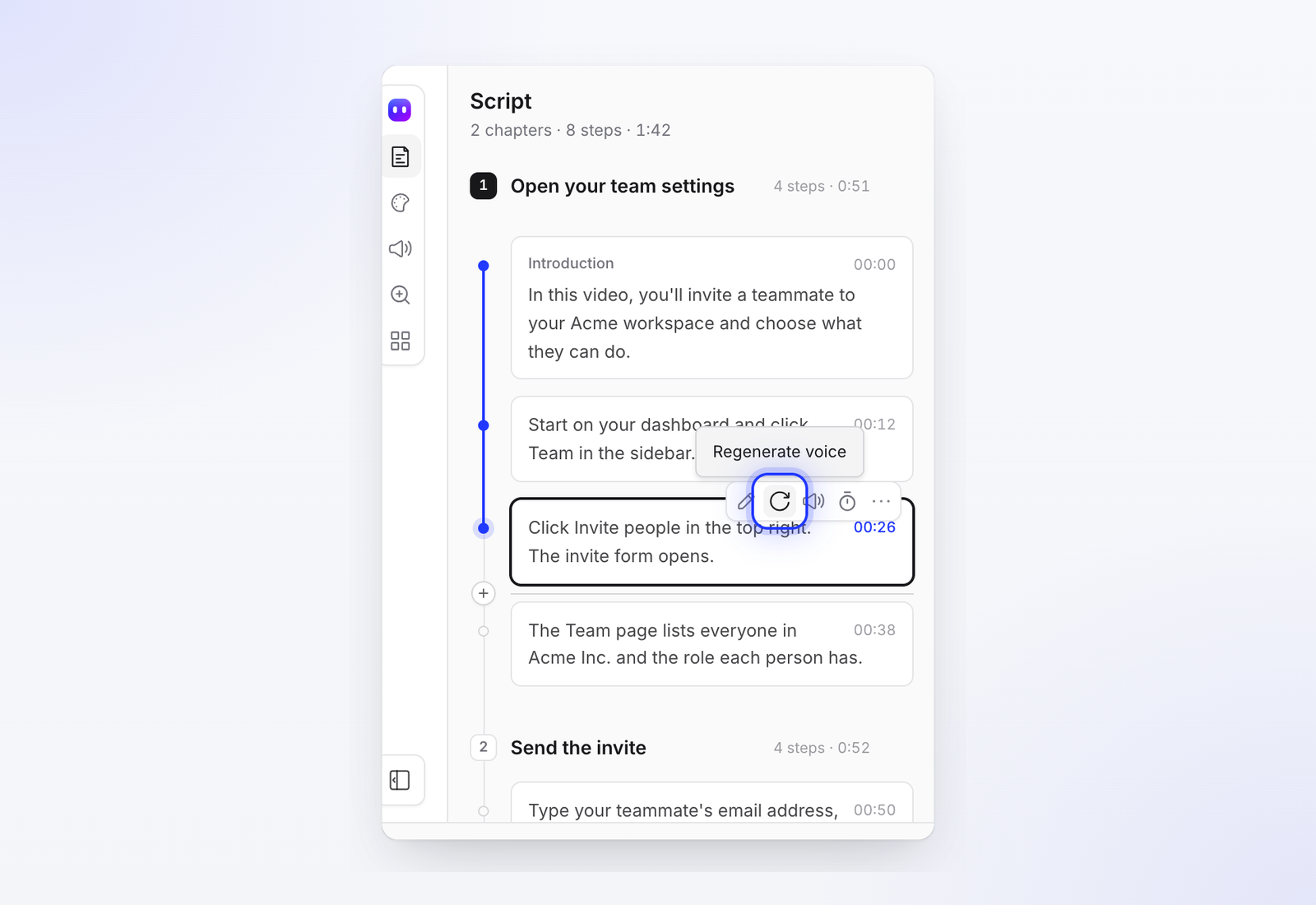
What matters here is the host. Vimeo says replacing a video file keeps the same link and embed, and Wistia's replace media keeps the embed code. On YouTube, you can trim a published video, but new footage means a new upload and a new URL. Tools that host their own videos often update every embed when you edit: in Clevera this is called LiveSync, and it's on every plan.
The limit is honest and the same everywhere: editing words doesn't change footage. If the old label is clearly visible on screen, viewers see one word and hear another. Treat in-place edits as the fix for label changes and a bridge for anything bigger.
3. Automate screenshots and clips from your test suite
Engineering-heavy teams capture documentation images inside their automated UI tests, so every build produces current screenshots. Camunda wrote up how it automated its documentation screenshots this way. The same idea extends to scripted screen recordings with browser automation.
This is the most reliable option when it's built, because the test fails when the UI changes. The catch is ownership: someone has to write and maintain the scripts, and narration, pacing and editing still need a separate step. If your docs live in a Git repo next to the code, this is worth a look. If your help center is owned by support, it usually stalls for lack of engineering time.
4. Tools that watch releases and propose updates
A newer category: the tool connects to your code host or changelog, works out which videos and articles a release affected, and drafts the fixes. Today few vendors ship this, and the ones that do put it on higher tiers.
| Tool | What triggers it | What it does | Approval step | Where it sits |
|---|---|---|---|---|
| Clevera Autopilot | GitHub, GitLab or Bitbucket releases or merged pull requests (checked hourly); a changelog page (daily or weekly); or a change you describe | Labels each affected video and article as fine, text fix or re-record; re-records only changed screens when you let it use your app | You approve each plan and its credits before anything runs | Pro and above |
| Clueso Auto Updates | A GitHub push, or a manual trigger | An agent re-records the flow in your current product and redoes voice-over and guide text | Not described on its feature page | Paid add-on to the Enterprise plan; book a demo |
| Trupeer | Not described publicly | "Content health checks" | Not described publicly | Enterprise only |
| Guidde | Not a release trigger | "Content review, verification & version control" | Review workflow | Enterprise |
Sources: Clevera Autopilot, Clueso Auto Updates and pricing, Trupeer pricing, Guidde pricing, all checked November 2026.
Clueso Auto Updates, fairly described
Clueso's Auto Updates is the closest equivalent to what Clevera does, and it's a serious option. When a GitHub push makes a video outdated, Clueso flags it, and an agent records the flow again in your current product. The refreshed guide goes through the same recording, voice-over and writing steps as a new one, with your workspace branding. You can also trigger an update by hand.
Things to know before you book the demo: it's a paid add-on to Clueso's Enterprise plan, not part of Free, Solo or Business. Your plan sets how many updates run at once and how many guides can be on automatic refresh, and the page doesn't publish those numbers. The page also doesn't say whether a refreshed guide waits for approval before it goes live, so ask. If you already run Clueso at enterprise scale and your releases flow through GitHub, it's the natural choice.
How Clevera's Autopilot works
Clevera turns a screen recording into a narrated how-to video and a step-by-step help article, and hosts both on a help center. Autopilot is the part that keeps them current.
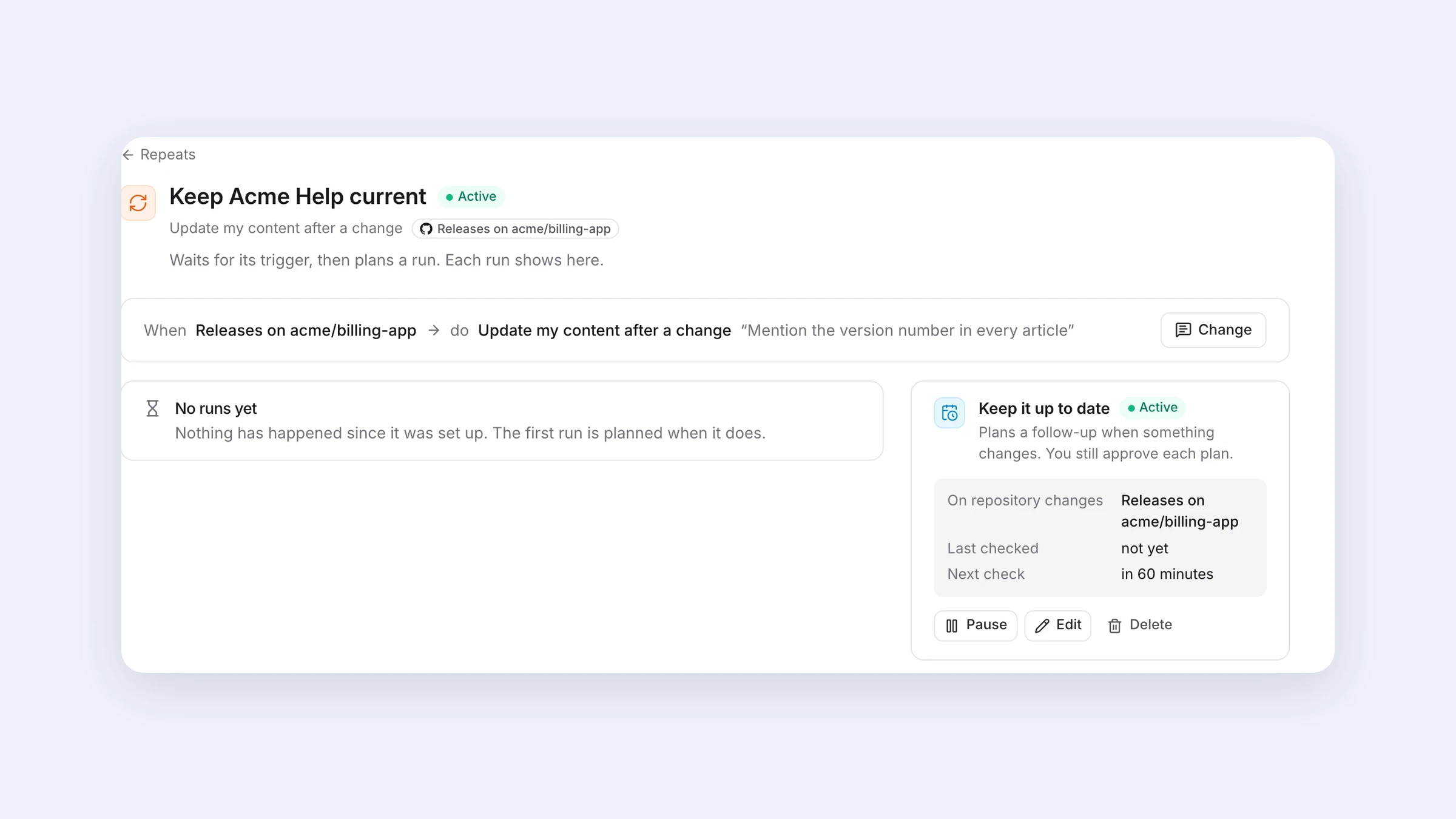
- It watches where your releases already are. A connected GitHub, GitLab or Bitbucket repository (read-only, checked about every hour), a public changelog page, or a change you describe in a sentence. Teams without repo access, which is most support teams, can use the changelog option.
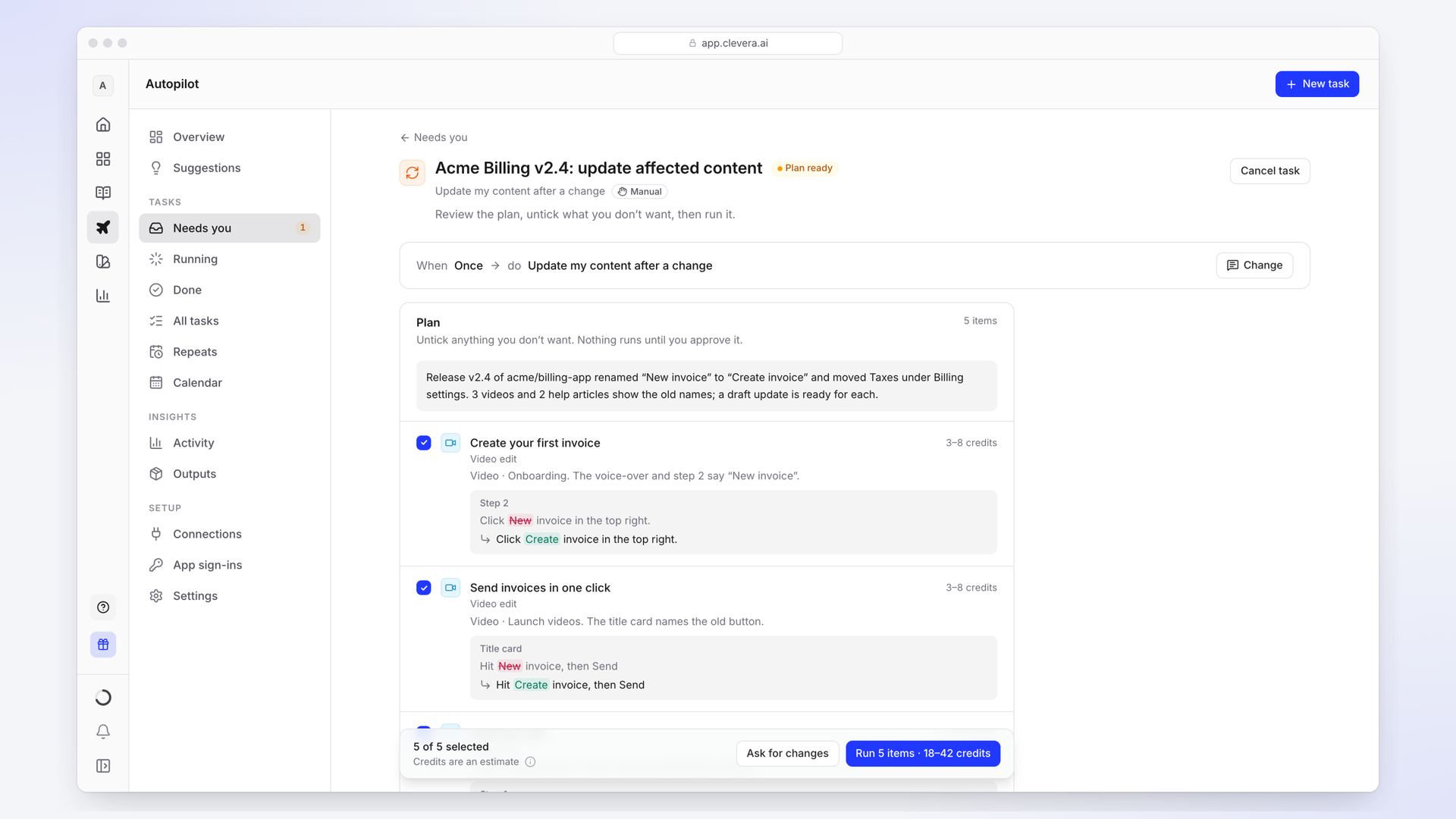
- It reads release notes and pull request titles, never your code. For each video or article the release touched, it reads the whole item and labels it still right, a text fix, or a re-record.
- It re-records only what changed. If you let it use your app (with a saved sign-in, ideally a test account), it records the changed screens again. If you don't, it limits itself to text fixes and tells you which lines need a re-record.
- You approve the plan. You get a plan with one line per item, a reason and a credit range. Untick what you don't want, ask for a different plan, or click Run. Articles arrive as new revisions you can undo; a re-recorded video replaces the old one at the same link, and the previous take stays in your library.
- Cost. Planning uses no credits. A run that keeps a help center current usually takes 10 to 150 credits, and you see the estimate before you approve it.
Limits worth stating plainly. Autopilot is on Pro and above. It needs a Clevera help center to check against; if your videos live in Zendesk, Wistia or an LMS and you're not moving them, Autopilot won't watch them. AI re-records work on web apps; desktop software still needs a person with the desktop recorder. And Clevera's SOC 2 audit is in progress, expected in 2027, per its security page. If your procurement needs a finished SOC 2 report today, Clueso, Guidde and Trupeer all state SOC 2 Type II on their sites.
How to choose
- Fewer than 30 videos and monthly releases: manual review plus in-place edits is enough. Spend the effort on the inventory, not a tool.
- Docs in a Git repo, engineers who own them: automate screenshots and clips in CI. Nothing beats a test that fails when the UI changes.
- Enterprise contract, GitHub-based releases, already on Clueso: ask Clueso about Auto Updates and its approval step.
- Support or education team, frequent releases, no engineering help, want videos and articles on one help center: look at Clevera's Autopilot, starting from your changelog page if you have no repo access.
Whichever you pick, keep a person in the approval step. An automated update that publishes a wrong video is worse than an old one, because nobody is looking for it.
FAQ
Can any tool update a tutorial video automatically when the UI changes?
Yes, partly. Clevera's Autopilot and Clueso's Auto Updates both re-record changed flows with an AI agent. Neither should go live unreviewed: Clevera's Autopilot waits for you to approve each plan, and Clueso's page doesn't describe its review step.
Do I have to re-record a video every time the product changes?
No. Label changes can be fixed by editing narration and on-screen text, if your host updates embeds in place and the old label isn't clearly visible in the footage. Layout and flow changes need new footage.
Do these tools need access to our code?
Clevera's Autopilot reads release notes and pull request titles from a read-only repository connection, or works from a changelog page with no connection at all. Clueso's Auto Updates is triggered by GitHub pushes.
What does automatic updating cost?
Clueso's Auto Updates is a paid Enterprise add-on priced on request. Clevera's Autopilot is included on Pro and above (from $124 a month, or $86.80 a month billed yearly) and uses credits per run, typically 10 to 150. Manual review costs staff time instead of licence fees.
What happens to translated videos after an update?
Translations don't follow the source on their own in most tools. Re-run the translation after the English version is approved. Our guide to translating tutorial videos covers the order of operations.
See what Autopilot would change after your next release
Connect a repository or point it at your changelog, review the plan, and run only what you approve.