How to keep your knowledge base up to date (without a full-time editor)

Ask any support team what their biggest documentation problem is, and the answer is almost always the same: stale docs.
Articles that describe the old UI. Videos that show a feature before it was redesigned. Step-by-step guides that skip a step that was added 6 months ago. Customers follow the instructions, hit a wall, and open a support ticket. Your team answers the same question for the 40th time.
Learning how to keep your knowledge base up to date isn't just a nice-to-have — it directly affects your ticket volume, your customer satisfaction scores, and how much trust users put in your docs.
This guide breaks down a practical system for keeping your knowledge base current without requiring a dedicated editor or constant manual audits.
Why knowledge bases go stale
Before fixing the problem, it helps to understand why it happens.
Knowledge bases go stale for 3 main reasons:
1. No one owns it. Documentation is created during a launch or onboarding push, then ownership diffuses. There's no single person responsible for keeping it accurate, so updates happen reactively — after a user complains — or not at all.
2. The update process is too slow. If updating a help article or tutorial video requires opening a ticket, briefing a writer, waiting for review, and republishing, most changes will never get made. The friction kills maintenance.
3. Product changes outpace documentation. Fast-moving SaaS teams ship new features, rename things, and redesign UIs constantly. Without a system for catching documentation debt, the gap between "what the product does" and "what the docs say" grows quickly.
The solution to all 3 involves the same ingredients: ownership, tooling, and a process for catching changes early.
Step 1: Assign content ownership
Every section of your knowledge base should have an owner. Not a team — a person.
This doesn't mean one person writes everything. It means one person is responsible for ensuring each area stays accurate. Owners should be subject matter experts, not necessarily writers — they just need to know when something has changed.
A simple ownership map for a SaaS product might look like:
Onboarding articles: Product team lead
Integrations docs: Developer advocate
Billing and account management: Customer success team lead
Feature walkthroughs: The PM or designer who owns that feature area
When you have clear ownership, stale docs become someone's responsibility. Reviews actually happen.
Step 2: Build a review cadence
One-time documentation is always better than no documentation, but scheduled reviews are what keep a knowledge base alive.
A practical cadence for most SaaS teams:
After every product release: The feature owner or PM does a quick pass on docs affected by that release. This doesn't have to be thorough — just enough to catch anything obviously wrong.
Quarterly full review: Every article in the knowledge base gets checked against the current product. Flag outdated content and create tasks to fix it.
Trigger-based review: Any article that generates above-average support tickets gets flagged for immediate review. High-ticket articles are almost always inaccurate or incomplete.
The quarterly review sounds like a lot of work, but with a clear ownership map it distributes quickly. Each owner reviews their section, not the whole knowledge base.
Step 3: Track what's changed in your product
The hardest part of keeping documentation current is knowing when something has changed.
Build a simple workflow with your product team:
Add a "documentation impact" field to your sprint tickets. When a feature change affects existing docs, that field gets flagged.
Include docs on your release checklist. Before shipping, confirm that any affected articles are queued for update.
Involve your support team in product reviews. They're the first to hear about documentation gaps — their feedback is a leading indicator of stale content.
This doesn't need to be heavyweight. A shared Notion or Confluence page listing recent product changes and affected documentation is enough to start.
Step 4: Choose tools that make updates faster
Documentation maintenance is abandoned when it's painful. The right tooling makes updates fast enough that they actually happen.
For written articles, look for a knowledge base platform with version history, an easy editing interface, and search analytics (so you can see which articles get the most searches and zero clicks — a signal that something's broken).
For tutorial videos, the update problem is historically the hardest. Re-recording, re-editing, and re-embedding a video is expensive enough that teams often just leave outdated videos in place.
Clevera's LiveSync addresses this directly. When you update a video in Clevera, every embedded instance of that video across your docs, help center, and knowledge base updates automatically. You don't need to find all the places it's embedded and re-link them — the update propagates from one place.
This is one of the most practically impactful features for documentation teams, because it removes the "update cost" from video content almost entirely.
Step 5: Use support tickets as a signal
Your support inbox is a real-time audit of your documentation gaps.
Build a habit of tagging tickets by root cause. If the customer's issue could have been resolved by a help article, tag it: was there an article? Was it accurate? Was it findable?
Over time, patterns emerge:
"Article doesn't exist" means you have a content gap
"Article exists but is wrong" means you have a stale doc
"Article exists and is correct but customer didn't find it" means you have a navigation or search problem
Each of these has a different fix. Treating them the same wastes effort — creating new content when the real problem is findability, or improving search when the real problem is outdated information.
Step 6: Make video documentation easier to maintain
Video is one of the most effective formats for tutorials — and one of the most painful to maintain. The combination of re-recording, editing, and re-embedding is enough that many teams avoid video documentation entirely or let it go stale.
A few practices that help:
Record modular videos: One video per task, not one long video covering 8 steps. When a workflow changes, you only need to re-record the affected clip.
Keep originals in one place: Store source recordings centrally so updates can be made from the original, not from a compressed export.
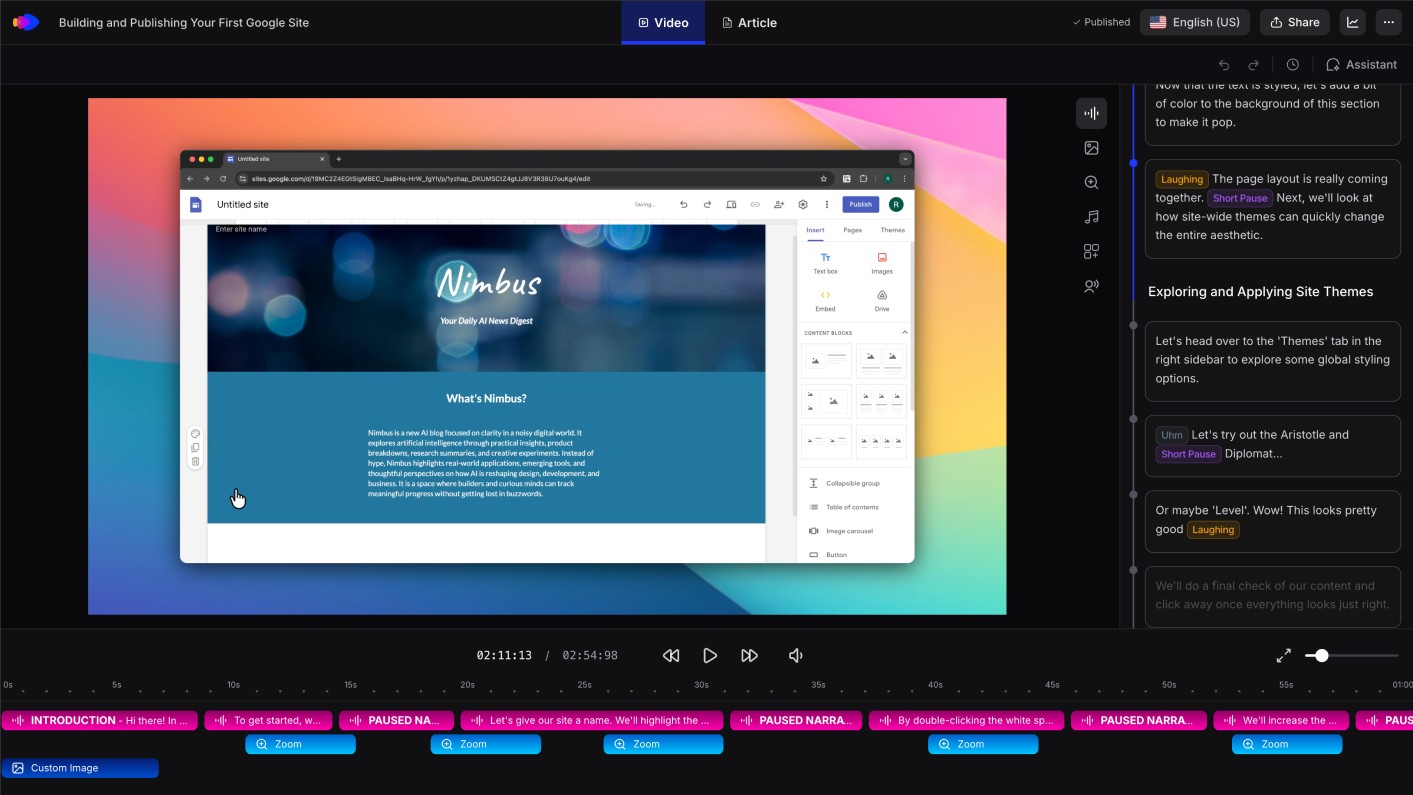
Use AI narration: Tools like Clevera generate AI narration from your screen recording. When you update the video, you can adjust the narration script without re-recording — just revise the text and re-render.
Let LiveSync handle embedding: Rather than embedding video files directly, use Clevera's embedded player, which supports LiveSync. Update once, and every embedded instance updates across your knowledge base.
Step 7: Audit for stale docs automatically
Manual audits are better than nothing, but they're time-consuming and easy to skip. A few automated signals can help you catch stale content faster:
Search analytics: Most knowledge base platforms show which articles get searched and whether users click them. Articles with high search + low click-through are either mislabeled or unhelpful.
Article age filters: Export a list of articles sorted by last-updated date. Anything older than 6 months for a fast-moving product is worth reviewing.
Ticket-to-article mapping: Some help desk tools can suggest relevant knowledge base articles based on ticket content. If those articles are being suggested but not resolving tickets, they're likely outdated.
404 and broken link detection: Regularly scan your knowledge base for broken internal links. These often indicate that a page was moved or deleted without updating the articles that link to it.
What "up to date" actually means
A helpful reframe: "up to date" doesn't mean perfect. It means accurate enough that users can follow the instructions and succeed.
You don't need a polished rewrite every time a button label changes. A quick edit to the relevant step is enough. Don't let the pursuit of perfect documentation block you from doing the maintenance that matters.
The teams with the best-maintained knowledge bases are usually not the ones with the most resources — they're the ones with the clearest ownership, the lightest update process, and the discipline to treat documentation as a living product, not a one-time project.