Guidde pricing (2026): plans, limits, real cost
Guidde costs $0 to $59 per creator a month, but AI voice, desktop capture and translation sit on higher plans. Here is what 1, 5 and 20 creators really pay.
 Berkay Akpolat13 min read

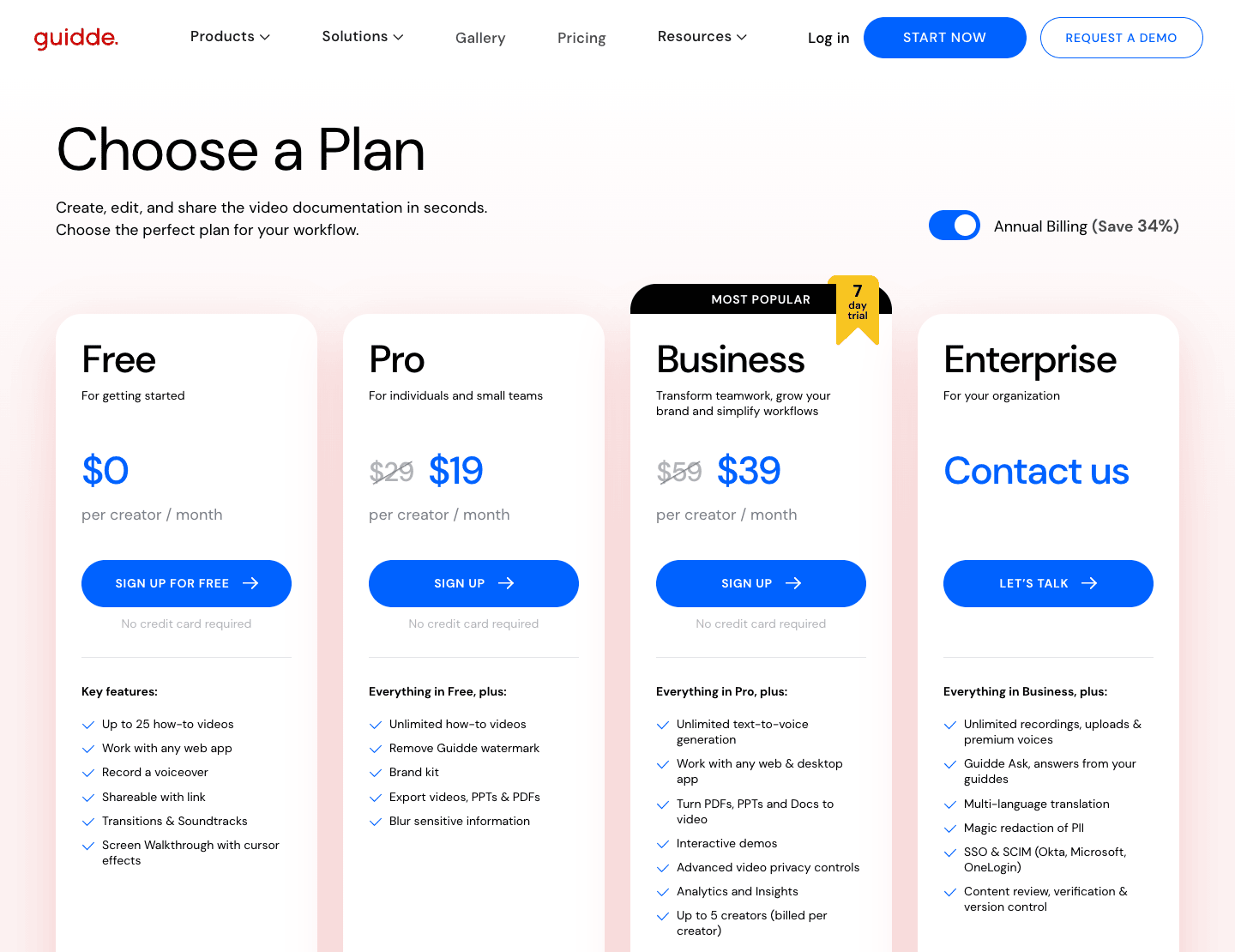
Guidde pricing has four plans: Free ($0, up to 25 videos, web capture only), Pro ($19 per creator per month billed yearly, $29 monthly), Business ($39 per creator per month yearly, $59 monthly, up to 5 creators) and Enterprise (quote only). AI voice-over and desktop capture start on Business. Every translation option sits in Enterprise, and some of it costs extra even there.
Updated 2026-11-04. Prices are in US dollars, taken from guidde.com/pricing and Guidde's help center on that date.
On this page
- Guidde pricing at a glance
- Which plan each job needs
- What Guidde's free plan can and can't do
- What 1, 5 and 20 creators pay
- Hidden costs: voices, seats and annual terms
- Is Guidde worth it?
- Alternatives at the same budget
- Where Clevera fits
- Our method and sources
- Why other sites show different Guidde prices
- FAQ
Guidde pricing at a glance
Guidde charges per creator. Admins, Content Managers and Creators each take a paid seat. Viewers are free. The yearly price is about a third lower than the monthly one ("Save 34%" on the page). Put another way, paying monthly costs about 51–53% more.
| Plan | Billed yearly | Billed monthly | Guidde's tagline | Main limits |
|---|---|---|---|---|
| Free | $0 | $0 | "For getting started" | 25 videos, web apps only, Guidde watermark, no MP4 download, no AI voice |
| Pro | $19 per creator / month | $29 per creator / month | "For individuals and small teams" | Unlimited videos, no watermark, MP4/PPT/PDF export, 1 brand kit; still web-only, still no AI voice |
| Business | $39 per creator / month | $59 per creator / month | "Transform teamwork, grow your brand and simplify workflows" (badged "Most popular") | Up to 5 creators; adds AI text-to-voice (200+ voices), desktop and mobile capture, interactive demos, analytics |
| Enterprise | Quote | Quote | "For your organization" | Adds SSO and SCIM, translation, automatic ("magic") PII redaction, integrations such as Zendesk and Confluence |
Which plan each job needs
The plan cards list highlights. The full comparison table further down Guidde's pricing page is where the gates are. This is the cheapest Guidde plan that covers each job, read from that table:
| You need | Cheapest Guidde plan | Note |
|---|---|---|
| Record a web app with your own voice | Free | Up to 25 videos |
| Download MP4s, remove the watermark | Pro | MP4, GIF and PPT downloads start on Pro |
| AI voice-over from text | Business | 200+ voices in 50+ languages; premium voices are a paid add-on |
| Record desktop apps or mobile | Business | Free and Pro capture web apps only |
| Turn an MP4, PDF, PPT or Doc into a guide | Business | |
| Interactive click-through demos | Business | |
| More than 5 creators with AI voice | Enterprise | Business stops at 5 |
| Translate existing guides into other languages | Enterprise | Automatic translation is an add-on even here |
| SSO and SCIM | Enterprise | Okta, Microsoft Entra ID, OneLogin |
| Zendesk, Confluence, SharePoint, Salesforce or SCORM | Enterprise | Chrome, Edge, Slack and Gmail work on every plan |
| A customer-facing portal for your guides | Enterprise | |
| MCP connector for AI assistants | Enterprise add-on |
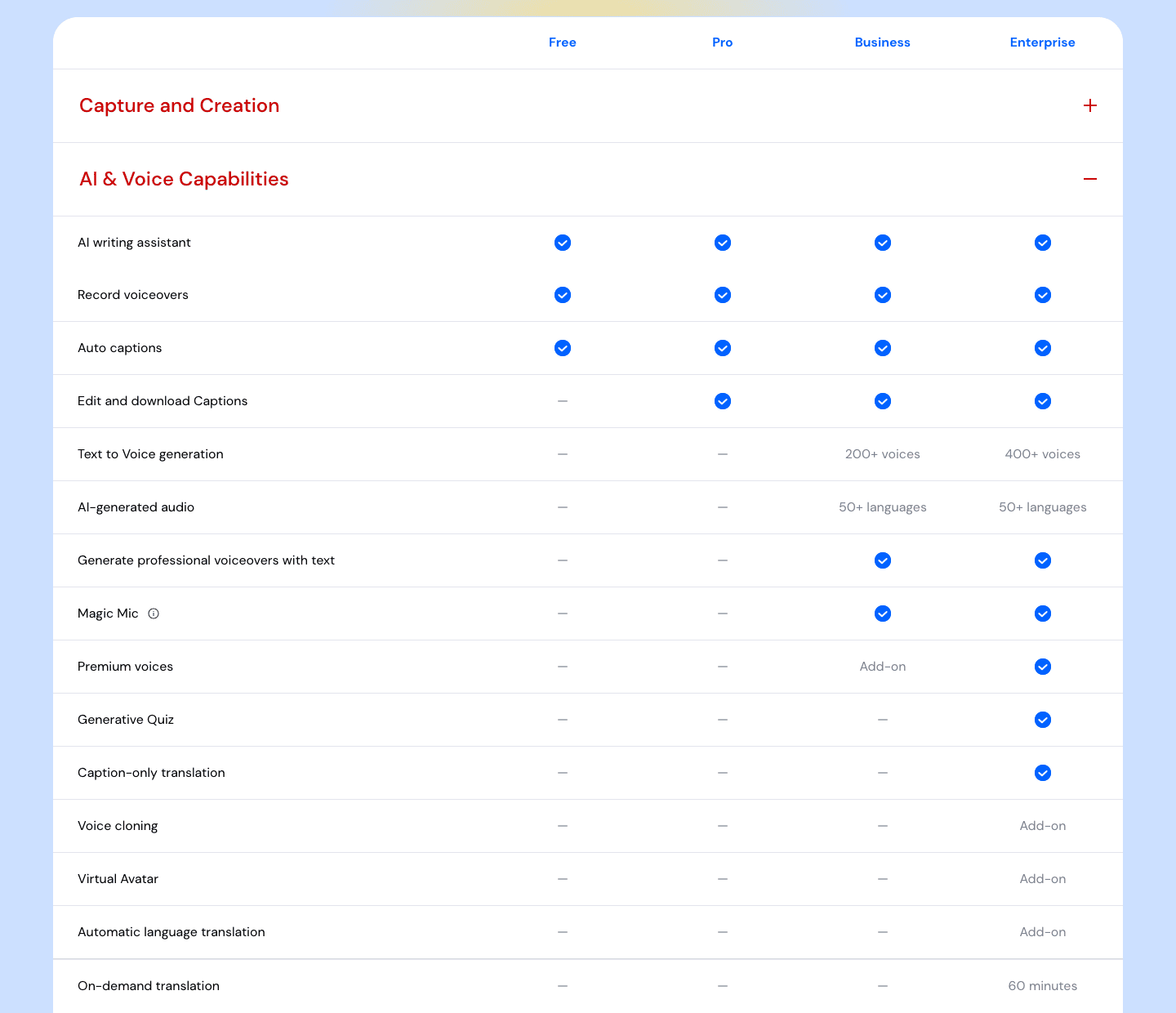
Two points are easy to miss. First, Business can generate AI voice in 50+ languages, but it can't translate a guide you've already made: the "On-demand translation, 60 minutes" row is in the Enterprise column. Second, the Enterprise card says "Multi-language translation", but the table lists automatic language translation as an add-on on Enterprise too. Ask the sales team which translation is in your quote.
What Guidde's free plan can and can't do
Guidde's free plan costs nothing and needs no card. It covers up to 25 video guides, recorded from web apps with your own voice-over, shared by link. It carries the Guidde watermark, has no MP4 download and no AI voice.
Guidde also offers a 7-day Business trial without a card. Its FAQ says some features, "like MP4 export", need a paid plan during the trial. If you don't upgrade, the workspace moves to Free: nothing is deleted, but you can edit only your last 25 videos.
What 1, 5 and 20 creators pay
What Guidde costs for 1, 5 and 20 creators: yearly totals at list price, before tax. The monthly-billing total is in parentheses.
| Team | Pro | Business | Business + Premium Voices | Enterprise |
|---|---|---|---|---|
| 1 creator | $228 ($348) | $468 ($708) | $696 ($1,056) | Quote |
| 5 creators | $1,140 ($1,740) | $2,340 ($3,540) | $3,480 ($5,280) | Quote |
| 20 creators | $4,560 ($6,960) | Not available (5-creator cap) | Not available | Quote |
Per month, that's $195 for 5 Business creators on yearly billing, or $295 billed monthly.
How to read it:
- 1 creator. Pro is cheap, but it's a web-only recorder with your own voice. If you want AI narration or need to record a desktop app, the real starting price is Business at $468 a year.
- 5 creators. This is the Business sweet spot, and the cap. Adding Premium Voices takes the bill from $2,340 to $3,480 a year.
- 20 creators. The page shows no creator cap on Pro, so 20 Pro seats list at $4,560 a year, with no AI voice and no desktop capture. For Business features at that size you need an Enterprise quote. Guidde publishes no Enterprise price. The only public anchor is Vendr's buyer data: the median Guidde buyer pays $18,557 a year, in a range of $13,450 to $42,000. Vendr doesn't say which plans, team sizes or period those deals cover, so treat it as a rough guide to what larger contracts cost.
Hidden costs: voices, seats and annual terms
- Premium Voices. A Business add-on at $19 per paid user per month on a yearly plan, $29 on a monthly one. Each paid user adds 60 voice minutes a month to a shared pool. Unused minutes don't roll over. Regenerating a guide after an edit uses minutes again, and when the pool runs out, new videos fall back to a standard voice (Guidde help, updated July 5, 2026).
- One plan per workspace. "A workspace operates under a single plan" (Guidde help). You can't put two people on Business and the rest on Pro.
- Annual seats can't shrink mid-term. On a yearly plan, removing seats or switching to monthly goes through support and takes effect at renewal, and the FAQ says "We don't offer refunds for unused time."
- Seat count matters more than it looks. Zylo, a SaaS-management vendor, says in its 2026 SaaS Management Index that the average organization uses only 54% of its provisioned licenses, leaving 46% unused or underused (vendor data). With per-creator pricing and annual terms, buy seats for the people who record every week, and keep reviewers and readers as free viewers.
- Enterprise add-ons. Even on Enterprise, the comparison table lists automatic translation, voice cloning, virtual avatars, the MCP connector and Guidde Ask inside Broadcast as add-ons. Ask for each one you need in the quote.
- Tax. Prices are in US dollars, and local taxes are added at checkout (Guidde billing).
Is Guidde worth it?
It depends on team size and on which gate you hit first.
| Team | Guidde is a good buy when… | Look elsewhere when… |
|---|---|---|
| Solo | You document web apps, are happy to narrate yourself, and want branded MP4s: Pro at $228 a year | You need AI voice or a desktop app recorder, which means Business at twice the price |
| 2–5 creators | You want AI voice, desktop capture and interactive demos in one tool, and many free viewers | You need translation, SSO or a Zendesk or Confluence integration (all Enterprise) |
| 6–20+ creators | You're ready for an Enterprise contract with SSO, SCORM and Guidde Ask | You want a published price, or only a few people need AI narration |
Where Guidde is strong: unlimited videos per paid creator from Pro up, free viewers, a Chrome extension and Edge add-on on every plan, and a lot packed into Business for five people. If your team is five or fewer, records web apps and doesn't need to translate its guides, Business is a reasonable price for what it does.
The cost jumps when you need the sixth creator, translated versions of your guides, or an integration with your help desk. Each of those moves you to a quote.
Alternatives at the same budget
Not every tool makes the same thing, so the "what you get" column matters as much as the price. Yearly billing, list prices, checked on each vendor's page on 2026-11-04.
| Tool | 1 creator / year | 5 creators / year | 20 creators / year | What you get |
|---|---|---|---|---|
| Guidde Business | $468 | $2,340 | Quote | Narrated video guides, AI voice, desktop capture, interactive demos |
| Scribe | $300 (Pro Personal) | $780 (Pro Team, 5-seat minimum) | $3,120 | Step-by-step screenshot guides, desktop capture, PDF/HTML/Markdown export; translation on Enterprise |
| Tango | $264 (Pro) | $900 (Pro Team, 3+ users) | $3,600 | Step-by-step guides, browser and desktop capture, PDF/HTML/Markdown export; translation (15 languages) on Enterprise |
| Clevera | $348 (Starter) | $1,948.80 (Pro, 5 creators) | Quote (Custom) | Narrated video, help article and hosted help center from one recording; translation on every plan; monthly credit allowance (900 Starter, 4,000+ Pro) |
Scribe and Tango are cheaper because they make written guides with screenshots, not narrated videos. If written guides are enough, read our Scribe vs Tango comparison, Scribe alternatives and Tango alternatives. For the wider field, see Guidde alternatives.
Where Clevera fits
Clevera is an AI platform that turns a screen recording into a narrated how-to video, a step-by-step help article and a page on your hosted help center, in 74 languages. For one creator who needs AI voice-over and desktop recording, Guidde Business lists at $468 a year and has no translation. Clevera Starter lists at $348 a year with both, plus translation, within a monthly allowance of 900 credits.
Clevera prices differently from Guidde: a monthly credit allowance per workspace instead of unlimited videos per seat.
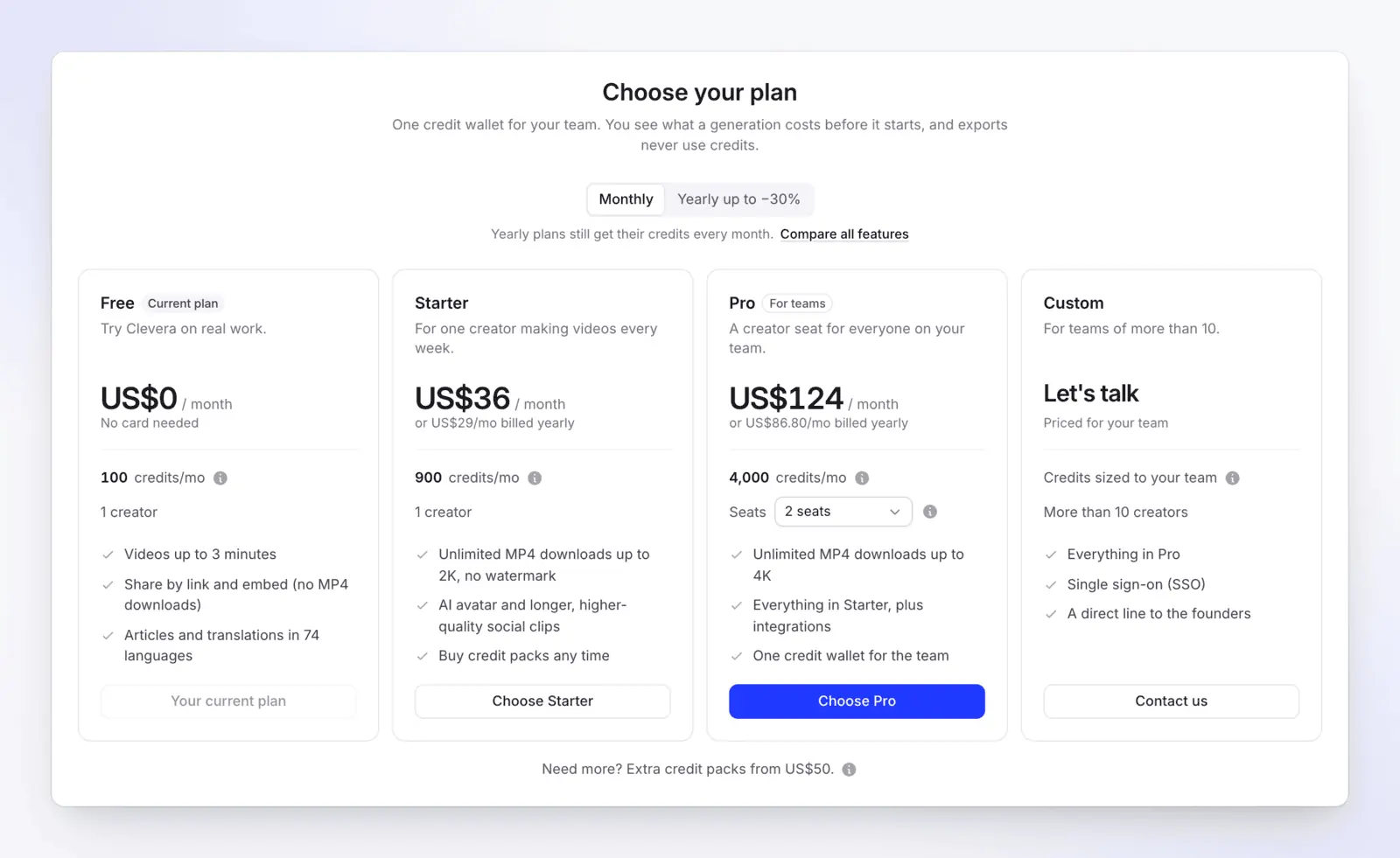
- Free: $0, 100 credits a month, videos up to 3 minutes, AI voice-over, articles and translations, and one hosted help center. Sharing is by link and embed only: no MP4 downloads, and videos carry the "Made with Clevera" watermark.
- Starter: $36 a month, or $29 a month billed yearly. One creator, 900 credits a month, MP4 downloads up to 2K and a help center on your own domain.
- Pro: $124 a month for 2 creators, or $86.80 a month billed yearly, with 4,000 credits a month. Each extra creator adds $36 a month and 650 credits, up to 10. Adds 4K downloads, publishing integrations and AI agents & API (MCP).
- Custom: more than 10 creators, priced for your team, with single sign-on.
Where the gates differ from Guidde's:
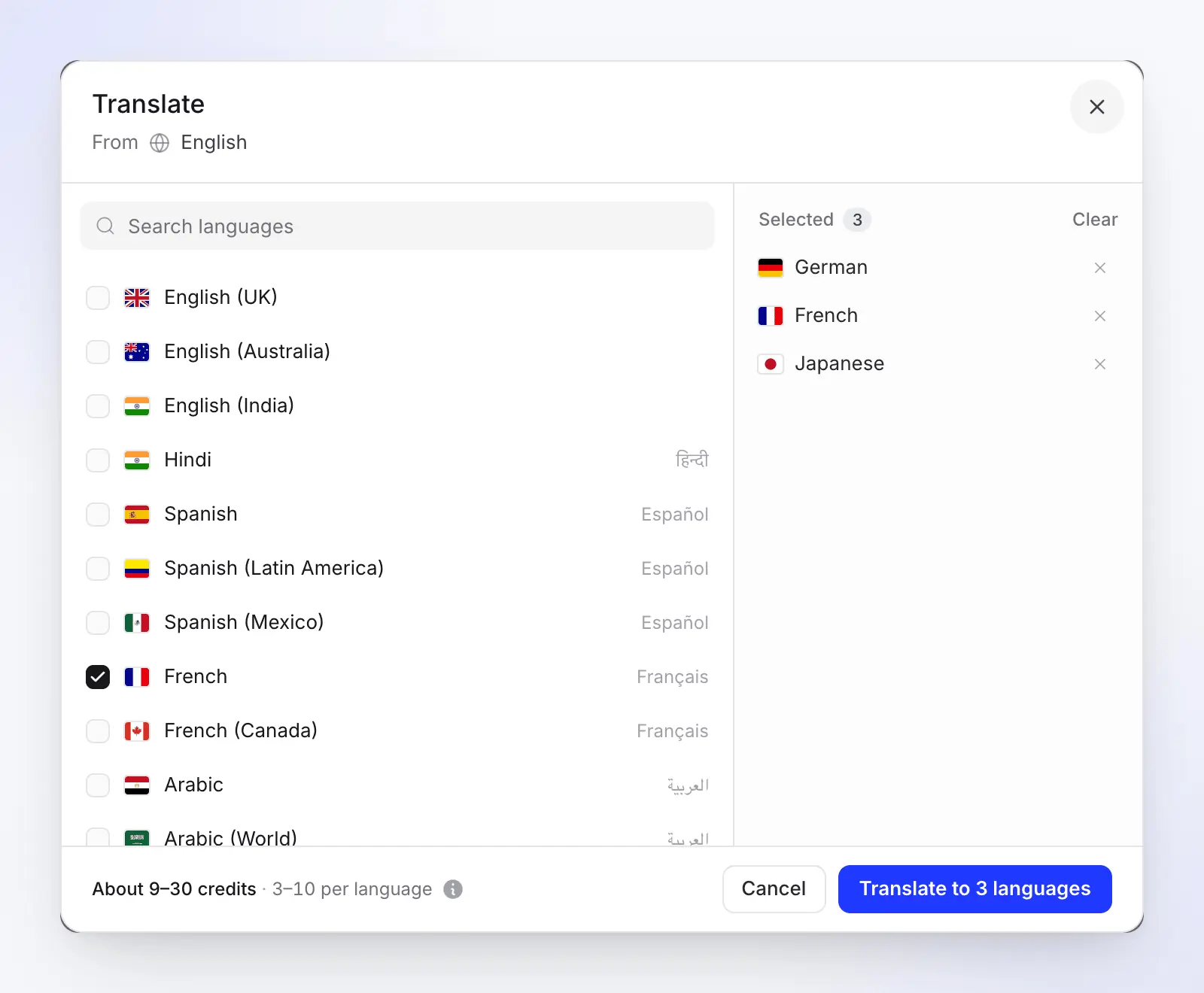
- AI voice and translation are on every plan, including Free. Translating a finished video in the Translate dialog usually costs 3–10 credits per language (how translation works).
- Desktop recording on every plan. The Clevera desktop app records on Mac, Windows and Linux.
- A hosted help center on every plan, with search and an AI assistant for readers. See help center software.
- Editors are unlimited and free. Only creators take a seat.
The honest catches: credits cap how much you make each month. A how-to video typically uses 5–25 credits, so heavy months may need an extra pack ($50 for 1,000 credits, Starter and Pro). Free has no MP4 download. You record with the desktop app or the Chrome extension, upload a video, or let Record with AI click through a public web app. And it doesn't build click-through interactive demos; it makes videos and articles. For a side-by-side, see Clevera vs Guidde, or the full plan comparison in the help center.
Our method and sources
We read Guidde's public pricing page, its plan comparison table and three Guidde help articles on 2026-11-04, and captured the screenshots above the same day. The prices are written into the page's HTML in US dollars, not set by the visitor's location, and Guidde's billing help confirms US-dollar pricing. We didn't sign up for a Guidde account or run a trial, so nothing here is a hands-on test. Team totals are list price × seats × 12, before tax and before any discount a sales team might offer.
Why other sites show different Guidde prices
Guidde's prices moved during 2026, and many listings haven't caught up. In January the pricing page showed Pro at $18 a month billed yearly ($25 monthly) and Business at $39 ($55 monthly); by March it showed today's prices (January and March archive copies). An older Guidde pricing page, still online, lists $16 or $23 for Pro and $35 or $50 for Business. Sites that quote $29 for Pro are quoting the monthly rate. The prices in this post are from guidde.com/pricing on 2026-11-04.
FAQ
How much does Guidde cost per month?
Pro costs $19 per creator per month billed yearly, or $29 billed monthly. Business costs $39 per creator per month yearly, or $59 monthly, for up to 5 creators. Free is $0. Enterprise is quote-only.
Can I mix Pro and Business seats in one Guidde workspace?
No. "A workspace operates under a single plan," so moving one person to Business moves every paid seat.
What does the Guidde Business plan include?
Everything in Pro plus AI text-to-voice (200+ voices), desktop and mobile capture, turning MP4, PDF, PPT and Docs into guides, interactive demos, privacy controls and 30 days of engagement insights. It's limited to 5 creators. Premium voices cost extra.
Do viewers need a paid Guidde seat?
No. Only Admins, Content Managers and Creators use paid seats. Viewers can join the workspace at no extra cost.
How much do Guidde Premium Voices cost?
$19 per paid user per month billed yearly, or $29 monthly, as a Business add-on. Each paid user adds 60 voice minutes a month to a shared pool, and unused minutes don't roll over.
How much does Guidde Enterprise cost?
Guidde publishes no price. Vendr's buyer data puts the median Guidde buyer at $18,557 a year, in a range of $13,450 to $42,000, without saying which plans or team sizes that covers.
Need narrated videos and translation without a quote?
Clevera's Free plan includes AI voice-over, translation in 74 languages and a hosted help center. Compare every plan on the Clevera pricing page.