Translate product tutorials and help articles without enterprise pricing
Most tutorial and guide tools keep translation on Enterprise plans. Here's where translation sits in each vendor's pricing, what you actually get, and how to translate help content on a mid-market budget.
 Roozbeh Firoozmand8 min read
Checked November 2026 against each vendor's own pricing page.
You can translate product tutorials and help articles into many languages without an enterprise contract, but only with a few tools. Most how-to video and guide tools (Guidde, Scribe, Tango) keep translation on their Enterprise plans, and most help center suites (Zendesk, Intercom) put multilingual help centers on their higher tiers. The tools that include translation on self-serve plans price it per use: Trupeer charges credits per minute per language, and Clevera uses 3 to 10 credits per language for each video or article. The cheapest path is to translate the voice-over, captions and article together from one approved source, and only for the pages that answer the most tickets.
This guide is for support and customer education leads planning a multilingual help center on a mid-market budget. It shows where translation sits in each vendor's pricing, what you actually get, and how to keep the bill small. For the step-by-step method (glossary, review, hreflang), see how to translate your help center and its videos together.
Where translation sits in each vendor's pricing
| Tool | What gets translated | Plan that includes it | How it's priced |
|---|---|---|---|
| Guidde | Videos and guides | Enterprise | Contact sales |
| Scribe | Guides | Enterprise | Contact sales |
| Tango | Workflows, into 15 languages | Enterprise | Platform fee, contact sales |
| Clueso | Videos and articles | Listed on every plan | Within plan limits; language count not stated on the pricing page; glossary and rules on Enterprise |
| Trupeer | Videos | Paid plans; Scale includes 2 translation languages, Enterprise 10 | 100 credits per minute per language; top-ups $4 per 100 credits |
| Synthesia | Avatar videos; dubbing | Dubbing on paid tiers; 1-click translation into 140+ languages tied to Enterprise in its feature list | See their pricing page |
| Zendesk Guide | Help center articles (text) | Suite Professional (40+ languages); Suite Team has 1 default language | $115/agent/mo billed yearly ($149 monthly) |
| Intercom | Help center articles (text) | Advanced | See their pricing page |
| Document360 | Knowledge base articles | Languages are a pricing factor | Quote only |
| Skilljar | Academy platform | Language Packs add-on | From $10k for 5 languages |
| Trainn | Videos and knowledge hub | Multilingual voice-overs on Launch; 1-click translation into 30 languages on Scale | Launch $2,400/yr; Scale $10,000/yr |
| Clevera | Video voice-over, captions, title cards and the article | Every plan; help center languages: 2 per site on Free, 5 on Starter, unlimited on Pro | 3 to 10 credits per language for each video or article |
Sources: Guidde, Scribe, Tango, Clueso, Trupeer, Synthesia, Zendesk, Intercom, Document360, Skilljar, Trainn, Clevera, checked November 2026.
Two patterns stand out. Guide and walkthrough tools treat translation as an enterprise feature. Help center suites translate article text, but the videos inside articles stay in whatever language they were made in unless you produce new versions elsewhere.
What "translation" includes matters as much as the price
When you compare, ask what comes out the other end:
- Article text only. Most help center platforms. A Spanish reader gets a Spanish article with an English video in it.
- Captions only. Readable, but viewers have to read while watching the product.
- Voice-over, captions and on-screen titles. The video plays in the reader's language. The footage still shows your product's UI in the language you recorded it in.
- Lip-synced presenter. Avatar and dubbing tools. Useful for talking-head content, not needed for screen walkthroughs.
For product tutorials, voice-over plus captions plus the article is the useful set. Ask each vendor whether their translation re-times the video to fit the new voice, so zooms and highlights still land on the right click.
What it costs on credit-based tools
Credit pricing makes the cost per language visible, which helps with planning:
- Trupeer: 100 credits per minute per language. A 2-minute video into one language is 200 credits; at the top-up rate of $4 per 100, that's about $8 per language per video.
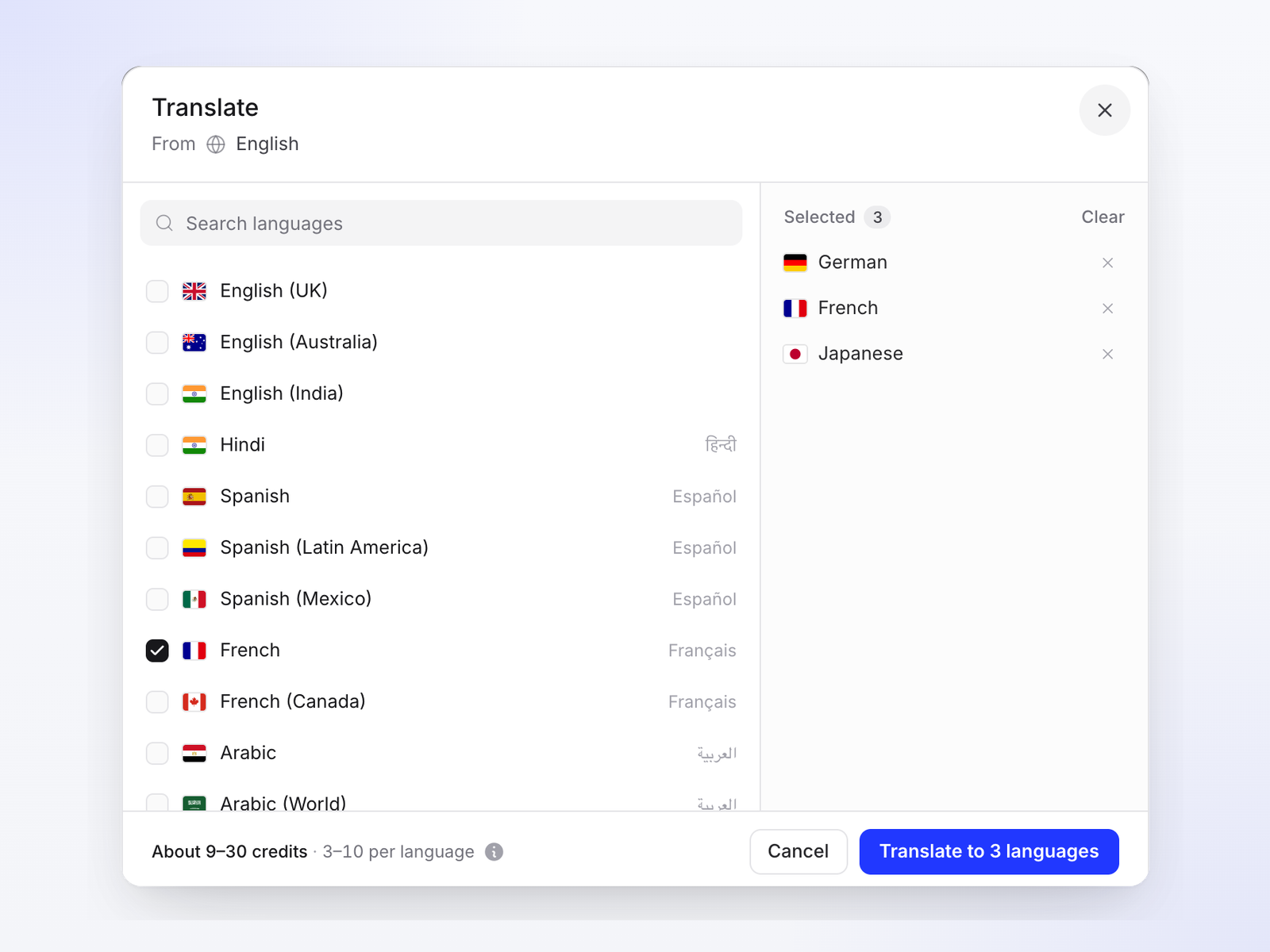
- Clevera: 3 to 10 credits per language for each video or article, depending on length and whether the voice-over is recorded again. At the extra-credit rate of 1,000 credits for $50, that's about $0.15 to $0.50 per language for each one, and plans include monthly credits (900 on Starter, 4,000 on Pro).
These are list-price illustrations, not quotes. Your real cost depends on video length and plan allowances, so check each pricing page with your own numbers. Clevera's localization cost calculator helps estimate the alternatives, including human translation.
A worked example: 50 articles with videos, four extra languages
Say your help center has 50 articles, each with a 2-minute how-to video, and you want them in Spanish, German, French and Japanese. That's 200 article translations and 200 video translations. Using list prices:
- Clevera: 400 translations at 3 to 10 credits each is 1,200 to 4,000 credits, once. Starter publishes five languages per site (English plus four) and includes 900 credits a month, so this takes two to five months of Starter's allowance, one month of Pro's 4,000 credits, or two to four extra packs ($100 to $200) on top of either. Later updates cost the same per changed video or article.
- Trupeer: 50 videos × 2 minutes × 4 languages × 100 credits is 40,000 credits. That's four months of Scale's 10,000-credit allowance, or about $1,600 at the $4 per 100 top-up rate. Scale also includes only two translation languages; Enterprise includes ten.
- Zendesk Suite Professional: the articles translate as text, priced per agent ($115 a month billed yearly). The 50 videos need a separate tool and new versions per language.
- Guidde, Scribe, Tango: an Enterprise conversation before the first translation.
Again, these are illustrations from published prices, not quotes. They show where the cost lands: per minute, per agent, or per contract.
Five ways to keep translation affordable
1. Translate what costs you tickets
Start with getting-started pages, billing and account pages, and your top 20 articles by views. Two or three languages done well beat ten done halfway. Pick languages from support tickets and active users by country, not signups.
2. Translate once, from an approved source
Translating a draft means paying twice, in credits and in reviewer time. Approve the English video and article first.
3. Keep videos short and single-task
A 20-minute walkthrough must be re-translated in full when one step changes. Two-minute clips keep each update small in every language.
4. Use AI for the draft, a native speaker for review
Machine translation is a strong first draft for step-by-step instructions. Have someone who knows your product read each language once against a glossary of UI labels and product terms. Document360's own guidance recommends the same pattern.
5. Re-translate on a rule, not on memory
When a source article or video changes, re-translate it in every language that week. Most tools don't flag stale translations automatically, so write the rule into your release checklist.
Where Clevera fits
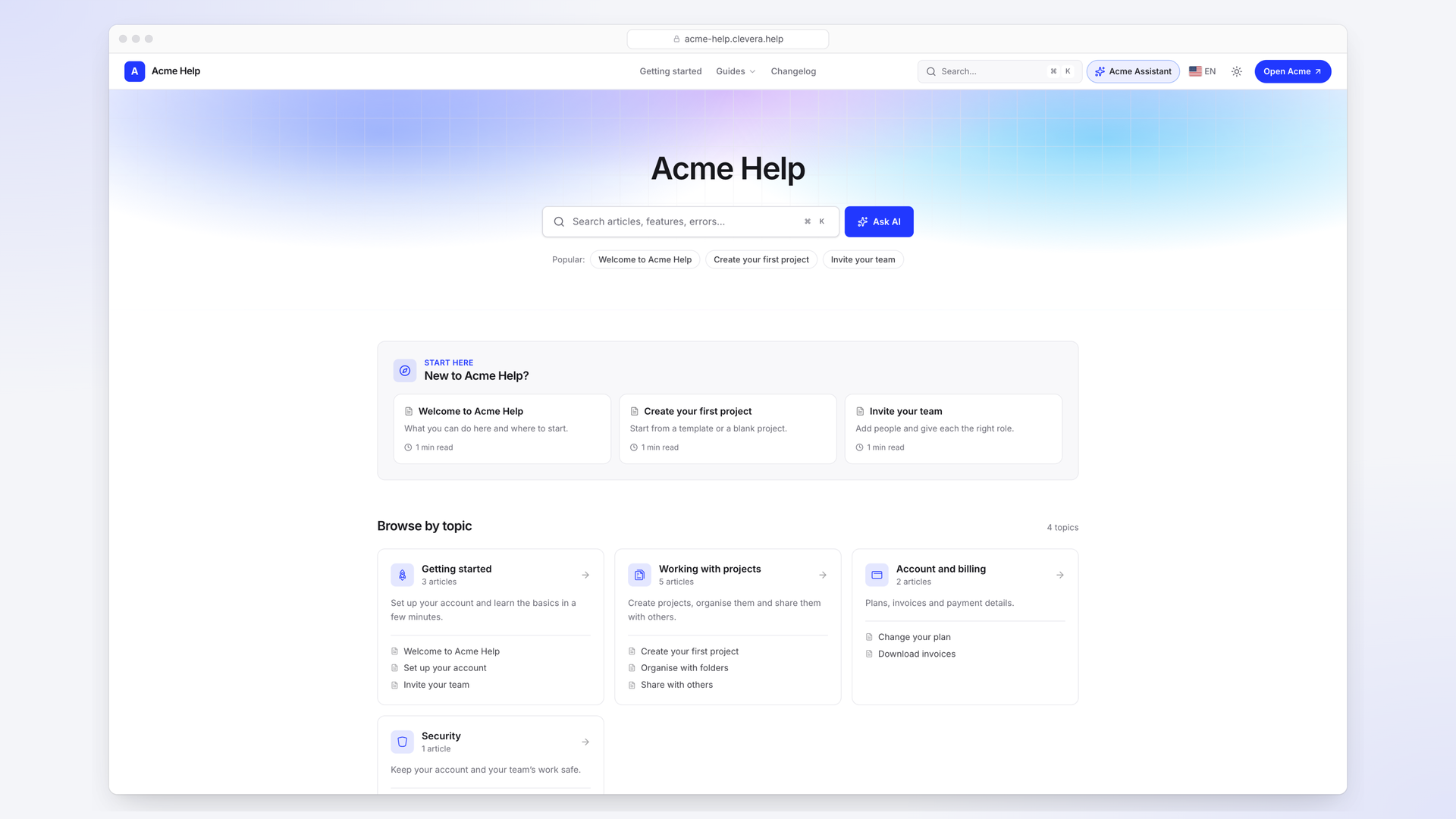
Clevera makes a narrated how-to video and a step-by-step article from one screen recording, and translates them together into 74 languages: new AI voice-over, captions, title cards and the article. The footage is re-timed to the new voice, and you pick the voice per language. Translations are versions of the same item, published on a multilingual help center where each language gets its own URL, hreflang links and a language switcher.
Things to know:
- The footage shows the UI you recorded. If your product is itself localized, record your top markets on the localized UI.
- Text elements you add yourself aren't translated automatically, so review title cards and overlays per language.
- Translations don't follow the source on their own. After you change the original, ask for the translation to be updated; it re-translates from the source.
- Language limits per help center depend on plan: 2 per site on Free, 5 on Starter, unlimited on Pro.
Where it isn't the right fit: if your help center lives in Zendesk or Intercom and you're staying, their built-in article translation covers the text and you'd make translated videos separately. If you need lip-synced presenters, an avatar or dubbing tool like Synthesia fits better. And if you need translation memory and professional translator workflows, a dedicated localization platform is the stronger choice.
FAQ
Which tutorial video tools include translation without an enterprise plan?
Of the tools checked here, Clevera, Trupeer and Clueso list translation on self-serve plans. Guidde, Scribe and Tango keep it on Enterprise.
How much does it cost to translate a tutorial video?
On credit-based tools, from well under a dollar to several dollars per language per short video at list prices: Clevera uses 3 to 10 credits per language for each video or article, Trupeer 100 credits per minute per language. Enterprise tools price translation into the contract.
Do help center platforms translate embedded videos?
Generally no. Zendesk, Intercom and Document360 translate article text; an embedded video stays in its original language unless you add a translated version.
How many languages should we start with?
Two or three, chosen from ticket volume and active users. Translate your getting-started, billing and top-viewed pages first, measure tickets from those markets, then expand.
Is AI translation good enough for help documentation?
For step-by-step instructions it's a strong first draft. Have a native speaker who knows the product review each language once against a glossary before publishing.
Put your help center in your customers' languages
Videos, captions and articles translated together, on a help center with a URL per language.