How to put your API documentation in your help center
Keep your API reference next to your guides, in one search. What we learned turning a real OpenAPI file into endpoint pages on our demo help center.
 Roozbeh Firoozmand6 min read

Your customers don't split their questions the way your docs do. Someone setting up a webhook reads the guide, then needs the endpoint, then wants to know what changed last month. If those live on 3 sites, your support team answers the gap. This post shows how to keep API documentation in your help center, next to the guides, and what we learned doing it on our own demo site.
Why two docs sites cost you more than a second bill
Most teams end up with a help center for product questions and a separate developer portal for the API. It looks tidy on an org chart. For readers, it means 2 searches, 2 navigations and 2 places where an answer might be out of date.
It also breaks AI answers. An assistant on your help center can only answer from what's in it. Ask it "how do I assign a conversation from my CRM?" and it finds the guide but not the endpoint, so it guesses or gives up. Put both in one place and the answer cites both.
The upkeep doubles too. A release that changes a screen and an endpoint means 2 edits in 2 tools, usually by 2 teams. One of them slips.
What goes where
You don't need to merge everything into one kind of page. Each type of content still has its own job:
| Content | Comes from | Who writes it |
|---|---|---|
| How-to guides | A screen recording or a writer | Support or product |
| API reference | Your OpenAPI, Swagger or Postman file | Generated from the spec |
| Release notes | Each release | Product, with a draft from the tool |
The point is that they sit in one site, with one sidebar and one search. The reference stays generated from your spec, so nobody hand-writes endpoint pages.
How to add it: our run with a real file
We tested this on our demo help center, which documents a made-up support inbox called Relaypoint. It already had guides for authentication and webhooks. We wrote an OpenAPI 3.1 file for the same API: 12 endpoints and 5 webhook events, with the same base URL and error codes the guides already used.
Add the file
In the doc site's Pages, choose Add pages, then API reference. You can upload the file, paste a link to it, paste a curl command, or write the endpoints in a form.
Read the report
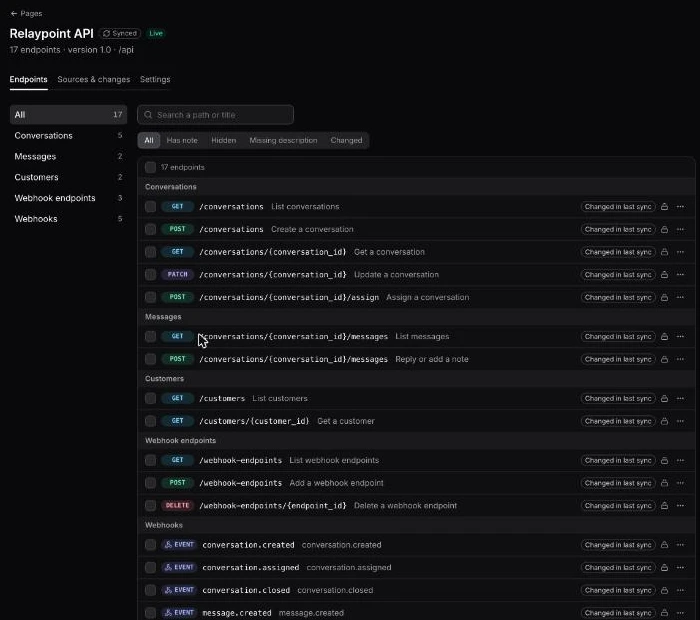
Clevera read the file and reported 12 endpoints in 5 groups, 5 webhooks, 1 server and bearer sign-in. It flagged 6 endpoints with no example response. We could have let it generate examples from the field types, but for a showcase we went back and added real ones to the file.
Place it
We set the address to
/api, put it at the end of the sidebar, and turned Try it off, because Relaypoint's API address doesn't exist and a button that fails looks worse than no button.
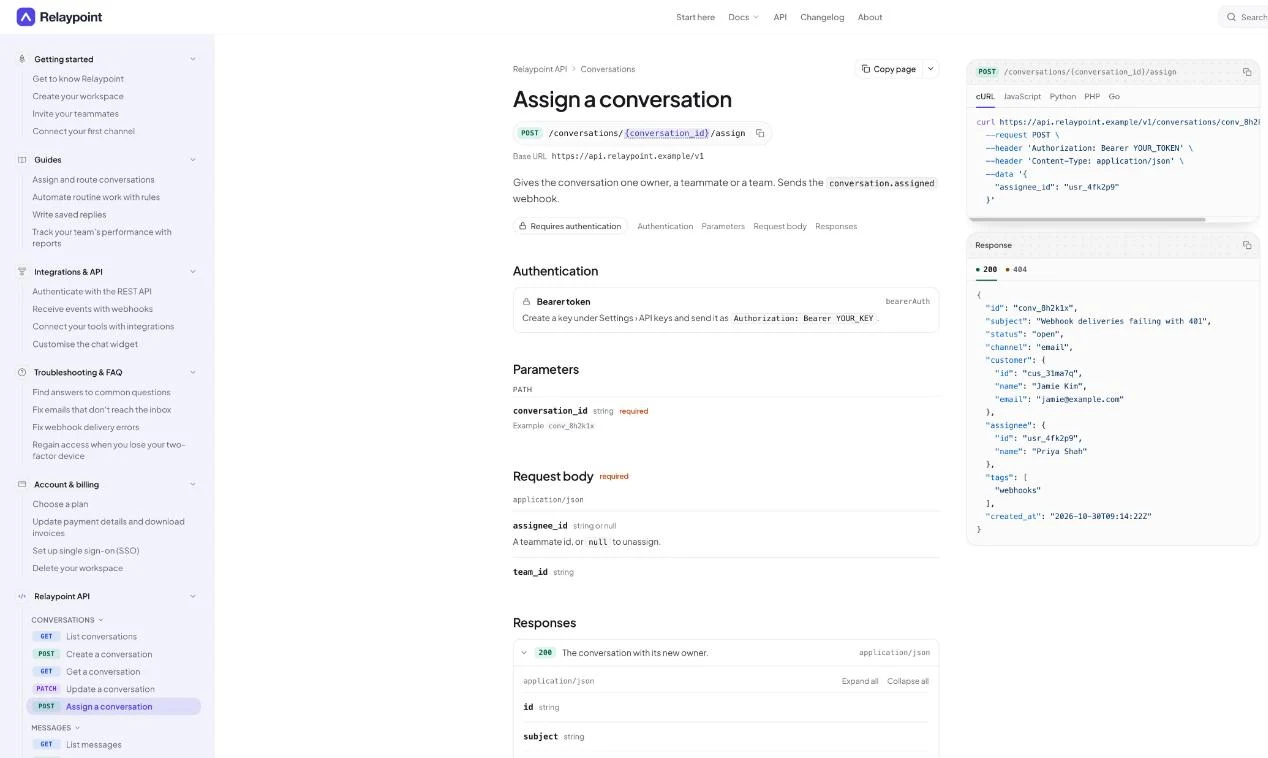
From opening the dialog to having 17 endpoint pages took about 3 minutes. Most of that was reading the report. The live reference is public if you want to click around.
What surprised us
Three things we didn't expect, good and bad:
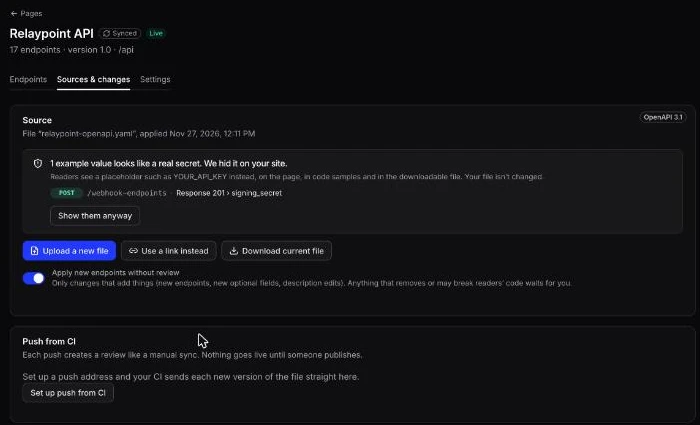
- It caught a fake secret. One example response had a signing secret in it. Clevera hid it on the site and in the code samples, and showed a placeholder instead. An owner can show it if it really is only an example.
- Angle brackets disappeared. Our auth description said
Authorization: Bearer <key>, and<key>vanished on the page. We changed it toYOUR_KEYand uploaded the file again. Avoid angle-bracket placeholders in descriptions. - Auto-publish is fast. The site had auto-publish on, so the new pages went live within a few minutes. Turn it off first if you want to review before readers see anything.
Keep it in step with your API
A reference is only useful if it matches the API your customers call today. There are 3 ways to send a new version:
- Upload a new file when you release.
- Link to the file and let Clevera check it once a day (Starter) or every hour (Pro).
- Push it from CI on Pro, so every merge that changes the spec sends it over.
Each sync shows what was added, changed and removed. Removed endpoints redirect, so old links don't break, and a changelog entry is drafted for you to edit. This is the same idea as updating docs on every release: the source of truth sends the change, and a person approves it.
Where Clevera is not the right fit
If your engineers own all your docs and want them in Git, reviewed as pull requests and versioned per release, a docs-as-code tool like Mintlify or ReadMe is built for that. They go deeper on developer portals, with versioned references and docs that change for signed-in developers. Clevera has no Git sync and no API versioning.
Clevera fits when the help center is run by support or product and the API is one part of it. The guides come from screen recordings, the reference comes from your file, and readers get one place to look.
What it costs
Every plan can add an API reference to a help center. Free and Starter include 1 per site, with up to 25 and 300 endpoints. Pro includes 5 per site with no endpoint limit, plus hourly checks and CI. The details are on the API reference page and in pricing.
Start with the file you already have
You almost certainly have an OpenAPI or Postman file somewhere, because your engineers use it. That file is the hard part, and it's done. Add it to your help center next to the guides, and the next "how do I do this from the API?" ticket has an answer readers can find on their own.