AI ad creative variations for B2B SaaS

AI ad creative variations are cheap to make now. Testing them isn't. A B2B SaaS audience is small, clicks are expensive and demo requests are rare, so spreading 8 variants across a budget sized for 2 gives each one too little delivery to produce a verdict.
Below: what to change and what to lock, how many variants a B2B budget can carry, how the LinkedIn, Meta and Google test tools work, a copyable variant matrix, and how to produce the clips in Clevera.
Why most B2B creative tests can't reach a verdict
The platforms tell you the minimums, and they're higher than most teams assume. LinkedIn's A/B testing best practices set a floor of $700 lifetime (or $20 a day) and 14 days per test, and recommend 21 days. Google's video experiment reporting won't compare conversion rate or cost per conversion until each arm has at least 100 conversions.
Run the arithmetic for your account. If a demo request costs $200 (illustrative, use yours), a 2-arm test on cost per conversion needs 2 × 100 × $200 = $40,000 before Google will call it. So judge most B2B creative tests on a leading metric (click-through rate, view rate or cost per view), which has no action minimum, and confirm against pipeline later.
What to vary and what to hold constant
Ad variant testing works when exactly 1 thing differs between A and B. Meta's split testing guide is blunt: test 1 variable at a time, or you can't tell what caused the difference.
Variable | What changes between A and B | Test it when |
|---|---|---|
Hook | The first line and the first 2 to 3 seconds: problem-led ("Still exporting CSVs every Monday?") vs outcome-led ("Your Monday report, built for you") | Always first. Nothing after the hook matters if people scroll past it |
Opening visual | Same words, different first frame: product UI vs a bold text card vs a presenter | Your hook wins but view rate stays low |
Proof | The middle beat: a customer logo strip vs a metric you can source vs a 5-second product moment | Viewers watch but don't click |
CTA | "Book a demo" vs "Start free" vs "See pricing", in the end card and the ad's button | Clicks are fine but the landing page converts poorly |
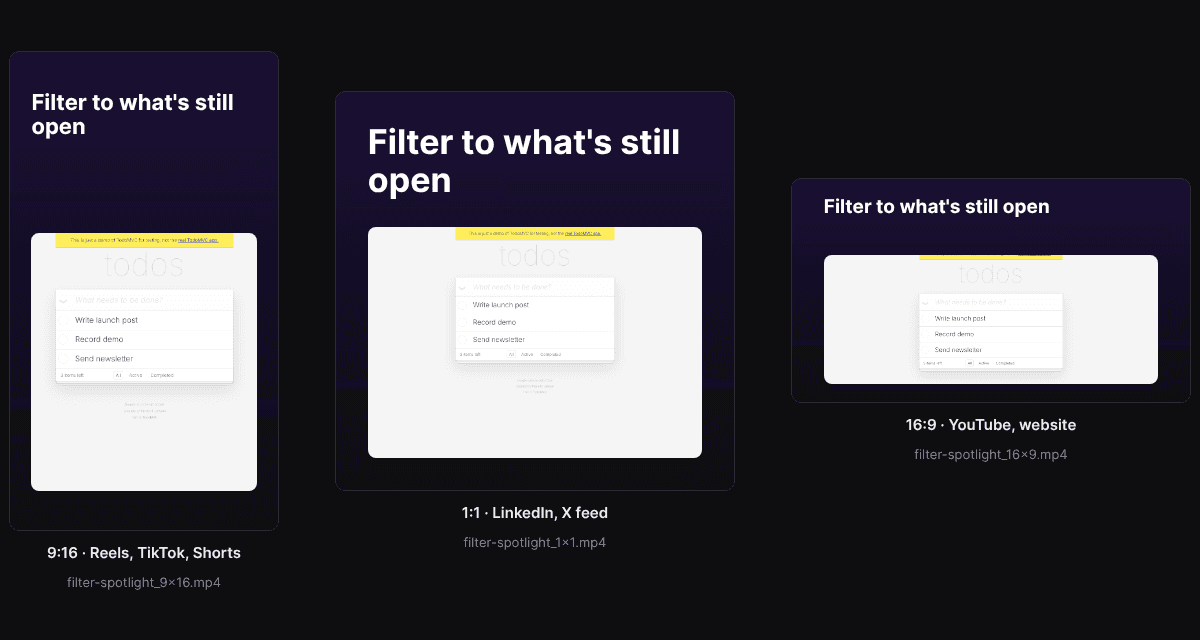
Format | 9:16 vs 1:1 vs 16:9, same edit | You're choosing placements, not messages |
Hold everything else still: audience, objective, bid strategy, budget split, schedule, landing page, offer, post copy, video length, music and Look. The Look and music are easy to change by accident when you regenerate a clip, which quietly turns a hook test into a 2-variable test.
Format is mostly a placement question, since each ratio wins different inventory. LinkedIn's video ad specs accept 4:5, 9:16, 16:9 and 1:1, so upload the same message in each ratio and spend test budget on message variables.
How many variants per test on a B2B budget
Start from the platform's floor and your decision metric, not from how many clips you can produce.
LinkedIn: an A/B test is always 2 ad sets. LinkedIn recommends 1 ad per ad set, so 2 variants per test is the honest maximum.
Google Ads: the basic "A/B test video assets" path is 2 arms (control and treatment). The Custom path allows up to 10 arms, each of which needs its own budget to reach a result.
Meta: creative tests in the Marketing API run 2 to 5 cells with exactly 1 ad per cell.
For most B2B SaaS budgets that means 2 variants per round, 3 on Meta if your audience is broad. Run rounds in sequence: hook, then the winning hook with 2 proof beats, then CTA. 3 clean 2-arm tests teach more than 1 muddy 6-arm test.
How the test tools work on each platform
LinkedIn Campaign Manager
In Campaign Manager, go to Measure > Test > Create test > A/B test and pick Ad as the variable (LinkedIn help). Both ad sets share every setting except the ads. You can test 2 ad formats against each other or 2 versions of content in 1 format.
What trips people up:
A test can't be activated on the day you create it, so build it a day ahead.
It runs at least 2 weeks and at most 90 days, and both ad sets pause at the end.
An A/B test and a Brand Lift test can't run at the same time in the same account.
If you edit or remove ads in the winning ad set afterwards, LinkedIn no longer treats that result as statistically valid.
Meta: controlled tests vs Advantage+ and dynamic creative
Meta offers 2 different jobs under similar names. A creative test splits the audience into 2 to 5 cells with 1 ad each, so you learn which variant wins. Dynamic creative and the flexible ad format take a pool of videos, headlines and text and let delivery pick combinations per impression. Advantage+ creative goes further and generates its own variations of your ad for each viewer.
Use the pooled options to find something to scale, and a controlled test when you need a reusable lesson, such as "problem hooks beat outcome hooks for this audience." In a controlled test, check which Advantage+ creative enhancements are on, because they add variation of their own.
Google Ads video experiments
Go to Campaigns > Experiments > Video experiments (Google Ads help). "A/B test video assets" duplicates your control campaign and swaps only the videos, but it's limited to Video Reach (Efficient Reach) and Video View campaigns. Other video campaigns use the Custom path.
You pick 1 success metric up front, such as CTR, view rate, cost per view or cost per conversion. Experiments don't end on their own, so put the end date in your calendar.
A naming convention that survives 3 platforms
Name the file, the ad and the test row the same way, so every result traces back to the exact clip.
`2026-10_LI_reporting-launch_T03_hook-problem_9x16_v2`
That's month, platform (LI, META, GA), campaign, test ID, variable-value, aspect ratio and version. Keep the variable-value pair as the only part that differs between A and B. If 2 names differ in more than 1 slot, you've built a 2-variable test.
Variant matrix template
Copy this into a sheet. 1 row per test.
Field | What to write | Example |
|---|---|---|
Test ID | Sequential | T03 |
Hypothesis | 1 sentence you could be wrong about | Problem-led hooks beat outcome-led hooks for ops managers |
Variable | 1 only | Hook (first 3 seconds) |
A (control) | Exact wording or frame | "Still exporting CSVs every Monday?" |
B (variant) | Exact wording or frame | "Your Monday report, built for you" |
Held constant | List it, so you notice drift | Audience, offer, landing page, 9:16, 35 seconds, Signal Grid look, music track |
Platform and tool | Where and how | LinkedIn A/B test, ad variable |
Decision metric | 1 metric, chosen before launch | CTR |
Budget and dates | At or above the platform floor | $700 lifetime, 21 days |
Result | Status as the platform reports it | Winner found / Similar performance / Inconclusive |
Decision | What you do next | Roll B into T04 (proof test) |
Reading results, and what to do with "inconclusive"
Read the decision metric you chose before launch. The others are context, not a second chance to find a winner. LinkedIn reports Winner found, Inconclusive or Directional winner found, Similar performance or Pending, and its results help page notes that the p-value can keep moving for 7 days after the test ends, so don't close the book on day 1. Google shows directional results at 70% or 80% confidence and conclusive ones at 95%. Acting on a 70% read means accepting that a fair share of your "winners" won't hold up on a rerun.
When a test comes back inconclusive:
1. Keep the cheaper variant. Google's own guidance makes this point: 2 creatives that perform the same are a result if one costs less to produce or update. 2. Make the next swing bigger. If 2 hook wordings tie, test a different opening visual or video type next, not a third wording. 3. Check delivery before blaming creative. Google notes that evenly funded arms can still get different impression counts because they win different auctions. Meta's docs warn against judging tests with uneven group sizes.
How to produce AI ad creative variations in Clevera
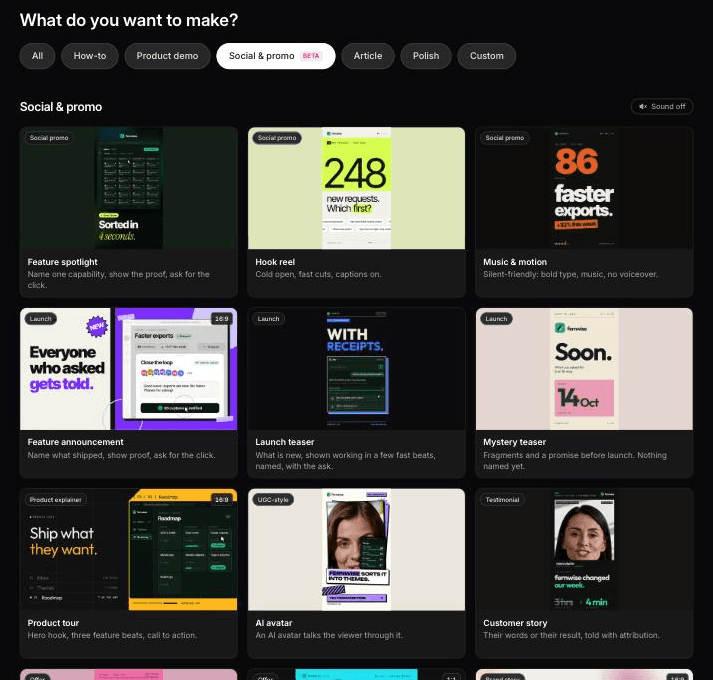
Clevera works as an AI ad creative generator for SaaS teams that already have a product page. Paste the link, and Clevera reads the page, pulls the product's facts, screenshots, media and logo, and builds a short motion-graphics clip with no footage needed. The Clevera for product marketing teams page shows where ad clips sit next to demos and launch content.
Pick the social & promo type that matches the job:
Feature spotlight: 1 feature, 1 outcome. A good default control.
Hook reel: built around the opening line.
Music & motion: no voiceover, for feeds where people scroll muted.
Offer promo: a discount or trial offer. If you don't give the offer, Clevera asks before generating.
AI avatar: an avatar you pick talks the viewer through the product, UGC-style.
Then build the matrix:
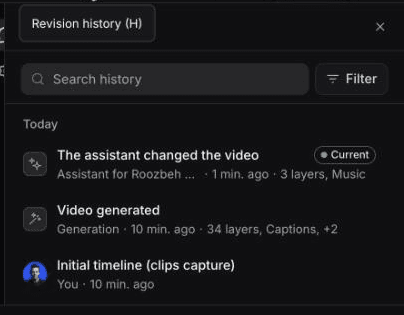
1. Make the control. Generate 1 clip from the link and settle what stays constant: the Look (pick one of the named styles rather than Automatic, so it can't change between variants), music, length and ratio. 2. Make each variant from the same link and change 1 thing with the AI assistant. Be explicit about what stays: "Replace only the opening line with 'Still exporting CSVs every Monday?'. Keep every other scene, the music, the visual style and the length the same." If the line is both spoken and on screen, say which to change: in our run, the Assistant changed only the voice-over. 3. Check the diff. Play A and B back to back. If a prompt changed more than you asked, revision history lets you preview and restore an earlier version. 4. Export the ratios you need. Social & promo clips come in 9:16, 4:5, 1:1, 16:9 and other sizes. Use the ratio slot in the file name.
For a bigger swing after an inconclusive round, swap the type: music & motion against an AI avatar carrying the same message. If narrated clips sound flat, see choosing an AI voiceover. For what happens after the click, see demo formats that convert.
Social & promo clips and the AI avatar are on paid plans, starting with Starter (see pricing). Generating a variant uses credits; rendering and exports don't.
What happened when we made a variant with the Assistant
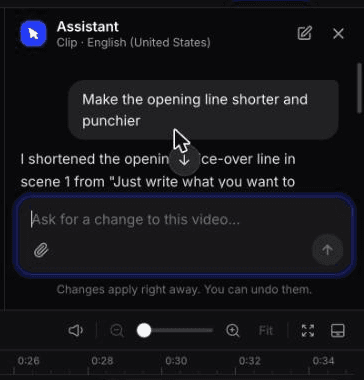
In October 2026 we made a 0:35 feature spotlight in 9:16 from the clevera.ai link, then used the Assistant to make a variant of the opening. The prompt: "Make the opening line shorter and punchier."
It changed the scene 1 voice-over from "Just write what you want to show." to "Just type what you want." in seconds, with Undo, for 4 credits (3 for the edit, 1 to re-record the voice-over). The on-screen text didn't change, and the Assistant said so. For a hook test that matters: if your hook is both spoken and on screen, a variant that changes only one of them is a weaker test than it looks. Name both in the prompt.
Revision history kept the control ("Video generated") and the variant ("The assistant changed the video") as separate versions, so you can preview either one before you export.
One more check before you spend budget: the control's first frame showed a leftover example from Clevera's showreel instead of the feature in the brief, and both arms would have carried it. Fix the control before you make variants, or the test measures the same mistake twice.
Where Clevera is not the right fit
If you run high-volume consumer DTC creative testing, with dozens of new ads a week across a product catalogue, Clevera isn't built for that. It has no bulk variant generation, ad launcher or ad performance tracking, so you'd make clips 1 at a time and manage tests in each ad platform. At that volume, use a performance-creative tool built for bulk generation and ad-account integration, or a creator platform if you need real people filmed with a physical product. Clevera fits the B2B case: a handful of deliberate variants per month, built from your own product page and UI.
Start with 1 hook test this month
Pick your best product page, make a feature spotlight from it, and write 2 opening lines that make different promises. Run them as a LinkedIn A/B test at $700 over 21 days, judged on CTR, and log it as T01. Whatever comes back, including "similar performance", tells you what T02 should be. For how ad clips fit with demos and launches, see the product marketing use case.