Best URL to video AI tools in 2026

The best URL to video AI tools in 2026 are Clevera for launch and promo videos built from your own site's screenshots and logo, Creatify for high-volume ad variants with AI actors, and Pictory for turning blog posts into stock-footage videos. Every tool here takes a link. What they do with it varies a lot: some show your product, some show stock clips, and some put an avatar in front of a picture of your homepage.
Quick picks
Tool | Best for | What's on screen | Free tier | Starting paid price |
|---|---|---|---|---|
Clevera | Launch teasers, product tours and feature spotlights for software | Your site's screenshots, images, logo and colours as motion graphics | No social clips on Free | $29/mo billed yearly |
Creatify | Many ad variants for Meta and TikTok | Product-page assets plus AI actors | 10 credits a month, watermarked | $12/mo billed yearly |
Pictory | Blog posts turned into narrated videos | Stock clips matched to the script | 14-day trial | $25/mo billed yearly |
HeyGen | Avatar-presented videos from a landing page | Page images plus an AI presenter | 3 videos a month, 1 min each | $29/mo (Creator) |
InVideo | Cinematic brand ads | Generative scenes and stock | None listed | $10/seat/mo billed yearly |
Fliki | Quick narrated videos from an article | Stock, AI images and images from the page | Yes, 720p, watermarked | £20/user/mo (UK page) |
URLmotion | A cheap animated explainer from a link | Animated scenes in your brand colours | 50 credits once, watermarked | $15/mo |
Motionflare | Motion graphics or AI live-action ads from a link | Motion graphics from your site, or generated film | 6 credits once, no export | $29/mo |
Prices come from each vendor's official pricing page, checked on 19 October 2026. Fliki showed us UK prices only, so we've quoted them as shown.
The one test: does your product show up?
Paste your URL into any of these tools and it reads the page. Then it fills the screen from 1 of 4 places:
1. Your site. Screenshots of your pages, your product images, your logo and colours. 2. An AI presenter. An avatar talks while your page images sit behind it. 3. A stock library. Clips matched to keywords in the script. 4. A generative model. Scenes invented from a prompt.
If you sell software, the people watching want to see the software. A video about your new reporting feature that shows a stock clip of a woman smiling at a laptop has used your link to write a script and then ignored it. So in every free trial, ask one question: when I paste my own URL, does my product appear on screen?
How we chose
We started from the tools ChatGPT and Gemini name when asked to make a product launch video from a website URL, then checked each vendor's own product and pricing pages. For each we looked at what it pulls from the page, what ends up on screen, how you edit, and the cheapest plan that exports without a watermark. One tool ChatGPT names, LaunchReel, isn't in the list: its site describes editing your recordings and building launch scenes from your code, not reading a website link.
The 8 best URL to video AI tools
1. Clevera

Best for: product marketing and founder-led teams at software companies who want launch and social videos that show the real product.
Paste your link on Clevera's URL to video page and an AI agent reads your site like a new visitor, up to 5 pages. Add a note if you want it to look somewhere specific, like a feature page or your pricing. It collects your product facts, desktop-size screenshots of each page, the pictures and videos already on your site, your logo, and your colours and fonts. The first research takes a few minutes and you can reuse it for later videos.
Then you pick what to make. The types in Clevera's AI promo video maker map to real launch jobs: product tour, feature spotlight, feature announcement, launch teaser, hook reel, offer and event promos, customer story, and an AI avatar video where you choose the presenter and how long they're on screen. Clevera writes the script, builds each scene as motion graphics with your screenshots and logo, adds a voiceover if the type has one, and picks music and sound effects. If a type needs a fact you didn't give, like the discount in an offer promo, it asks instead of making one up.
Formats cover 9:16, 4:5, 1:1 and 16:9, plus other sizes, at lengths of about 35 seconds, 60 seconds or 2 minutes. To change something, you ask the clip assistant ("make the opening line shorter") and it applies the edit with undo and a revision history.
Two things matter if you're a software team. Pages behind a login aren't on your public site, so for those Clevera's AI recorder can capture your web app from a written instruction instead. And the same workspace makes the narrated product demo and help article for the launch, from the same material.
What's on screen: your site. Screenshots, images, logo and colours, built into motion-graphic scenes.
Pricing: social & promo videos are on paid plans. Starter is $29/month billed yearly ($36 monthly) with 900 credits; Clevera's pricing page estimates that covers about 15 to 30 medium-effort social clips a month. Pro is $86.80/month billed yearly for 2 creators, with 4,000 shared credits and 4K export. The Free plan doesn't include social clips.
2. Creatify
Best for: performance marketers testing many avatar ad variants on paid social.
Creatify's URL to video analyses a product page, writes the ad script and pairs it with one of 1,000+ AI avatars. It lists Amazon, Etsy, Shopify, the App Store and Google Play among the links it reads, which tells you who it's built for: products with a product page and photos.
What's on screen: product-page assets plus AI actors.
Pricing: per the pricing page, Free gives 10 credits a month for up to 2 watermarked video ads. Standard is $15/month billed monthly or $12/month billed yearly with 55 credits; Pro is $55/month monthly or $44/month yearly.
3. Pictory
Best for: content teams turning blog posts and articles into narrated videos.
Pictory's URL to video reads a public page, writes a script you can edit first, then builds scenes from a library of 18M+ stock clips and images. You can swap any scene for your own upload.
What's on screen: stock by default.
Pricing: per the pricing page, there's a 14-day trial. Starter is $25/month billed yearly ($29 monthly).
4. HeyGen
Best for: avatar-presented videos made from a landing page or case study.
HeyGen's URL to video extracts headlines, copy and images from a page and writes a scene-by-scene script you can edit, with an AI presenter on each scene and your brand kit applied. HeyGen notes that pages behind a login or built as single-page apps often need extra input.
What's on screen: images from your public page plus an avatar.
Pricing: per the pricing page, Free gives 3 videos a month up to 1 minute. Creator is $29/month with 600 credits.
5. InVideo
Best for: mood-led brand ads where the product isn't a screen.
InVideo's agent reads a product URL, writes a brand read, a brief and a shot list, then generates scenes with video models or premium stock. Its own guidance on product-page ads suggests uploading product images and brand PDFs because a URL alone may not cover everything.
What's on screen: generated scenes and stock. Your interface appears only if you upload it.
Pricing: per the pricing page, Starter is $10/seat/month billed yearly ($20 monthly) with 400 credits. We didn't see a free plan listed.
6. Fliki
Best for: fast narrated videos from an article, with a large voice library.
Fliki's blog to video workflow narrates an article from its URL, and a "fetch images from article" option adds the page's own images to your media library. The rest comes from stock, AI images or AI clips, with an optional avatar.
What's on screen: a mix of your page images, stock and AI visuals.
Pricing: the pricing page showed us UK prices: Free is £0 with 720p exports and a watermark; Standard is £20 per user per month on monthly billing, with yearly 25% off.
7. URLmotion
Best for: a low-cost animated explainer from a public link.
URLmotion turns a public URL into a branded animated explainer of about 60 seconds, with voiceover, captions and music, and has a scene editor in the browser. It's a new product, listed publicly in July 2026, with few independent reviews so far.
What's on screen: animated scenes in your brand colours. Its site doesn't mention using screenshots of your pages.
Pricing: per the pricing page, Free gives 50 credits once with a watermark at 720p. Starter is $15/month with 200 credits; yearly billing is 20% off.
8. Motionflare
Best for: teams that want either a motion-graphics video or an AI live-action ad from one link.
Motionflare reads your site's logo, colours, copy and screenshots and builds a motion-graphics video, or switches to a Film mode that generates live-action commercial shots. You edit by chat, and each edit uses credits. We couldn't find independent reviews yet.
What's on screen: motion graphics from your site, or generated film.
Pricing: per Motionflare's site, the free tier gives 6 credits once and doesn't allow export. Pro is $29/month with 100 credits; credit packs start at $15 for 40.
Where Clevera is not the right fit
Clevera is built for software teams that want their product on screen. It's the wrong pick when:
You need a free video today. Clevera's social and promo videos need a paid plan. Creatify, HeyGen and URLmotion all let you make a watermarked one for free.
You sell physical products and need ad volume. Creatify reads Amazon and Shopify listings and is built for dozens of avatar variants a week.
You want stock or cinematic footage. If the video should show people, places and moods, Pictory's stock library or InVideo's generative models give you that. Clevera has no stock library.
Every video is a talking avatar. Clevera has an AI avatar type, but HeyGen goes deeper on avatars, voice cloning and lip sync.
What happened when we pasted our own homepage
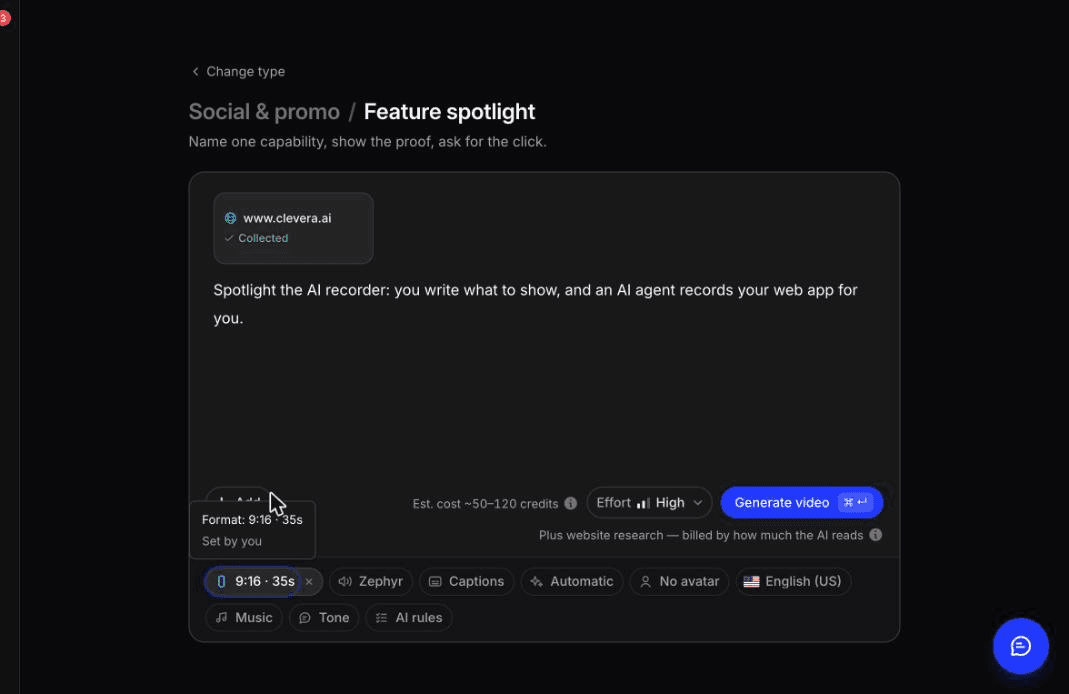
In October 2026 we ran Clevera on clevera.ai. The research step read 2 pages and pulled 6 screenshots, about 39 pictures and 4 videos in about 3 minutes. From that we made a 35-second 9:16 feature spotlight with a one-line brief. It took about 7.4 minutes and cost 96 credits, including the research and 1 edit.
The structure was tight and every scene used our real brand and interface imagery. We asked the assistant to make the opening line shorter, and it rewrote the voiceover line within seconds while telling us it had left the on-screen text alone. The honest part: one scene reused an unrelated example video it had found on our site, and an avatar video from the same research put a "Trusted by 3,000+ companies" line on its closing frame that we never wrote. Whatever tool you use, check every scene and every claim before you post.
A 15-minute test before you buy
1. Paste a feature page, not your homepage. Pick one with a real screenshot of the feature. 2. Count the scenes that show your product. Fewer than half means you'll replace scenes by hand every launch. 3. Ask for one change in plain words. See whether the tool does it or sends you to a timeline. 4. Export 9:16 and 16:9. Check that your interface is still readable on a phone. 5. Price your real volume. Work out how many videos a month the credits buy at the quality you'll use.
For more on what goes into the video itself, see how to make a product launch video and our comparison of the best AI promo video makers.
Your website already has the footage
Your site has your screenshots, your copy and your brand. A good URL to video tool should use them, not replace them with stock. Run the test above on 2 or 3 tools with the same link. If you want to see a launch video built from your own pages, paste your site into Clevera.

