Best AI screen recorders in 2026, compared

The best AI screen recorders in 2026 are Clevera for teams that want AI to record, narrate and edit product videos, Screen Studio for polished Mac demos in your own voice, and Loom for quick async messages. The right pick depends on which job you want the AI to take off your hands.
Tool | Best for | Starting paid price |
|---|---|---|
Clevera | AI that records web apps, writes the voiceover and polishes the edit, plus articles | $29/mo billed yearly |
Clueso | Narrated product videos and docs, with an agent that can record | $40/mo billed yearly |
Screen Studio | Polished Mac demos with auto zoom | $9/mo billed yearly |
Loom | Async video messages and AI summaries | $15/user/mo billed yearly |
Descript | Editing video by editing the transcript | $16/person/mo billed yearly |
Guidde | Step-by-step browser guides | $19/creator/mo billed yearly |
Trupeer | Short narrated walkthroughs plus written guides | $40/mo billed yearly |
Tella | On-camera demos and course videos | $13/user/mo billed yearly |
ScreenPal | AI captions and text-to-speech on a small budget | $4/mo billed yearly |
Prices are from each vendor's official pricing page, checked on 12 October 2026.
Three kinds of "AI screen recorder"
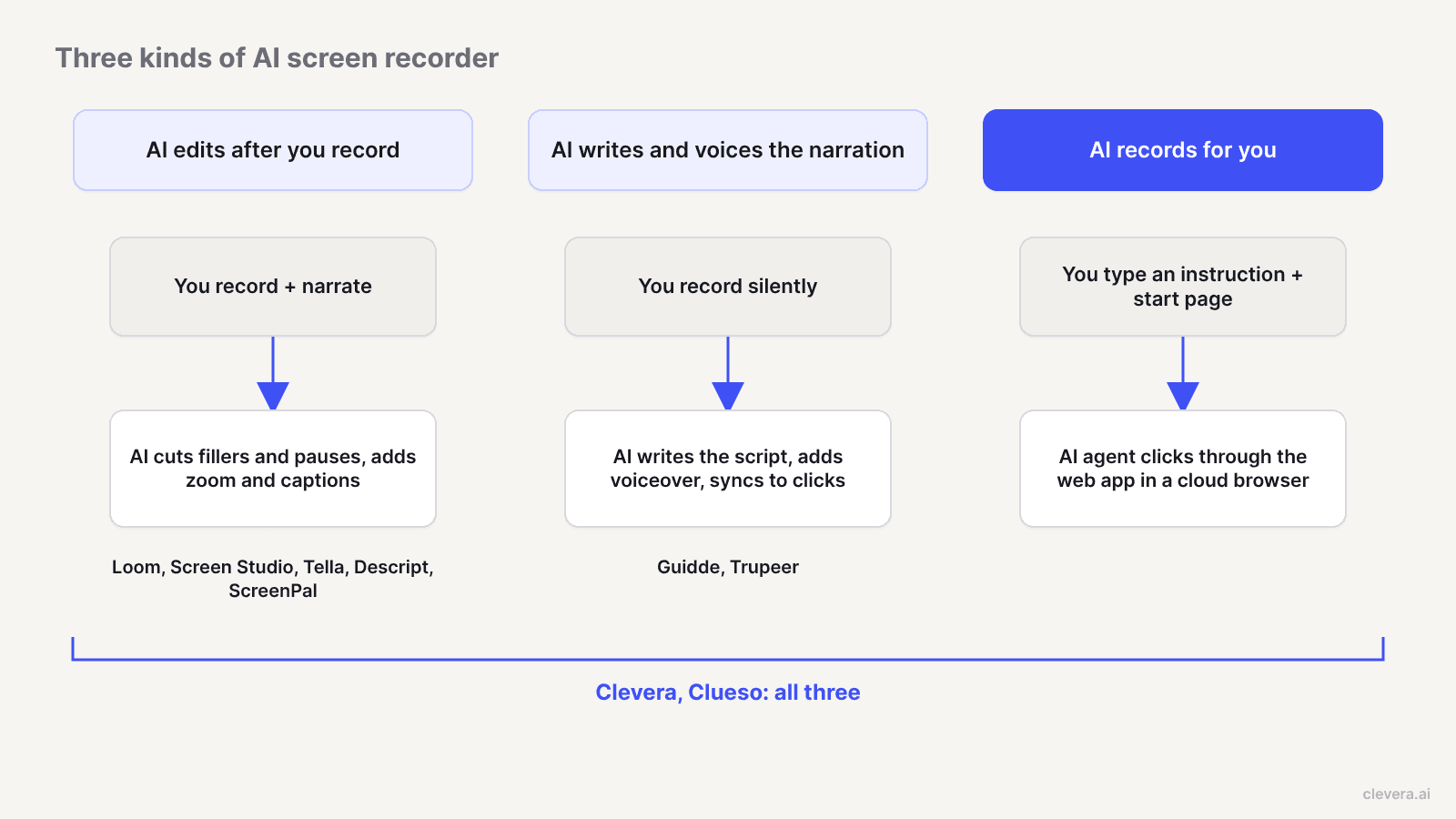
Vendors use the same label for 3 different things, and mixing them up is how teams end up paying for the wrong one.
1. AI that edits after you record. You record yourself, talking as you go. The AI cuts filler words and long pauses, zooms in where you clicked, smooths the cursor and writes titles or captions. Loom, Screen Studio, Tella and Descript live here. You still need a clean take and a confident voice.
2. AI that writes and voices the narration. You record silently. The AI works out what happened on screen, writes a script and reads it with a synthetic voice, synced to your clicks. Guidde, Trupeer, Clueso and Clevera do this. Screen Studio, Descript and ScreenPal can voice a script, but you write it.
3. AI that does the recording for you. You type an instruction and a start page. An AI agent opens the web app in a browser, clicks through the flow and captures it. Only 2 tools on this list do this today: Clevera and Clueso.
Each kind removes a different bottleneck. Kind 1 saves editing time. Kind 2 removes the microphone. Kind 3 removes the recording session itself, which matters most when you're refreshing 30 help videos after a UI release.
How we chose
We looked for tools where AI does real work on a screen recording, then checked each one's official site and pricing page for 5 things:
Auto-editing: filler and silence removal, auto zoom, cursor smoothing.
AI narration: does it write the script, or only read one you wrote?
AI recording: can an agent capture the flow without you at the keyboard?
Outputs: video only, or also written guides and articles?
Free plan: what you can do before paying.
Tools that only add AI captions to a classic recorder were left out unless they serve a clear budget need. For general recorders without much AI, see our best screen recording tools roundup.
The 9 best AI screen recorders in 2026
1. Clevera
Best for: product, support and marketing teams who want the whole video made for them, from capture to narrated output.
Clevera is the only tool here that covers all 3 kinds with both a full-OS recorder and an AI recording agent. You pick how to capture:
Desktop app (macOS and Windows) for anything on your computer, including desktop software, with optional mic and camera.
Chrome extension for web-only flows without an install.
AI recorder for web apps: describe what to show, give a start page, and an agent records it in a cloud browser. Sign-in can be skipped, supplied as a login, or typed by you. You can take over the browser mid-recording and hand it back. It's read-only unless you allow it to create or edit things.
Upload of footage from Loom, OBS, QuickTime or anything else.
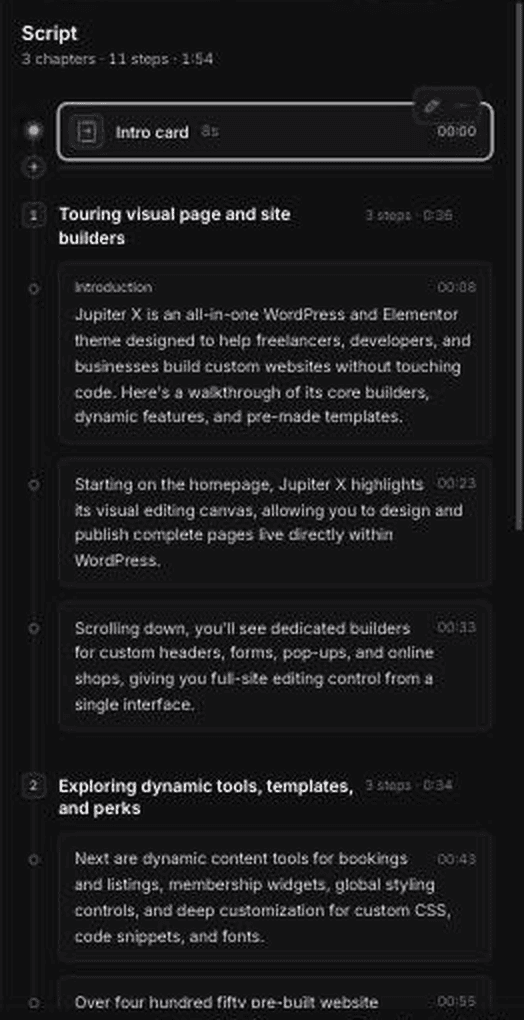
Then the AI takes over the editing and narration. For a how-to video or product demo, it removes accidental clicks and pauses, analyses what happened on screen, writes a script, records a synthetic voiceover and adjusts timing so the narration lands on the right click. It also smooths the cursor, highlights interactions and adds smart zoom. You never have to speak. If you'd rather keep your own voice, the cleaned-up option removes filler words, repeated words and dead time, and styled adds backgrounds, padding, zooms and branding. Styled videos use no AI credits, so they're unlimited on every plan, Free included.
The same recording can also become a written how-to article, SOP or troubleshooting guide, and a social clip such as a feature spotlight or launch teaser. Videos and articles translate into 74 languages. See how the AI tutorial maker turns one capture into a narrated how-to.
Pricing (clevera.ai/pricing): Free plan with 100 credits a month, videos up to 3 minutes and watermarked 1080p exports. Starter is $29/month billed yearly or $36 monthly, with 900 credits and unlimited exports up to 2K. Pro is $86.80/month billed yearly or $124 monthly for 2 creators, with 4,000 credits, 4K and publishing integrations. AI recording uses credits based on how long the agent works.
Limits: the AI recorder works on websites and web apps only. For desktop software, you record with the desktop app yourself. Published videos update on hosted links and embeds when you edit narration or overlays, but Clevera can't change the footage itself when your UI changes. You re-record, which the AI recorder makes quick for web apps.
2. Clueso
Best for: teams that want AI narration and docs, and are fine budgeting around export minutes.
Clueso is the other tool on this list that does all 3 kinds. You record with its browser extension or upload footage, and Clueso rewrites the script, adds an AI voiceover, applies zooms and spotlights and generates a step-by-step guide. The Clueso Agent can also navigate your product and record a walkthrough from a description, according to Clueso's homepage. Inputs also include PowerPoint, PDF and prompts.
Pricing (clueso.io/pricing): Free with 10 minutes of video exports a month at 1080p. Solo is $40/month billed yearly for 1 user, 3 hours of video exports a year and 180 articles a year, up to 2K. Business is $120/month billed yearly for 2 users and 6 hours of exports a year, up to 4K. Voice cloning is Enterprise only.
Compared with Clevera: both cover recording, narration and editing. The practical difference is the meter: Clueso caps finished video minutes per year, while Clevera's paid plans have unlimited exports and meter AI generation through credits. Clueso's pricing page lists capture by browser extension and upload, so for a desktop app you'd record elsewhere. Our Clevera vs Clueso page goes deeper.
3. Screen Studio
Best for: Mac users making polished launch clips and demos in their own voice.
Screen Studio records your screen without the cursor, logs mouse movement separately, and rebuilds the cursor afterwards. That's why its auto zoom and smooth cursor look so clean. It zooms in where you clicked, adds motion blur and click effects, and re-aims zooms when you switch between 16:9, 1:1 and 9:16. Version 4 adds edit-by-transcript, one-pass removal of filler words and pauses, local noise reduction and on-device captions. There's also an AI voiceover, but it reads a script you type rather than writing one.
Pricing (screen.studio): every feature on every plan. $9/month billed yearly or $29 monthly. 40% off for students and educators.
Limits: macOS only, and the FAQ says there are no near-future plans for Windows. No article output and no AI recording.
4. Loom
Best for: async video messages, bug reports and meeting recaps.
Loom is a kind-1 tool. You record screen and camera, talk as you go and share a link. On Business + AI, Loom adds auto titles, summaries, chapters, filler word and silence removal, edit-by-transcript, and workflows that turn a video into a doc, a Jira or Linear issue, or a message. Transcriptions cover 50+ languages on every plan.
Pricing (loom.com/pricing): Starter is free with 25 videos per person and 5-minute recordings at 720p. Business is $18/user/month monthly ($180/year). Business + AI is $24/user/month monthly ($240/year).
Limits: you narrate live; Loom lists AI voices as "coming soon" on its AI page. It's built for messages to teammates, not a narrated tutorial library. Comparing the two directly? See Clevera vs Loom.
5. Descript
Best for: creators who edit podcasts, talking-head video and screen recordings in one place.
Descript includes a screen recorder, but its real strength is editing. It transcribes your recording and you cut video by deleting words. Underlord, its AI co-editor, removes filler words, shortens gaps, removes retakes and can draft scripts. AI Speech offers stock voices and custom voice clones, so you can fix a fluffed line by typing it.
Pricing (descript.com/pricing): Free with 60 media minutes a month and 100 one-time AI credits. Hobbyist is $16/person/month billed yearly or $24 monthly, with 10 media hours and 1080p export. Creator is $24 yearly or $35 monthly with 4K. Business is $50 yearly or $65 monthly and adds translation and dubbing in 30+ languages.
Limits: it's still an editing session, metered by media hours and AI credits. Transcription covers 25 languages.
6. Guidde
Best for: step-by-step how-to guides for web apps, built in the browser.
Guidde captures a workflow with its browser extension and builds a step video with an AI script, highlights and captions, plus a written guide. It's a strong kind-2 tool for help-center content.
Pricing (guidde.com/pricing): Free for up to 25 how-to videos on web apps, with your own recorded voiceover. Pro is $19/creator/month billed yearly ($29 monthly). Business is $39/creator/month yearly ($59 monthly) and adds unlimited AI text-to-voice and desktop app capture. Multi-language translation is Enterprise.
Limits: unlimited AI voice and desktop capture start on Business, the tier most teams end up on. No AI recording agent.
7. Trupeer
Best for: short browser recordings turned into narrated videos and written guides.
Trupeer takes a raw capture from its browser extension or an upload, polishes the script, adds an AI voiceover, auto zoom and annotations, and generates a step-by-step document. Enterprise adds custom voice and avatar clones.
Pricing (trupeer.ai/pricing): a free tier with 1,000 AI credits and 5-minute recordings, listed as free for 10 days. Pro is $40/month billed yearly or $49 monthly, with 10-minute recordings and 1 seat. Scale is $199/month yearly or $249 monthly for 3 seats and 15-minute recordings, with translation.
Limits: recording length caps of 5, 10 and 15 minutes below Enterprise. No AI recording agent.
8. Tella
Best for: founders and educators who present on camera.
Tella records screen and camera from native macOS and Windows apps or a Chrome extension, with a teleprompter. Its AI side is cleanup: a mistakes finder, silence and filler word removal, auto layouts, auto zoom, AI audio enhancement, and AI-generated titles and chapters. It can also generate a doc from a video. Transcription covers 106 languages.
Pricing (tella.com/pricing): Pro is $13/user/month billed yearly. Premium is $19/user/month billed yearly and adds a custom domain, 60fps export and branding removal.
Limits: you narrate. No AI voiceover or AI recording.
9. ScreenPal
Best for: teachers and budget-conscious teams.
ScreenPal (formerly Screencast-O-Matic) is a classic recorder and editor with AI on top. The Max plan adds auto titles and summaries, text-based editing, filler word removal, silence detection and AI text-to-speech narration from your script.
Pricing (screenpal.com/plans): Free with a 15-minute recording limit and 10 hosted videos. Deluxe is $4/month paid yearly. Max is $10/month paid yearly. Team Business is $8/user/month for 3+ users.
Limits: the AI reads your script; it doesn't write narration from your actions.
Which kind of AI each tool covers
Tool | Edits after you record | Writes and voices narration | Records for you | Free plan |
|---|---|---|---|---|
Clevera | Yes | Yes | Yes (web apps) | Yes, 100 credits/mo |
Clueso | Yes | Yes | Yes | Yes, 10 export min/mo |
Screen Studio | Yes | Voices your script | No | No |
Loom | Yes (Business + AI) | No | No | Yes, 25 videos |
Descript | Yes | Voices your script, AI can draft | No | Yes, 60 media min/mo |
Guidde | Partial | Yes | No | Yes, 25 videos |
Trupeer | Yes | Yes | No | Free tier, 10 days |
Tella | Yes | No | No | No |
ScreenPal | Yes (Max) | Voices your script | No | Yes, 15-min limit |
What happened when we let the AI recorder do it
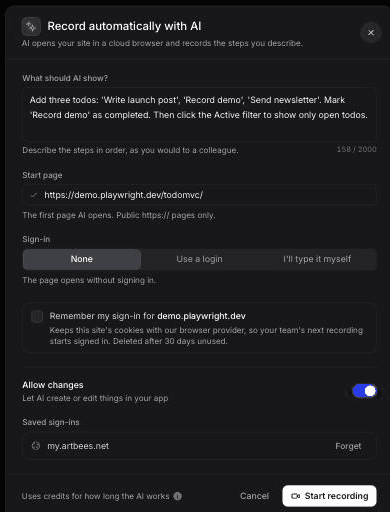
In October 2026 we gave Clevera's AI recorder a public demo app (TodoMVC) and one instruction: "Add three todos: 'Write launch post', 'Record demo', 'Send newsletter'. Mark 'Record demo' as completed. Then click the Active filter to show only open todos." Sign-in was set to None, and we switched Allow changes on because adding todos is a write.
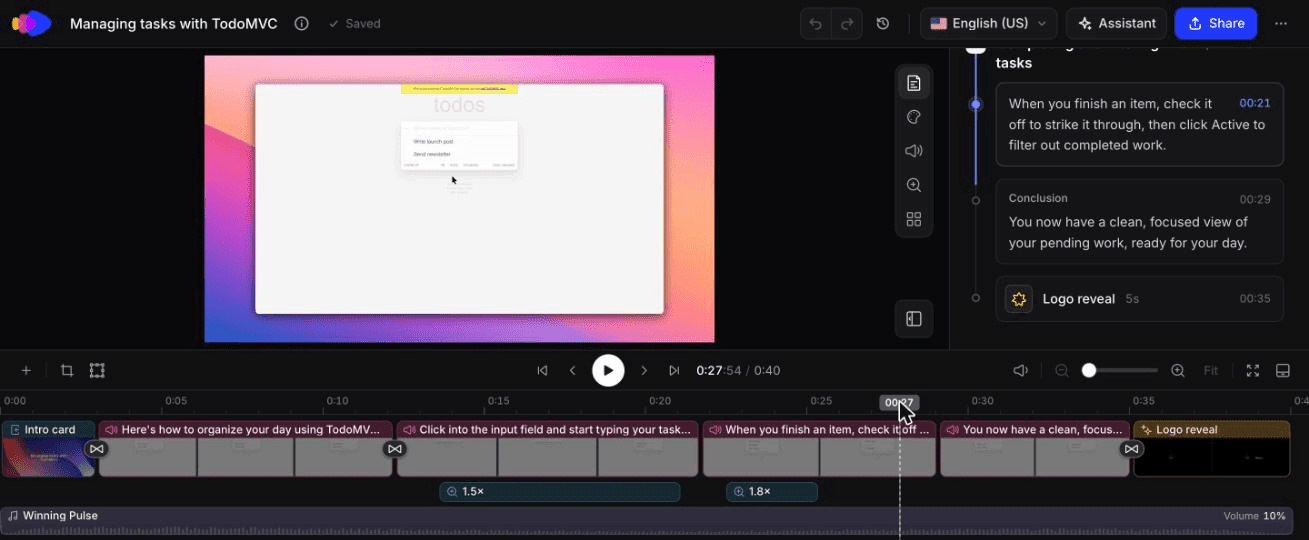
The 0:40 how-to video Clevera made from that AI recording, unedited.
The agent followed the instruction exactly. We didn't see a retry or a wrong click. The run took about 78 seconds and left 58 seconds of footage for a task a person does in about 20, because the agent pauses between steps. Clevera cut that to a 0:40 how-to video with 2 chapters, 6 steps, an AI-written script and 2 auto zooms. Generation took about 50 seconds. The whole thing cost 9 credits: 5 for the recording analysis and 4 for the how-to.
What wasn't perfect: the recorded page looks faded and low-contrast in the footage, so check a light-themed app closely before it goes on a help page. We then ran Styled for sharing on the same recording with our team template. It was ready in about 25 seconds and used 0 credits.
The 1:07 Styled for sharing version of the same recording, unedited, 0 credits.
Where Clevera is not the right fit
Clevera is built to make product videos and docs. That leaves some jobs where another tool here wins:
Async messages to your team. For a 2-minute "here's the bug" video or a meeting recap, Loom is faster and your teammates probably already have it.
A Mac-native, offline workflow in your own voice. Screen Studio processes everything on your Mac and has the best cursor and zoom polish in this list. If you love narrating and never need an article, it's the cleaner choice.
Podcast and interview editing. Descript is a full creative editor with multitrack audio, Rooms and eye contact correction. Clevera isn't trying to be that.
AI recording of desktop software. Clevera's AI recorder works on websites and web apps in a cloud browser. For a desktop app, you record with the Clevera desktop app yourself, and the AI handles narration and editing afterwards.
A $4 budget. If you need captions and a recorder for classroom videos, ScreenPal costs less than any AI-first tool.
How to pick in 2 minutes
Start with the bottleneck you feel most:
"Editing takes longer than recording." Pick a kind-1 tool: Screen Studio on Mac, Tella if you're on camera, Descript if you edit audio too.
"Nobody on the team wants to narrate." Pick a kind-2 tool. Check which plan includes unlimited AI voice, because on Guidde that's Business.
"We have 40 videos to redo after every release." Pick a kind-3 tool. An agent that records the web app from an instruction removes the slowest step. Clevera and Clueso both do it; compare how each meters usage before committing.
If you want to see kind 2 and 3 together on your own product, start with the free plan and record one help-center flow. More on how AI narration works is in our guide to the AI voiceover tool.
FAQ
What are the best AI screen recorder tools in 2026?
Clevera is the best all-round pick because it records, narrates and edits, including an AI agent that records web apps for you. Clueso also covers all three. Screen Studio is the best Mac recorder for polished demos in your own voice, Loom is best for async messages, and Descript is best if you edit by transcript.
Is there a free AI screen recorder?
Yes. Clevera, Clueso, Loom, Descript, Guidde and ScreenPal all have free plans. Limits differ: Loom caps recordings at 5 minutes, Clevera caps videos at 3 minutes with watermarked 1080p exports, and Clueso caps exports at 10 minutes a month. Clevera's styled videos use no credits, so styling is unlimited on Free.
Can AI record my screen for me?
For web apps, yes. Clevera's AI recorder and the Clueso Agent both take a written instruction and navigate the product to capture the flow. Clevera's agent is read-only by default and lets you take over the browser mid-recording. What to check before any agent logs in is in AI screen recording agent security.
Which AI screen recorder writes the voiceover for me?
Clevera, Clueso, Guidde and Trupeer write the script from your on-screen actions and voice it with AI. Screen Studio, Descript and ScreenPal can generate a voice from text, but you write the script.
Do AI screen recorders work on Windows?
Most do. Clevera and Tella have native Windows apps, and Guidde, Trupeer and Clueso record through a browser extension. Screen Studio is Mac only.
