How to make a video with Claude or ChatGPT (MCP setup)

Claude and ChatGPT can't render a narrated product video on their own. They can ask a tool that does. If you want to make a video with Claude, you connect it to a video tool's MCP server, and the agent requests the video for you.
This guide shows the exact setup for Clevera's MCP server in Claude, ChatGPT, Claude Code and Cursor, then what happens when you ask for a how-to video: the quote, the approval, the job and the link.
Before you start: plan and recording
Two things have to be true first.
Your workspace is on Pro or up. AI agents & API is a Pro feature. That includes the Claude and ChatGPT connectors and API tokens. Pro is $86.80 a month billed yearly ($124 monthly) for 2 creators, with 4,000 shared credits a month. On Free and Starter the connector is locked. See pricing.
The recording is already in your library. An agent makes a video from a recording you have. It can't record your screen or your website for you. Get the recording in first, any of these ways:
Record with the Clevera desktop app (Mac or Windows). It captures clicks and cursor moves, which is what drives the automatic zooms.
Record a web flow with the Chrome extension.
Upload an MP4 you made with another tool.
Use Record with AI in the Clevera app: describe the steps and it records your site in a cloud browser.
Every recording lands in Content › Recordings, and that's where the agent finds it.
Step 1: Connect Claude
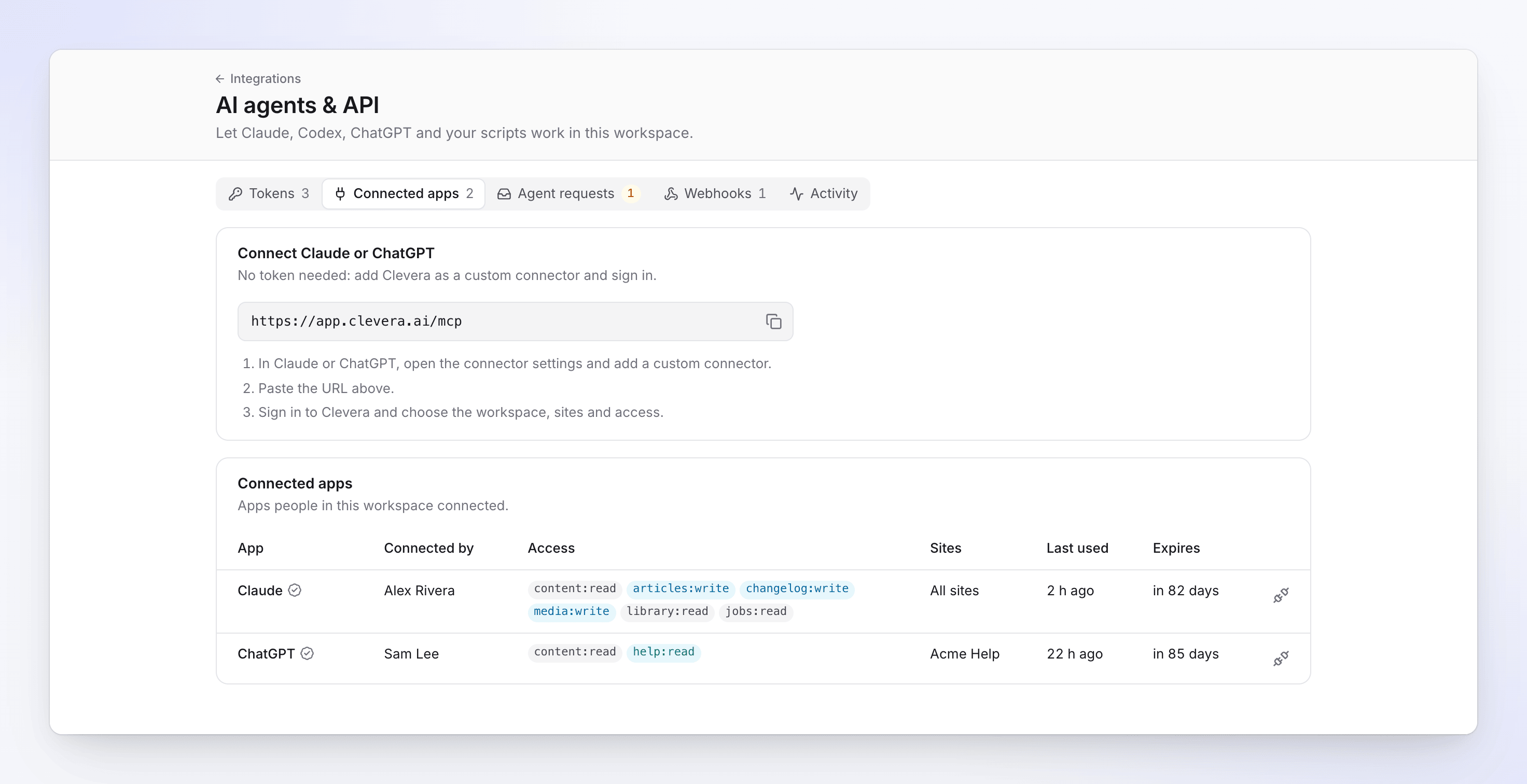
Claude connects without a token. You add Clevera as a custom connector and sign in.
1. In Clevera, open the workspace menu, choose AI agents & API, then the Connected apps tab. Copy the connector URL: `https://app.clevera.ai/mcp`. 2. In Claude, go to Customize › Connectors, click + Add, then Add custom connector. 3. Enter a name (Clevera), paste the URL and click Continue. Keep the detected sign-in settings, click Continue again, then Add. 4. Claude sends you to Clevera's connect screen. Pick the workspace, the access (a preset or custom permissions) and how long the connection lasts (30 or 90 days). Click Allow access. 5. In a chat, click + at the lower left, open Connectors and make sure Clevera is on.
On Claude Team or Enterprise, an owner adds the connector first in Organization settings › Connectors (Add, then Custom, then Web). Each member then finds it under Customize › Connectors and clicks Connect. Steps from Anthropic's custom connector guide.
Step 1 (ChatGPT): add a custom MCP server
ChatGPT also connects with a sign-in, no token. OpenAI moved this into Plugins, and you no longer turn on developer mode first.
1. In ChatGPT on the web, open Plugins, click the plus button, then Add custom MCP server. 2. Enter a name and, if you like, a description. 3. Under Connection, paste `https://app.clevera.ai/mcp`, and choose OAuth for authentication. 4. Read the risk warning, tick I understand and want to continue, and click Create as a plugin. 5. Install the plugin. When Clevera's connect screen opens, sign in and click Allow access. 6. Start a new chat, type @ and pick the Clevera plugin.
OpenAI's help article lists custom MCP servers for ChatGPT Business, Enterprise and Edu on the web. On Business, only admins and owners can add one; on Enterprise and Edu, admins can let other members do it. It doesn't work on mobile. If you're on a personal plan and don't see Add custom MCP server under Plugins, use Claude or a coding agent instead.
Step 1 (Claude Code or Cursor): use an API token
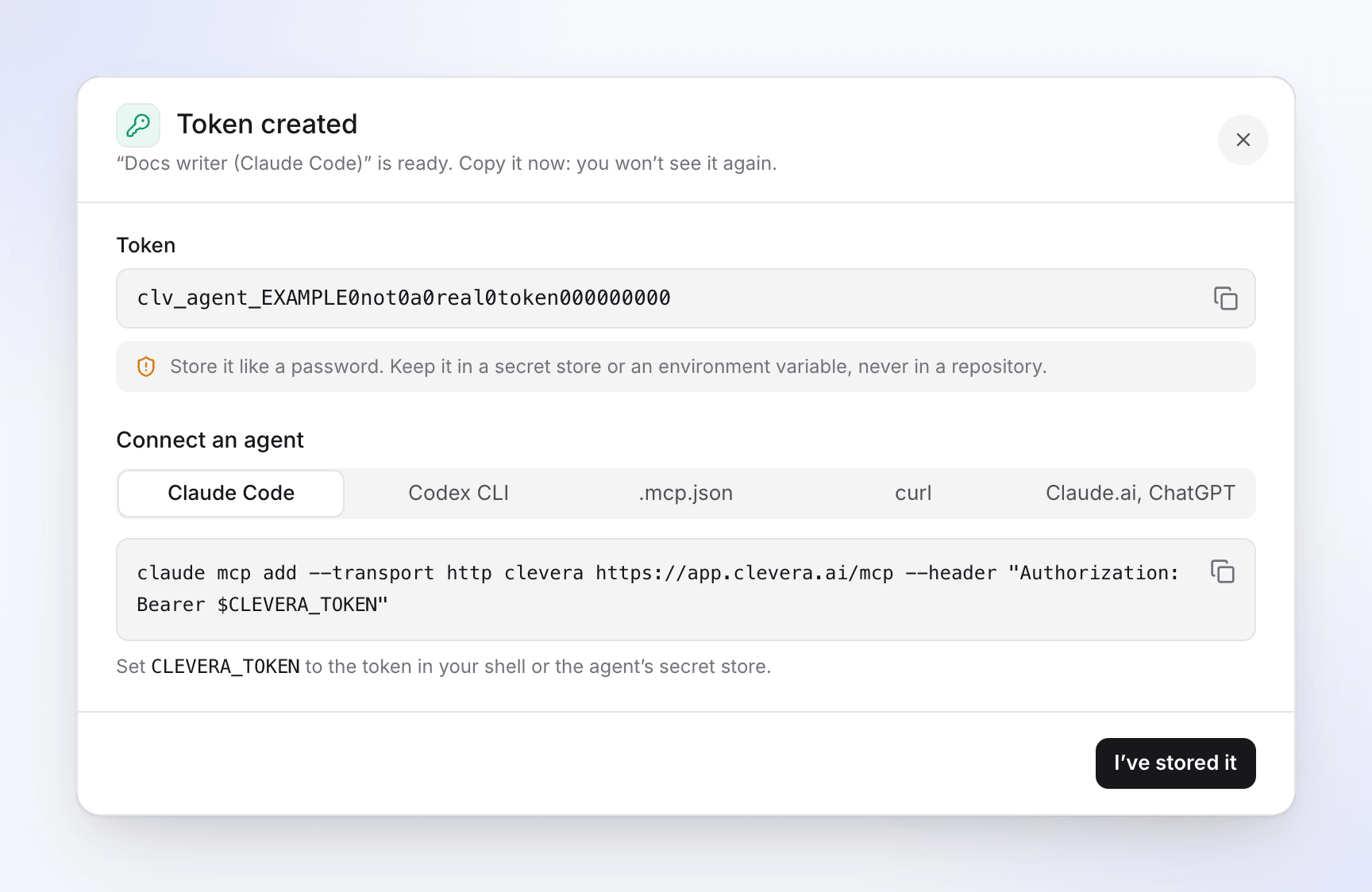
Coding agents connect with an API token.
1. In AI agents & API, open Tokens and click New token. 2. Name it ("Videos (Claude Code)") and pick the Producer preset. It can request videos and spend credits within caps. 3. On Limits, set the caps per job, day and month, and the Approve automatically below line. Start at 0, so a person approves every paid start. 4. Click Create token and copy it. Clevera shows it once. Put it in an environment variable called `CLEVERA_TOKEN`, never in a repo.
For Claude Code, run:
```bash claude mcp add --transport http clevera https://app.clevera.ai/mcp --header "Authorization: Bearer $CLEVERA_TOKEN" ```
Then type `/mcp` in Claude Code to check it's connected. More options are in Claude Code's MCP docs.
For Cursor, add this to `~/.cursor/mcp.json` (or `.cursor/mcp.json` in a project). Cursor reads environment variables as `${env:NAME}`, per Cursor's MCP docs:
```json { "mcpServers": { "clevera": { "url": "https://app.clevera.ai/mcp", "headers": { "Authorization": "Bearer ${env:CLEVERA_TOKEN}" } } } } ```
Cursor can also sign in to Clevera without a token: add the URL with no header and sign in when Cursor asks.
To test any setup, ask the agent to list your Clevera recordings. A short or empty tool list usually means the token doesn't have the permissions for the job.
Step 2: Ask for the how-to video
Name the recording and the kind of video. For example:
> "Find my most recent Clevera recording about exporting invoices and make a how-to video from it, a troubleshooting guide, formal voice. Tell me the cost before you start."
Here's what happens next:
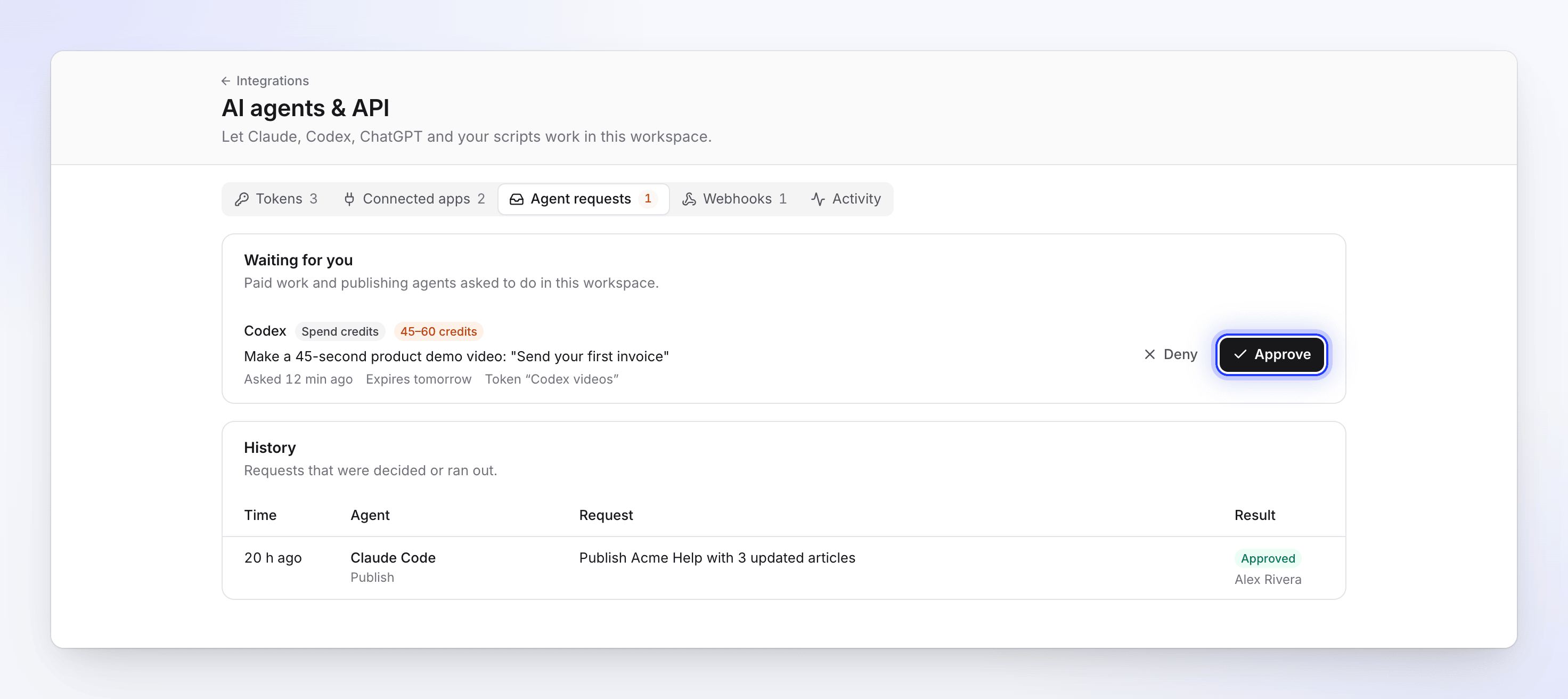
1. It finds the recording. The agent lists your recordings and picks the one that matches. 2. It gets a quote. Quotes are free and give a credit range, such as 5 to 25 credits for a how-to video from a recording of up to 5 minutes. A quote is valid for 15 minutes and works once. 3. It starts the job, or asks you. From Claude or ChatGPT, every paid start waits for a person, because connected apps have no spend caps of their own. With a token, the job starts on its own only if the quote is below your Approve automatically below line and fits your caps. 4. You approve. The workspace owner or an admin gets a notification and clicks Approve on Agent requests. A request expires after 24 hours. 5. It waits and sends the link. Clevera's own AI writes the narration, cuts dead time and zooms in on your clicks, which takes a few minutes. The agent then gives you the link to the new video in Clevera, where you can edit any line.
Prefer a sales-style walkthrough? Ask for a product demo instead. The same flow works for articles from a recording and for translations. Our guide to how to create a tutorial video covers what makes the recording itself good.
Step 3: Get the video where people will watch it
MP4: ask the agent to export it. Exports cost no credits, and you get a download link valid for 7 days. MP4 export is on paid plans, so it's available on Pro.
Link or embed: the agent can hand you the share link and embed code once sharing is on. It never turns sharing on itself, so a teammate switches it on in the app.
Help center: ask for an article from the same recording, with the video inside it. On a Clevera help center, the agent can draft the page. It goes live when a person publishes it, or a token you gave publishing rights does.
When your product changes, the same setup helps you update tutorial videos after a UI change: record the new flow and ask the agent again.
What the agent can't do
Agents can't record your screen, run website research, or post to social channels. They act as the person who connected them, never with more access than that person's role allows, and everything they do shows on the Activity tab.
FAQ
How much does it cost to make a video with Claude this way? The MCP calls are free: listing, quoting and checking a job cost no credits, and so do exports. The video itself costs the same credits as in the app. A how-to video from a recording of up to 5 minutes usually costs 5 to 25 credits.
Which plan do I need? Pro or up. That covers the Claude and ChatGPT connectors, API tokens and webhooks. Claude itself lets Free users add one custom connector, and Pro, Max, Team and Enterprise users add more.
Can the agent publish to my help center? Yes, to a Clevera doc site. It drafts pages, and publishing needs a person or a token with publishing rights. See the MCP server page for what agents can do there.
Is it safe? Can an agent spend all my credits? No. Every paid start is quoted first. Tokens have caps per job, day and month, and anything above your line waits for an owner or admin. Connected Claude and ChatGPT apps ask every time. Tokens always expire, and one found in a public GitHub repo is revoked automatically.
Does it work with ChatGPT Plus? OpenAI documents custom MCP servers for Business, Enterprise and Edu workspaces. On a personal plan, check whether Add custom MCP server shows under Plugins.
Start with one recording
The setup takes about five minutes. After that, the only real work is recording a clean flow. Record one, connect your agent, and ask it for the video. See what else agents can do with the Clevera MCP server → or browse all Clevera integrations.
