Automate product demo creation with AI
A polished product demo used to require a script, a recording session, a video editor, and a few rounds of review. Smaller teams either skipped the demo or shipped something rough. Larger teams had a backlog. Either way, the demo rarely kept up with the product.
AI changes this. You can now automate product demo creation from a screen recording: capture the workflow, let the AI handle the script, narration, and editing, and have a publish-ready demo in minutes. Here's how it works and what it means for product and sales teams.
Why product demo creation is a bottleneck
Creating a compelling product demo involves more work than it appears from the outside:
Scripting: a good demo explains what's happening and why. Writing a script that's accurate, engaging, and the right length takes time, and it requires someone who both knows the product and can write well.
Recording: you need a clean recording with no mistakes, accidental navigation, or dead air. Getting a clean take often means multiple attempts.
Narration: either you record a voiceover (equipment, quiet space, multiple takes) or you hire someone to. Either way, it's a separate production step.
Editing: syncing narration to video, cutting mistakes, adding zoom-ins and callouts, adjusting timing. Even experienced editors take hours.
Maintenance: when your product UI changes, the demo is wrong. Updating it means going back through the whole process.
Automated product demo creation collapses most of these steps into one: record your screen. The AI handles everything else.
How AI product demo creation works
The best AI product demo tools work from screen recordings captured during a real walkthrough of your product. You demonstrate the feature or workflow at a natural pace, and the AI:
Identifies the meaningful actions and filters out mistakes
Writes a narration script based on the on-screen context
Generates a natural-sounding AI voiceover synced to the video
Applies visual enhancements: smart zoom on key interactions, cursor highlighting, smooth motion
Produces a polished demo video ready to embed or export
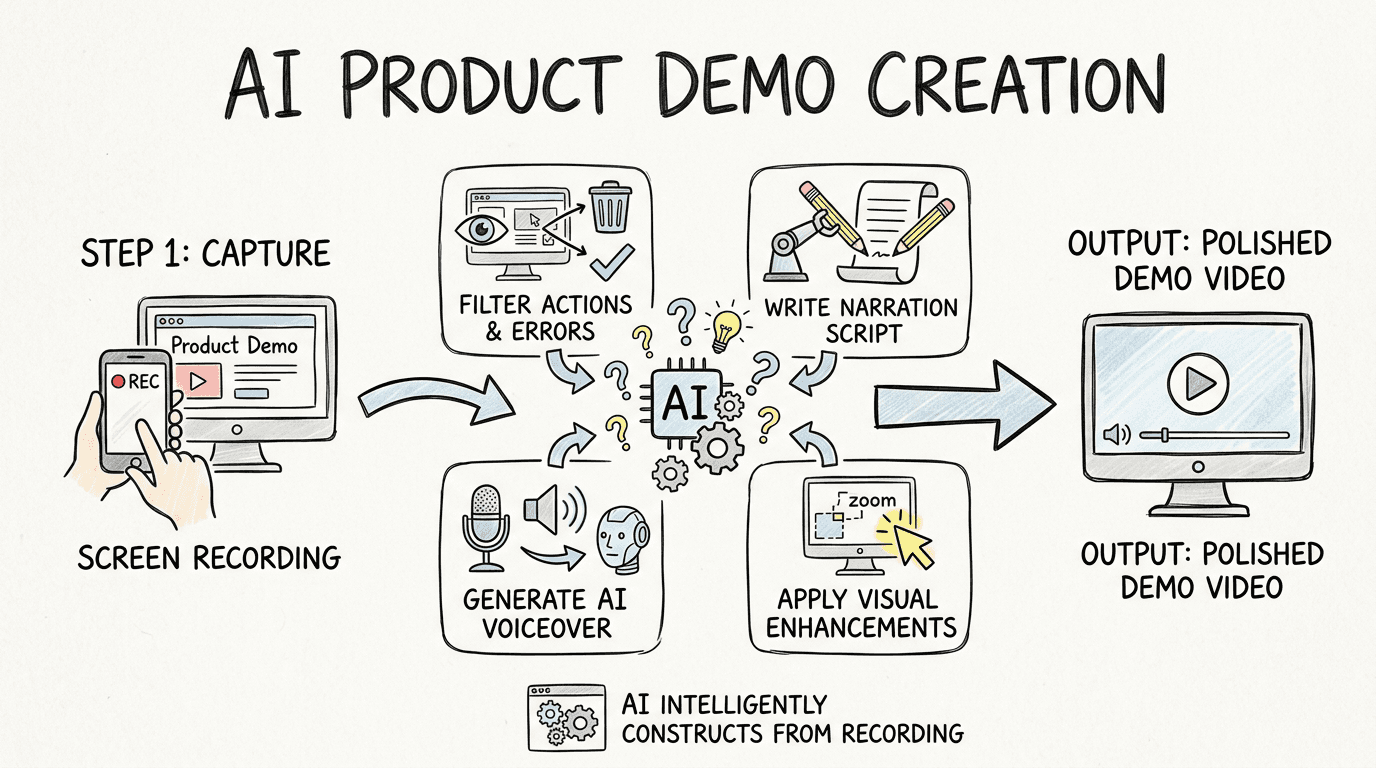
The output is a professional-looking demo with narration, not because someone edited it for hours, but because the AI constructed it from the recording intelligently.
Create product demos automatically with Clevera
Clevera is a Mac and Windows app built specifically for this kind of automated production. Record your screen while walking through your product, and Clevera generates a narrated demo video and an optional step-by-step article from that single recording.
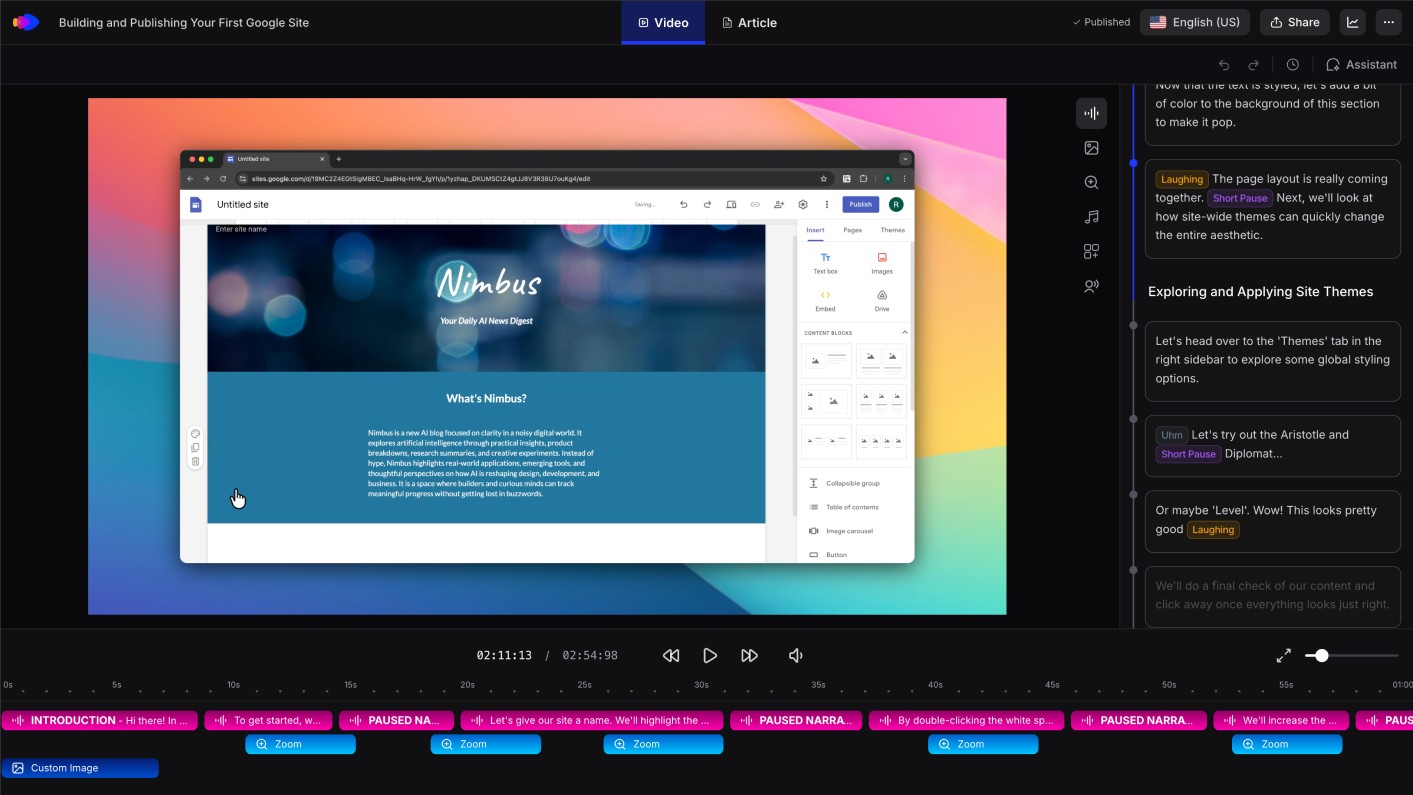
What makes Clevera the right tool for automated product demo creation:
No narration during recording: You don't need to speak while recording. Clevera analyzes your screen activity and writes the voiceover script from the context of what you're doing. This removes the most uncomfortable part of demo creation for most people, narrating live, and produces a cleaner script than most people produce on the fly.
Demo-quality output without editing: Clevera's AI removes accidental clicks, pauses, and backtracking. It applies smart zoom to highlight key interactions and smooth cursor movements throughout. What you get back looks like a produced demo, not a raw recording.
Instant updates with LiveSync: Publish a demo video and update it at any time. Changes to narration, visuals, or style apply immediately across every embed. When your product UI updates and you need a new demo, you re-record, regenerate, and publish. The new version replaces the old one everywhere it's embedded, with no broken links and no manual updates.
Optional help article: alongside the video, Clevera can generate a written product walkthrough with screenshots and step descriptions. This gives your audience both formats: a video for first-time viewers and an article they can scan when they need a quick reference.
Team-wide demo production: because Clevera handles scripting and narration automatically, any PM or CS team member who knows the product can produce a polished demo. You don't need a video editor or a professional narrator.
Use cases for automated product demo creation
Sales demos: prospects who don't book a live call still need to see the product. An automated demo video on your website or in a follow-up email keeps the conversation moving without requiring a rep's time for every interaction.
Feature launch demos: when you ship a new feature, a demo video explains it better than release notes. With Clevera, the demo can be ready the same day the feature ships.
Onboarding videos: new users need to see the product in action to get value from it fast. A library of short, focused demo videos for each core workflow reduces time-to-value and support load.
Help center content: support tickets are often "how do I do X?" questions. A demo video that shows the answer deflects the ticket. Automated creation makes building this library practical.
Investor materials: a clean, narrated product demo communicates capability better than screenshots. For startups, being able to produce this quickly without a production team is a practical advantage.
What to expect from the output
Automated product demos won't replace every type of demo. Live sales demos where you adapt to a prospect's questions, or highly produced marketing videos for major brand campaigns, still benefit from human involvement. But for how-to demos, feature walkthroughs, onboarding videos, and help center content, automated creation produces output that's indistinguishable from manually edited work, in a fraction of the time.
The teams that adopt automated demo creation first tend to end up with more demos, more consistently updated, with less effort than their competitors. That's a content advantage that compounds.