How to build a knowledge base with AI

Your support team is answering the same 20 questions every week. Customers are waiting. Tickets pile up. A knowledge base fixes that, but building one from scratch has always been the bottleneck. With the right AI tools, that changes.
This guide covers how to build a knowledge base with AI step by step, from figuring out what to write to keeping articles current without a dedicated writer on staff.
Why knowledge base projects stall
Most teams don't lack the knowledge. They lack time to document it. A senior support engineer knows exactly how to handle your top 10 issues, but producing clear, searchable help articles for each one takes hours they don't have.
AI-powered knowledge base creation shifts where the work happens. Instead of writing articles from scratch, you're directing AI to produce them from the expertise that already lives on your team. The bottleneck moves from "find time to write" to "record yourself solving the problem," which is a much faster loop.
Step 1: Audit your support tickets before writing anything
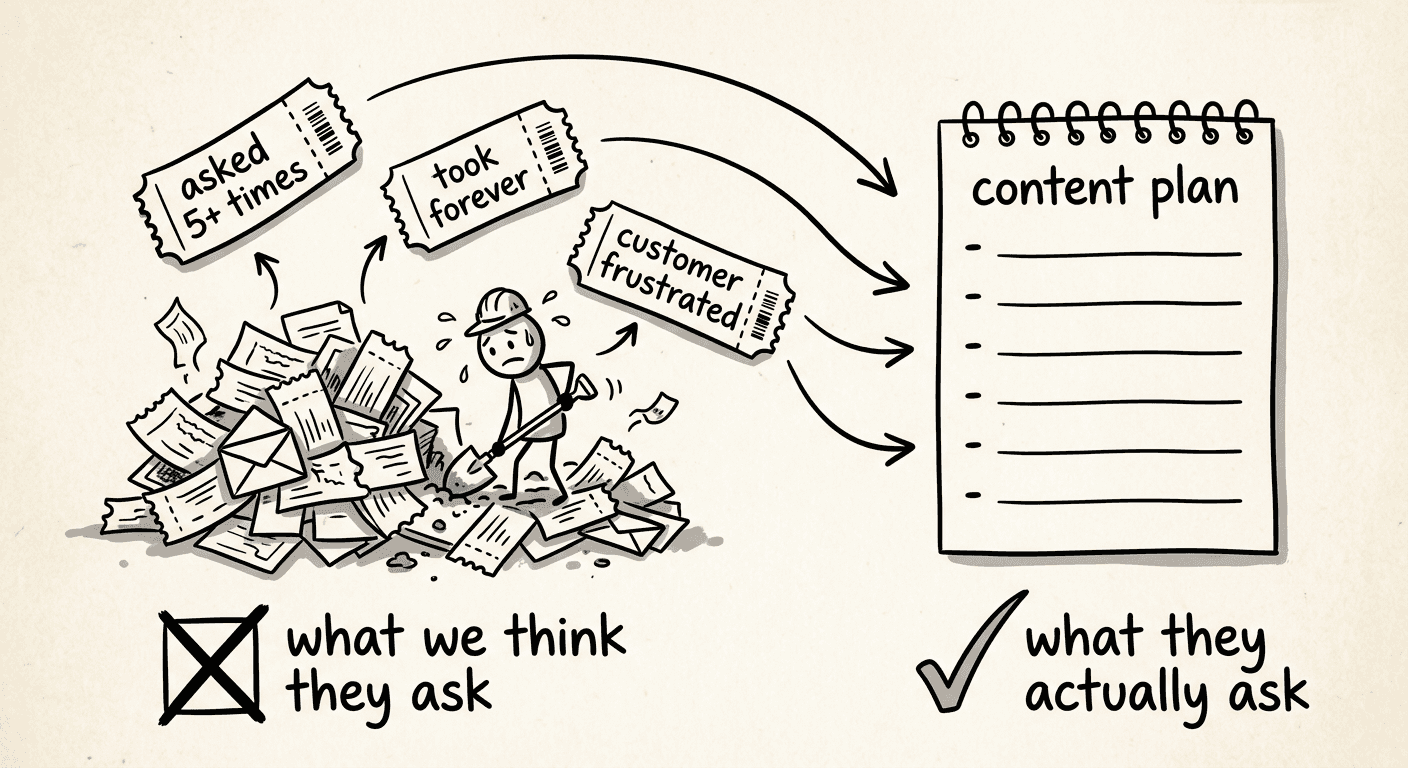
The biggest mistake teams make is guessing what articles to write. Before creating a single piece of content, pull your most common support queries from the last 90 days.
You're looking for:
Questions that appear more than 5 times
Issues that take more than 5 minutes to resolve in a ticket
Topics where customers express frustration about finding information on their own
That list is your content plan. Most help desks (Zendesk, Intercom, Freshdesk) let you filter and export tickets by tag or category. Spend the time to do this properly. A knowledge base that answers the wrong questions deflects nothing.
Group the topics into 6-10 categories that match how your customers think, not how your internal teams are organized. If customers call it "billing," your category is "billing," not "revenue operations."
Step 2: Plan your article structure before generating content
For each article you plan to produce, define 3 things before touching any AI tool:
The exact question it answers — use the customer's phrasing from tickets, not your internal terminology
The outcome after reading — what should a customer be able to do on their own?
Who it's for — new users, admins, a specific plan tier?
This 60-minute planning session pays off. Articles written without a clear outcome get rewritten. Articles based on real customer language get found in search.
A fully functional knowledge base for a mid-sized SaaS product typically covers 50-100 articles across 6-8 categories. That sounds like a lot until you see how fast AI can generate them.
Step 3: Use an AI knowledge base builder to generate articles
This is where the time savings become real. There are 2 main approaches.
Option 1: AI writing tools
You paste a rough answer or a ticket thread into a tool like ChatGPT and ask it to produce a help article. This works for simple FAQs. The quality is inconsistent for anything that involves a visual workflow, UI navigation, or a multi-step process. You'll spend time editing for accuracy and structure.
Option 2: Record the solution, let AI generate the article
For software walkthroughs and process-heavy topics, this approach is significantly faster and more accurate. With a tool like Clevera, you record your screen as you walk through the solution, and the AI automatically generates a polished, step-by-step help article from that recording. No writing required.
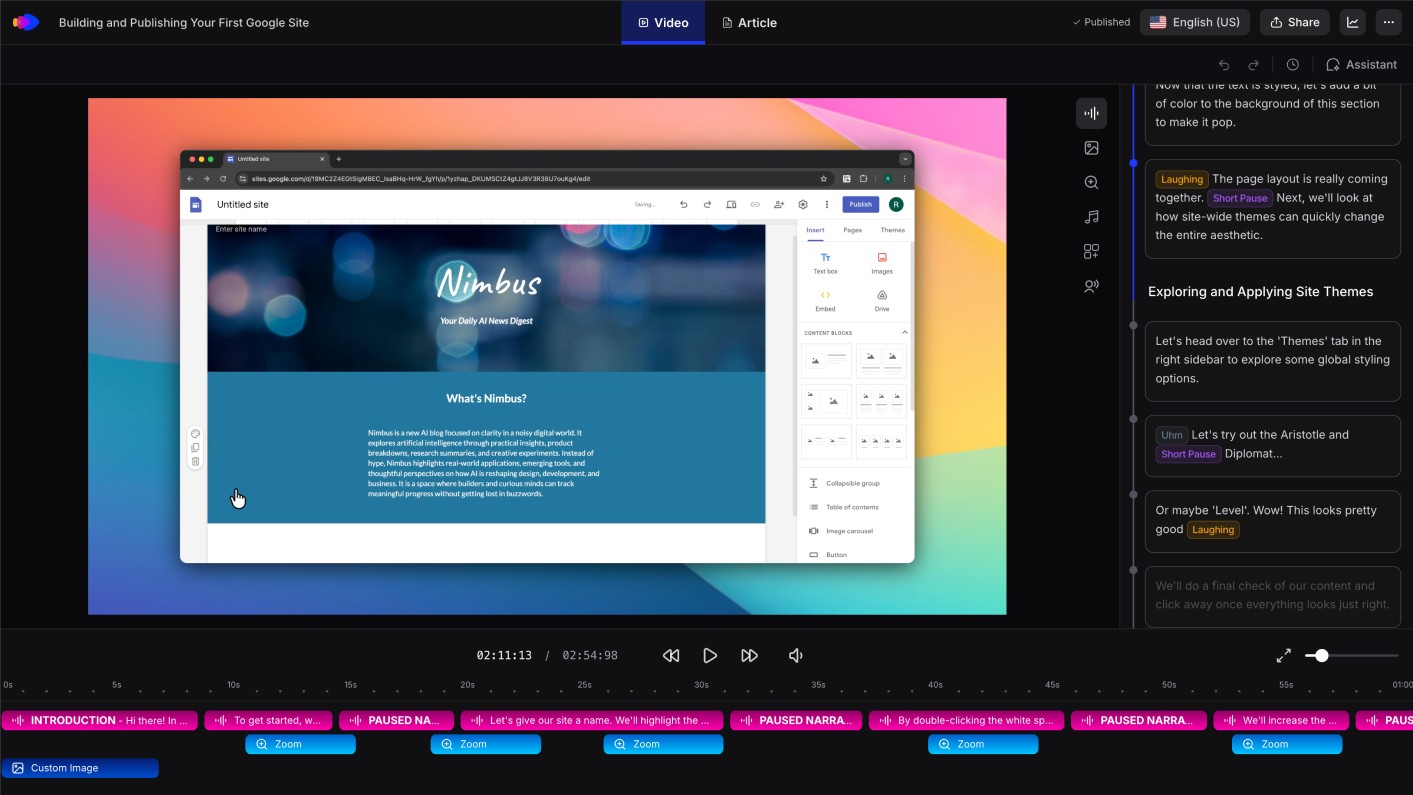
The output is accurate because it's derived from what you actually did on screen, not a rough description typed from memory. If a process has 14 steps, the article has 14 steps, in the right order, with no steps missing.
For support teams building a knowledge base around software workflows, this is the most practical path to create a knowledge base with AI at scale.
Once Clevera generates an article, you can publish it directly to your knowledge base platform. It connects to Notion, Confluence, HelpScout, GitHub, and more, so there's no manual copy-paste between tools.
Step 4: Review every article before publishing
AI-generated content needs a human review pass. This doesn't mean rewriting from scratch. For most articles, a 10-minute check is enough.
Look for:
Accuracy: does the article reflect how your product works today, not 6 months ago?
Completeness: does it cover edge cases or error states that customers hit?
Tone: does it sound like your brand, or like generic documentation?
Linking: does it point to related articles that already exist in your KB?
Set a consistent quality bar and apply it to every article. Inconsistent documentation is one of the main reasons customers stop trusting a knowledge base and go back to submitting tickets instead.
Step 5: Build in a maintenance process from day one
A knowledge base that goes stale does more damage than no knowledge base. Customers find outdated instructions, follow them, open a ticket asking why it didn't work, and trust the KB less from that point on.
Build maintenance into your process from the start:
Tie article reviews to your release cycle. When a feature changes, the relevant articles need to update at the same time, not two weeks later.
Track which articles still generate tickets. If customers read an article and contact support anyway, that article needs a rewrite. Most help desks can surface this with a simple tag.
Set a review date on every article. Nothing should sit untouched for more than 90 days in a product that ships regularly.
Clevera's LiveSync feature helps with product updates: when your UI changes, you can re-record the updated flow and regenerate the article automatically, rather than hunting through paragraphs of text to find what's now out of date.
Step 6: Measure deflection, not just article count
Publishing 80 articles doesn't mean your knowledge base is working. The metric that matters is ticket deflection: are customers finding answers before they contact support?
Track:
KB views vs. ticket volume on the same topics — if people are reading the article but still opening tickets, the article isn't solving the problem
Search queries with no results — gaps in your content that generate tickets
Article ratings and feedback — most KB platforms support thumbs up/down; low-rated articles are rewrites waiting to happen
A knowledge base is never finished. The teams that see the biggest reduction in support ticket volume treat it as a product, not a project. Content gets shipped, measured, and iterated on the same way features do.
Getting started
Start with your top 10 most common support tickets. Record someone on your team walking through the solution for each one. Let an AI knowledge base generator turn those recordings into articles. Review and publish.
That's 10 articles in a day, not a week. Do it again the following week with the next 10. Within a month, you'll have a knowledge base that covers the vast majority of what customers actually ask, built from real solutions, not guesswork.
The queue gets quieter faster than you'd expect.