The hidden cost of manual tutorial production (and how an AI tool fixes it)

You know the drill. Someone on the team says, “Hey, can you whip up a quick tutorial video for the new feature?”
“Sure, no problem,” you reply, picturing a simple 15-minute screen recording.
Fast forward five hours. You’re on your seventh take because a Slack notification popped up again. You’re wrestling with a clunky video editor, trying to crop out a clumsy mouse movement. And you’re debating whether your voice sounds more like a nervous robot or a tired parent.
That "quick" tutorial? It’s become your entire afternoon.
For most SaaS teams in support, product, and marketing, this story is painfully familiar. We know creating how-to videos takes time, but we rarely stop to calculate the real cost. Manual tutorial creation feels “free” because it’s done in-house, but it’s secretly one of the most expensive, time-sucking processes hiding in your help center.
Let’s pull back the curtain on this invisible money pit.
The Gritty reality behind one “simple” tutorial
We tell ourselves it's just "point and click," but the journey from idea to a published 90-second video is a winding, frustrating road.
The manual workflow usually looks something like this:
The scramble: Planning the flow and writing a script that doesn’t sound clunky.
The performance: Recording the screen, trying to narrate perfectly while flawlessly clicking through the UI.
The inevitable retakes: Realizing you forgot a step, your dog started barking, or you just plain messed up. (Repeat 3-5 times).
The editing quagmire: Trimming dead air, cutting out mistakes, adding zooms, and trying to make it all look smooth. This is where hours mysteriously vanish.
The voiceover void: Recording audio separately, trying to sync it to the video, and cringing at the sound of your own voice.
The export & upload: Waiting for the file to render, then uploading it to your help desk or YouTube.
The “oh No” moment: A month later, a UI element changes, and the entire video is now obsolete. Back to step one.
The result? Slow, inconsistent videos that drain your team's energy. Most teams wildly underestimate that a single, polished 60–90 second video often consumes several hours and involves multiple roles.

The cost breakdown you never see
This process isn’t just slow; it’s expensive. When you add up the hidden costs, the numbers are staggering.
Human time & opportunity cost: Let’s be conservative and say a single video takes 4 hours. If your team member’s fully-loaded cost is $50/hour, that’s $200 per video. What could that product manager, support agent, or marketer have achieved in those four hours? Probably something with a much higher ROI than fumbling with iMovie.
The expertise tax: Suddenly, your support specialist is expected to be a scriptwriter, a voice actor, and a video editor. These are specialized skills, and forcing people to do them without proper tools leads to burnout and subpar results.
The switching cost: Every time someone stops their core work to make a video, there's a cognitive cost. They lose focus and momentum on strategic projects. According to research from the University of California, Irvine, it can take over 23 minutes to refocus after a single interruption.
The chaos of inconsistency: When everyone makes videos their own way, your brand looks fragmented. Some have voiceovers, some have text overlays, and some just have frantic mouse-wiggling. This erodes user trust and makes your product feel less professional.
When you factor it all in, manual production can quietly cost 5–10 times more than teams assume.
The video graveyard: where good tutorials go to die
Here’s the killer. Your product isn't static. It evolves, improves, and changes. And every time your dev team pushes a UI update, they unknowingly send a wrecking ball through your help center.
That beautiful tutorial library you spent months building? It’s now a minefield of outdated information. This creates a vicious cycle:
Updating videos is even more painful than creating them from scratch.
So, teams avoid it. The help center slowly rots, becoming a "video graveyard."
Users get confused by old UIs, trust plummets, and they flood your support team with tickets you thought you’d already solved. And with the average support ticket costing businesses around $15-20, those tickets add up fast.

Users want video. your team can't keep up
This entire manual bottleneck is happening at the worst possible time. Users have zero patience for long, boring knowledge base articles.
The data doesn't lie:
Viewers claim they retain 95% of a message when they watch it in a video, compared to 10% when reading it in text (Insivia).
91% of consumers want to see more online video content from brands (Wyzowl).
Users are screaming for short, clear, guided videos. But your team is stuck in the manual mud, unable to produce them at the speed your product and your users demand.
Enter the automated tutorial maker: flipping the entire equation
What if you could eliminate 90% of the manual workflow? What if you could create a perfectly polished, narrated tutorial in the time it takes to drink a cup of coffee?
This is where an AI how-to video creator like Clevera changes the game.
Clevera is like having a professional video production studio built right into your browser. Here’s how it automates the pain away:
You just record your screen: messy clicks, pauses, and mistakes included. No pressure to be perfect.
Clevera’s AI watches your raw recording and instantly removes all the mistakes, hesitations, and dead air.
It automatically generates a step-by-step script based on your actions.
It produces a crystal-clear, professional AI-narrated voiceover in your choice of voice. (Goodbye, awkward self-narration!)
It reconstructs a clean, smooth video timeline with smart zooms and highlights on every click.
Need to change something? Just edit the text script, and the voiceover and video update instantly.
Product UI changed? Just create a new video in minutes. It's just easy and fast to create them now!
What took hours of manual agony now takes minutes. No editors, no writers, no voice actors, and no more retakes.
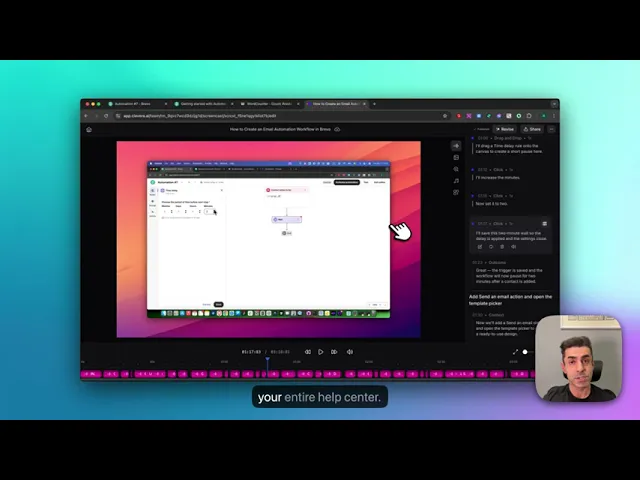
This short video explains the entire process of creating a video with Clevera based on a written help article:
The compounded ROI: from bottleneck to superpower
When you switch to an automated tutorial maker, the benefits compound across your entire organization. You don’t just save time; you unlock new potential.
Create videos 10x faster and keep pace with your product releases.
Reduce video production costs by over 90% by eliminating wasted hours and specialized software.
Empower everyone from support to marketing to become a confident video creator.
Keep your help center fresh and accurate, finally killing the video graveyard.
Dramatically lower support tickets by providing users with the clear and up to date visual answers they crave.
With AI, video documentation transforms from a frustrating bottleneck into your company's superpower.
Stop paying the hidden tax. video shouldn’t be a luxury
The old way of making tutorials is broken. It’s too slow, too expensive, and too fragile for the speed of modern SaaS. You’re paying a massive hidden tax in time, money, and team morale.
AI flips the equation. It finally lets your educational content move as fast as your product.
Ready to see for yourself? Try Clevera and create your first AI-powered tutorial in minutes.