AI documentation generator: what to automate and what not to
Last month, I watched a product team ship a beautiful UI update… and quietly light their help center on fire.
Not literally. But close.
The docs still showed the old button labels. The onboarding video still pointed users to a menu that no longer existed. Support started getting those “I’m stuck” tickets that feel like stepping on LEGO in the dark.
That’s when the temptation hits: “Let’s use an ai documentation generator to regenerate everything.”
Sure. And you can also microwave a steak. It will be fast. It will also be sad.
Here’s the rule we use: automate the parts of documentation that behave like facts, not the parts that depend on judgment. The moment your automation starts guessing intent, you’ve swapped “stale docs” for “confident fiction.”
(And yes, we’ll cover screen recording to documentation and how a step-by-step guide generator should actually work, without embarrassing you later.)
What an AI documentation generator should do (and why most fail)
An AI documentation generator is software that turns reliable sources (like product UIs, schemas, changelogs, and recordings) into updated documentation drafts, then keeps them current through checks and reviews, so teams ship faster without publishing incorrect instructions.
Most teams fail because they automate “writing” instead of automating verification.
The highest ROI automation is not “generate more pages.”
It’s “catch drift before customers do.”
Use this decision framework: ambiguity vs blast radius
When you decide what to automate, ask two questions:
1) Ambiguity: does this doc require interpretation and tribal context?
2) Blast radius: who gets hurt if this is wrong?
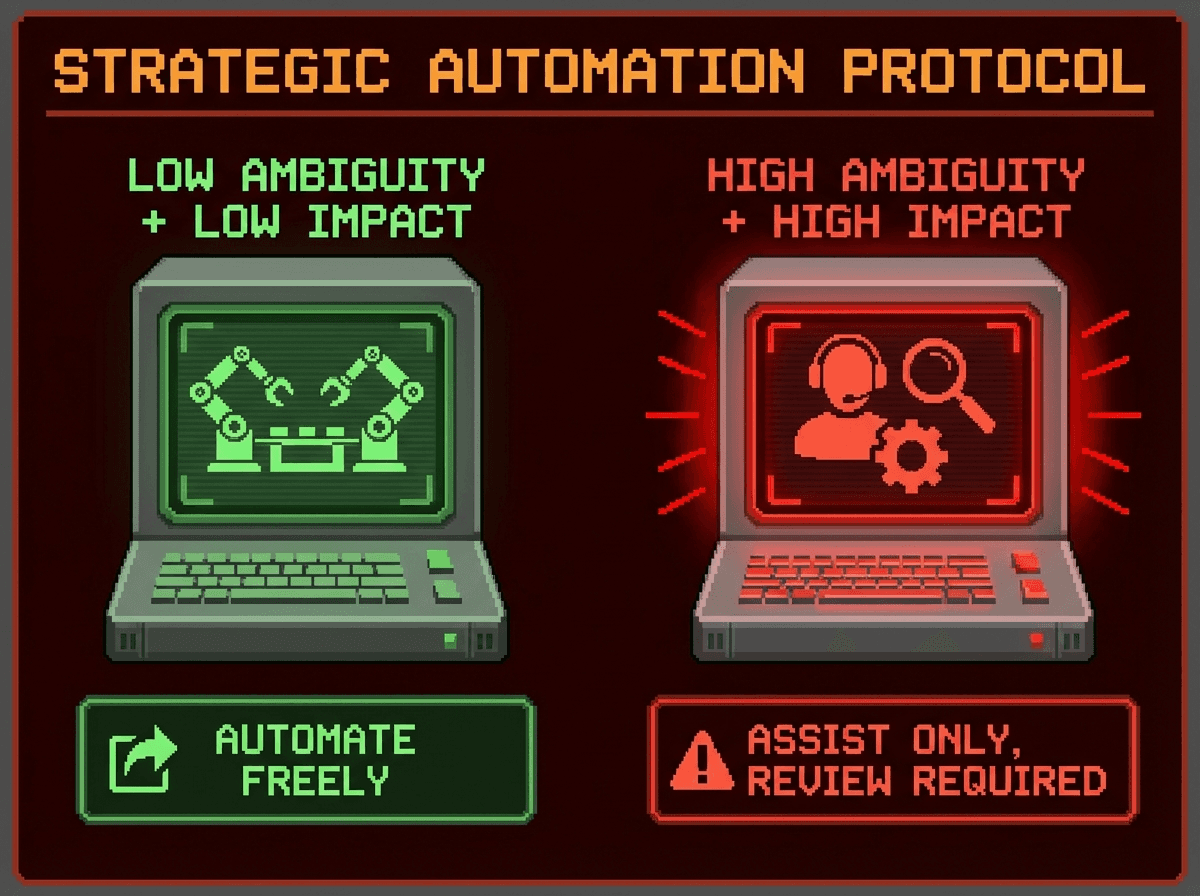
Low ambiguity + low blast radius = you can automate aggressively.
High ambiguity + high blast radius = automate only as assisted drafting, with strict review gates.
If you want a third question that saves careers: Do I have an authoritative source the AI can cite? (If not, it should not auto-publish.)
This mindset pairs well with “docs as code” workflows where docs get versioned, reviewed, and checked like software.
What to automate with an AI documentation generator (high signal, low ambiguity)
Generate reference docs from structured sources
If your “truth” lives in a schema, let the schema lead.
OpenAPI, AsyncAPI, GraphQL schemas
typed signatures, protobufs
config inventories
This is safe because you can validate outputs against the source and regenerate on release. OpenAPI guidance strongly supports structured, design-first thinking for reliable specs.
Draft change summaries, not “final truth”
Automate:
release note drafts from PR titles, labels, and commits
“what changed” diffs for docs owners
Then keep a human edit pass. The AI should spotlight changes, not decide whether they matter.
Keep a docs inventory and run freshness checks
Automate:
which pages exist
who owns them
when they were last verified against version X
which pages likely drifted after a release
This is where service catalogs shine because they connect ownership to systems and keep discovery sane.
Enforce consistency and hygiene
Low-risk, high payoff:
terminology consistency
style guide checks
broken links
snippet formatting
Google’s technical writing resources are a solid baseline for clarity and consistency when you need “boring and readable.”
Improve answers with retrieval, not freeform generation
For internal “how do I…?” questions, retrieval beats vibes.
Anthropic’s work on Contextual Retrieval shows large gains in reducing retrieval failures, which directly improves RAG reliability.
What not to automate (or only behind strict SME review)
If your AI doc generator touches any of these, add gates or don’t automate it at all:
Architecture rationale and tradeoffs
AI can summarize an ADR, but it cannot reliably infer “why we chose X” from code. That’s how you end up with a doc that sounds smart and is completely wrong.
Runbooks that can break production
Anything that changes prod state (DB restores, incident steps, key rotation) needs an owner, rehearsal, and review.
Security and privacy guidance
Don’t let an auto-generator normalize insecure patterns or leak internal topology.
Performance claims and benchmarks
If it’s not measured, it’s marketing. Keep humans on this.
Code samples that must compile or run
If you can’t test it in CI, do not auto-publish it.
My opinionated rule: If you can’t validate it, label it “draft” or keep it private. I’ve seen “helpful” auto-docs create more work than they save.
Screen recording to documentation: the shortcut that keeps you honest
Here’s the underused trick: when ambiguity is high, stop asking AI to “invent clarity” and instead give it evidence.
A good screen recording to documentation workflow flips the model:
Source of truth is not the AI’s prose.
Source of truth is the recorded workflow: the clicks, fields, UI state, and sequence.
This is exactly why we built Clevera to turn raw, silent screen recordings into a narrated product video and a structured, screenshot-rich article in one flow. The recording provides the grounding, and the doc becomes a faithful replay, not a creative writing exercise.
Contextual CTA: If your team keeps rewriting the same “how to” every release, try turning the next workflow into a Clevera recording and export it directly to your help center or wiki. You’ll feel the difference the first time you don’t have to chase screenshots.
Un-Googleable insight we use internally: Treat every how-to doc as “a replay,” not “a page.”
If you can’t replay how the result was produced, you’re one UI change away from nonsense.
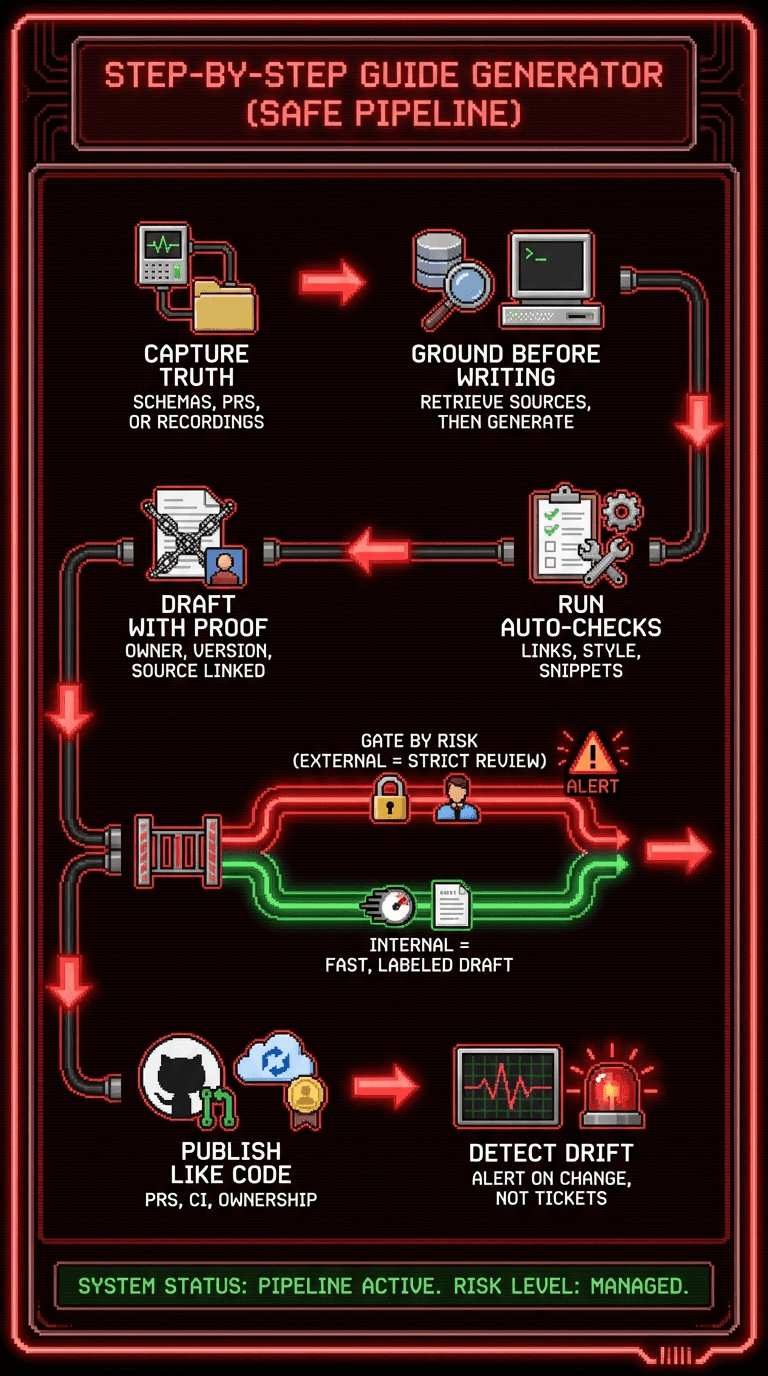
A step-by-step guide generator pipeline that won’t embarrass you
A step-by-step guide generator only becomes trustworthy when you run it like an engineering pipeline, not a content slot machine.
Here’s the workflow I recommend:
Capture authoritative inputs
schemas, PR metadata, or recordings (best for UI workflows)
Ground first, generate second
retrieval with citations, or deterministic extraction from structured sources
Generate a draft with “verification metadata”
owner, last verified version, linked source PR, “draft vs verified”
Run automated checks
link checks, style checks, snippet formatting
Gate by risk
external docs: stricter review and versioning
internal docs: faster, but label drafts clearly
Publish like code
PR review, CI passes, clear ownership
Detect drift
“what changed” alerts to the owner
don’t wait for support tickets to be your monitoring system
This also aligns with platform engineering’s core goal: reduce cognitive load with clear “golden paths” instead of letting everyone spelunk through tribal knowledge.
First wins you can ship in two weeks
If you’re starting from chaos, don’t do a “big rewrite.” Do three small automations that compound:
Reference docs generation
schema to docs, regenerate per release
Staleness detection
owners + “last verified against” metadata
Changelog drafts
auto-draft, human edit pass
These are the safest automations with the fastest “support ticket deflection” payoff.
Visuals that prove your docs are real (not corporate wallpaper)
Skip handshake stock photos. Use proof:
A drift dashboard screenshot showing pages “verified this release” vs “unknown”
Alt text: “AI documentation generator dashboard showing verified vs stale help center pages”
An annotated screenshot sequence (numbers + arrows) for a workflow step
Alt text: “Screen recording to documentation output with numbered steps and highlighted UI elements”
A before/after diff of a doc updated from a release PR
If you publish tutorials, embed the video above the article so users can choose their preferred learning style. Clevera exports exactly this format: video on top, step-by-step article underneath.
Your next move
Pick one doc your customers rely on this week.
Draw a quick 2×2: ambiguity vs blast radius.
Then automate one safe slice (reference, drift detection, or recording-based how-to docs) and put a review gate on the risky slice.
If you do it right, you won’t just publish faster. You’ll sleep better.
Challenge: What’s one “looks authoritative but is wrong” doc in your product right now, and which input would make it replayable: a schema, a PR diff, or a screen recording?