How to localize SaaS onboarding videos without re-recording everything

For most SaaS teams, video localization works like this: the product launches in a new market, someone asks if the onboarding videos are translated, there's an awkward pause, and then someone volunteers to "look into it."
What follows is usually a mix of manual subtitle files, outsourced voiceovers, and a growing list of videos that need to be updated every time the product changes. It's slow, expensive, and almost impossible to keep in sync across languages.
There's a better way to localize SaaS onboarding videos — one that doesn't require re-recording in each language or maintaining parallel video files for each market.
Why onboarding video localization matters
First, the business case. Video localization isn't just about accessibility — it's about activation.
Users who onboard in their native language are more likely to complete setup, understand the product's core value, and convert from trial to paid. For markets where English isn't the dominant language — much of Europe, LATAM, Southeast Asia, the Middle East — sending users through English-only onboarding is leaving conversion on the table.
It also matters for support. When users don't fully understand the onboarding, they either churn or generate support tickets. Localized onboarding reduces both.
The traditional approach (and why it breaks down)
The traditional approach to localizing onboarding videos involves:
Exporting the original video
Sending it to a translation vendor or in-house translator
Getting back translated subtitle files (.srt) or a dubbed audio track
Syncing the subtitles or re-editing the video with the dubbed track
Uploading the localized version to your platform
Repeating all of this every time the original video changes
The fundamental problem: it's not just slow and expensive — it creates a maintenance burden that compounds over time. Every product update means re-localizing every affected video. Most teams can't keep up, so the localized versions drift out of sync with the original.
A better approach: AI-powered multilingual onboarding
Modern AI tools can localize both the narration and the written content that accompanies your onboarding videos — without re-recording, without manual subtitle work, and without managing parallel video files per language.

Here's how the workflow looks with a tool like Clevera:
Record once: You record your screen walking through the onboarding workflow. No live narration required during recording.
Generate narration: Clevera generates AI narration in your source language (usually English). You review and edit the script.
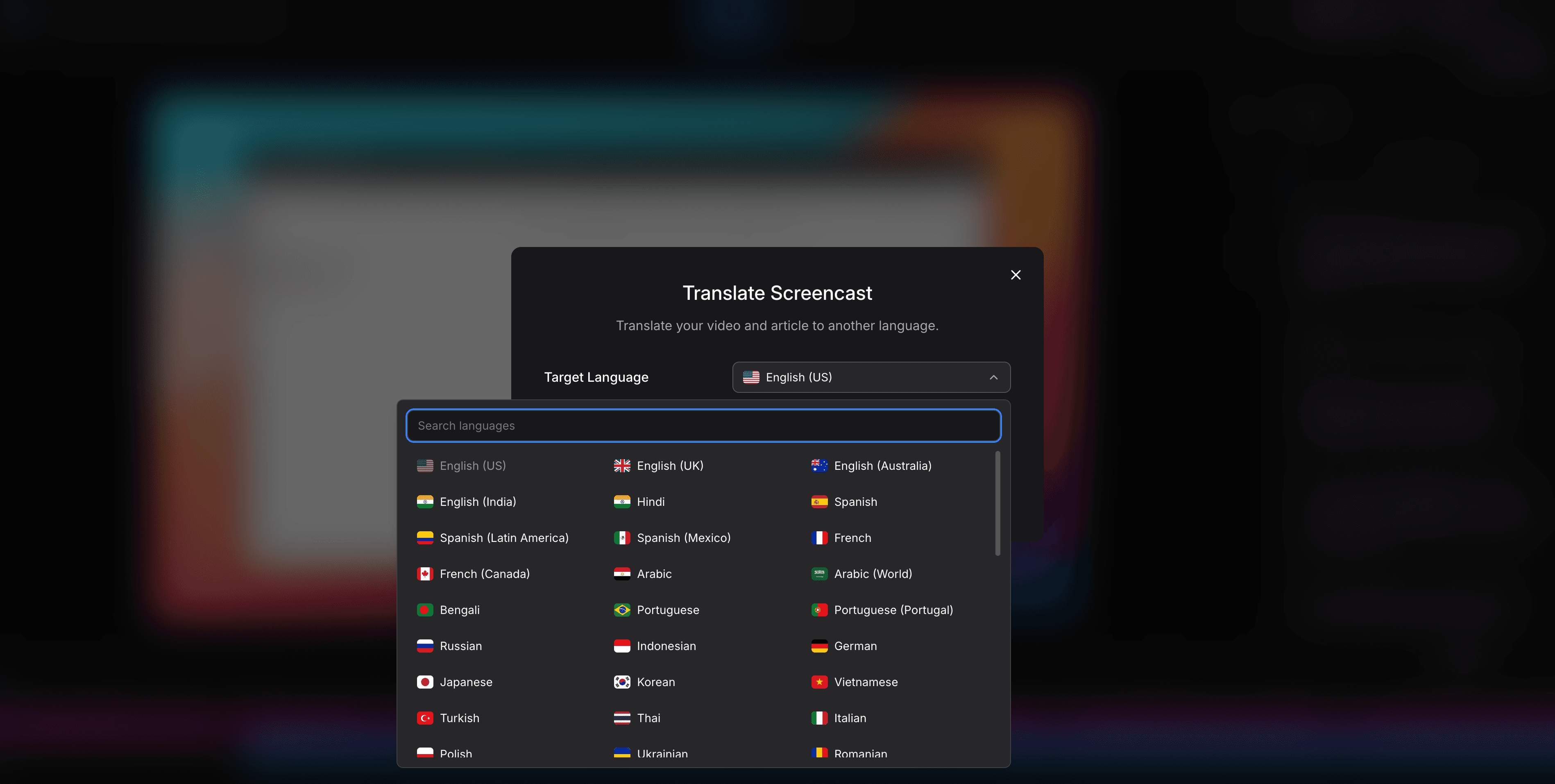
Translate in one click: Clevera translates the narration, captions, and accompanying help article into 70+ languages simultaneously.
Publish all versions: Each language version is available as a separate video, ready to embed in your localized help center or in-app onboarding flow.
Update once, update everywhere: When the product changes and you update the original video, the translated versions update from the same source. You don't maintain separate files per language.
This approach takes what used to be weeks of localization work per language and compresses it to minutes.
What gets translated
Effective multilingual onboarding isn't just about translating the video narration. It involves:
Video narration: The AI voiceover that explains each step. This is the most important element — users need to hear instructions in their language to follow along confidently.
Captions/subtitles: Many users watch video content without sound. Translated captions ensure the video is accessible regardless of how it's watched.
Help articles: If your tutorial video is paired with a written guide (as it should be), that article needs to be translated too. Clevera generates both video and written documentation from the same recording, and translates both simultaneously.
UI screenshots: If your help articles include annotated screenshots, consider whether the product UI itself is localized. Screenshots of an English UI in a French article create a jarring mismatch.
Multilingual onboarding best practices
Keep videos short and modular
Long onboarding videos are harder to maintain in any language. When you break onboarding into short, task-focused clips (3-5 minutes each), updates are isolated — you only need to re-translate the affected clip, not the entire sequence.
A modular approach also lets you build language-specific onboarding tracks. Some features or workflows might be relevant in certain markets and not others. Modular videos let you compose different tracks per region without re-recording everything.
Review AI translations for key markets
AI translation is excellent for most languages but can miss nuances in tone, formality, or product terminology. For your highest-priority markets — the languages you'll reach the most users with — have a native speaker review the translated content before publishing.
Pay particular attention to:
Product and feature names (don't translate brand names)
Formal vs. informal address (French "vous" vs. "tu", Spanish "usted" vs. "tú")
Technical terminology that may have established equivalents in the target language
Match localization depth to market size
You don't need to localize every piece of content for every language on day one. A tiered approach works well:
Tier 1 markets (highest revenue or growth): Full localization — video narration, captions, help articles, UI
Tier 2 markets: Video captions + help article translation (no dubbed narration)
Tier 3 markets: Help article translation only, with original-language video
This lets you serve more markets with the same resources while concentrating full localization effort where it matters most.
Embed localized videos in language-specific help centers
Translated videos need to live somewhere. If you're using a help center platform like Zendesk, Intercom, or Freshdesk, check whether it supports multilingual content. Most do — you'll create separate help center instances (or sections) per language and embed the relevant video version there.
Clevera's LiveSync embedding works across language versions: if you update the source video and the localized versions regenerate, the embedded instances in your help center update automatically.
A note on in-app localization
If you're triggering onboarding videos inside the product (via tooltips, modals, or empty state prompts), you'll need to detect the user's locale and serve the appropriate video version.
Most product analytics and in-app guidance tools support locale-based content rules. Connect your video embed URLs to the right language condition and test that the fallback behavior (usually English) works for unsupported languages.
Common pitfalls to avoid
Translating before the video is final: Don't localize a video that's still being iterated on. Wait until the source content is approved and stable, then translate. Re-translating draft content wastes time.
Different video lengths per language: AI-generated narration can produce slightly different audio lengths in different languages (German and French tend to be longer than English, for example). Build in tolerance for minor timing differences, or use Clevera's automatic timing adjustments when translating.
Ignoring text in the recording: If your screen recording captures UI text, system dialogs, or in-product messages, those text elements won't be translated by the narration tool — they're baked into the video. For full localization, either use a version of the product with a localized UI or add callout annotations that can be translated.
No process for keeping translations in sync: Establish a rule: every time the source video is updated, the affected language versions are queued for re-translation. With Clevera, this is largely automatic — but the process should still be documented so it doesn't fall through the cracks.
Getting started
If you're starting from zero, here's a practical first step:
Pick your 3 highest-priority onboarding videos and your 3 most important non-English markets. Localize those 9 combinations first. Measure whether localized users activate and convert at different rates than English-only users. Use that data to justify expanding the program.
Most teams are surprised by how fast the ROI shows up. Localized onboarding isn't a nice-to-have for global SaaS products — it's a measurable lever on activation and revenue.