AI onboarding video software: the first 10 videos to record

The first time I watched a new customer struggle through onboarding, it felt like watching someone assemble IKEA furniture without the manual. Tabs everywhere. Half-finished setups. A quiet rage click.
The problem was not motivation. It was friction. And we were explaining the wrong things, in the wrong order.
This is where ai onboarding video software earns its keep. Not by producing more videos, but by helping teams record the right ones first.
Below is a practical, operator-tested guide to the first 10 onboarding videos you should record if your goal is faster time to value, fewer support tickets, and a product onboarding guide people actually use.
Why most onboarding videos fail before they start
Most teams build onboarding libraries like feature catalogs. One video per feature. Clean. Logical. And mostly ignored.
Users do not open onboarding videos because they want to learn your product. They open them because they are stuck. If your videos do not map to moments of friction on the path to first value, they are dead weight.
This is why we recommend starting from activation, not features. Tools like Pendo and Gainsight consistently show the same pattern: customers who reach their first meaningful outcome faster stick around longer.
Your first 10 videos should remove the biggest blockers between signup and that outcome.
How to decide which 10 videos come first
Before hitting record, do two things:
Map your activation path. List the minimum steps a new user must complete to experience real value.
Pull your top onboarding-related support tickets. Look for repeats, not edge cases.
Where those two lists overlap, you have your first onboarding videos.
If you want a shortcut, this is exactly why we built Clevera to analyze onboarding friction and help teams prioritize videos that reduce time to value instead of just filling a library.

The first 10 onboarding videos to record (and why each matters)
1. Set up your account in under five minutes
Why it matters: Account setup friction kills momentum.
What it unlocks: Activation funnel completion.
This video should end with a visible “you are ready” state, not a tour of settings.
2. Connect the one integration that powers everything
Why it matters: Products without data feel broken.
What it unlocks: First meaningful output.
Do not cover every integration. Cover the one that delivers value fastest.
3. Create your first core object
Why it matters: Value starts when users create something real.
What it unlocks: First core event completion.
Name the outcome, not the feature. “Create your first report” beats “Reports overview.”
4. Invite your team and assign roles safely
Why it matters: Single-player usage rarely sticks.
What it unlocks: Multi-user adoption and expansion.
This video quietly reduces permission-related support tickets later.
5. Build a complete workflow from start to finish
Why it matters: Partial setups create false confidence.
What it unlocks: True time to value.
This is often the highest-impact onboarding video you will ever record.
6. Avoid the three setup mistakes that break everything
Why it matters: Most onboarding failures are predictable.
What it unlocks: Ticket deflection and faster onboarding.
Counterintuitively, this video often outperforms “full setup” guides.
7. Understand what “good” looks like in your dashboard
Why it matters: Users misinterpret results and assume failure.
What it unlocks: Correct usage and sustained engagement.
Explain signals, not charts.
8. Customize the product for your role
Why it matters: A marketer, PM, and CSM want different wins.
What it unlocks: Persona-based adoption.
Role-based onboarding videos reduce cognitive overload dramatically.
9. Fix the most common issues in two minutes
Why it matters: Speed matters when users are blocked.
What it unlocks: Support deflection and trust.
Think authentication errors, sync delays, and permissions.
10. Your next step after the first win
Why it matters: Onboarding does not end at activation.
What it unlocks: Deeper adoption and expansion.
This video should point users to the second workflow, not advanced features.
What “great” onboarding videos actually look like
Great onboarding videos are not short. They are dense.
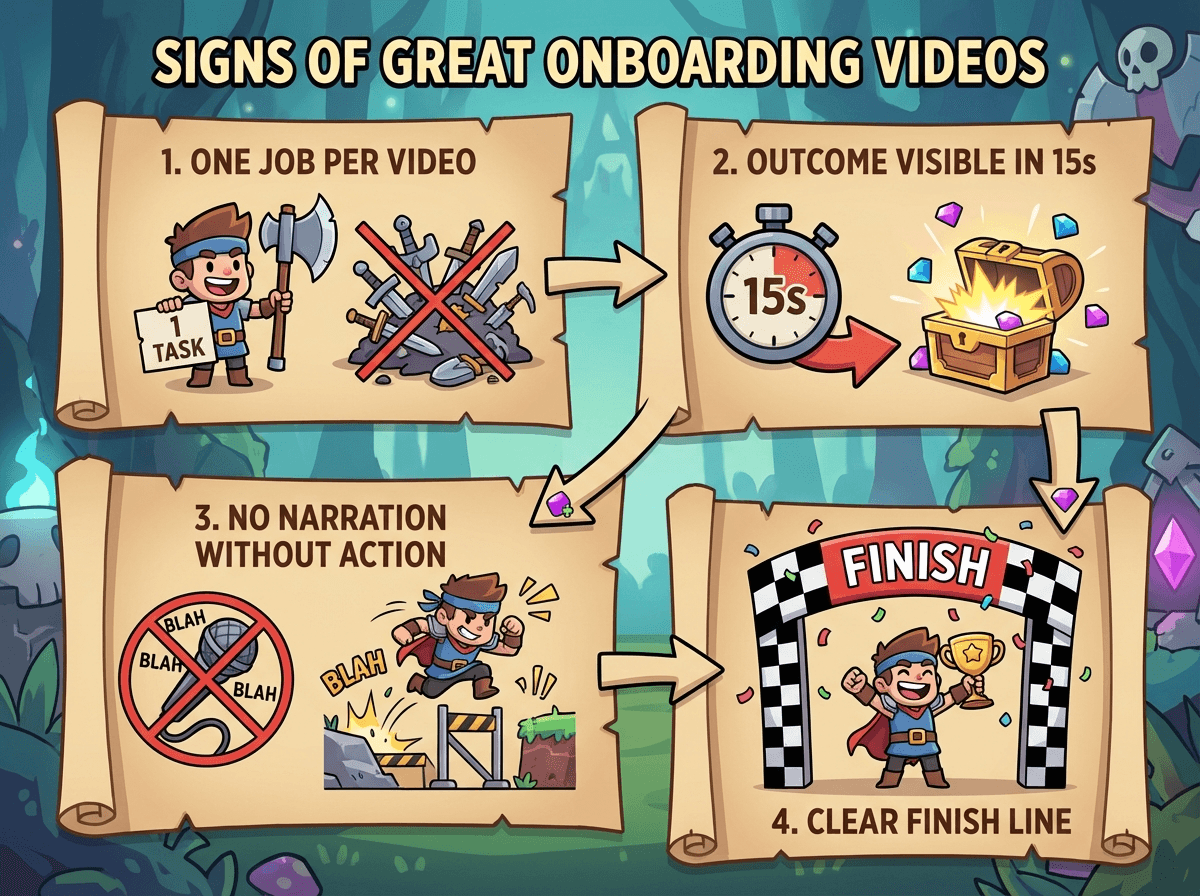
Here is the internal bar test we use:
One job per video.
Outcome visible in the first 15 seconds.
No narration without action on screen.
Clear finish line.
AI tools help by removing editing overhead, but accuracy still matters. When the UI changes, videos must change too. Treat onboarding videos like product surfaces, not content assets.
This is where AI onboarding video software shines when paired with ownership and versioning. Without that, speed just creates outdated videos faster.
Measuring whether onboarding videos work
Do not obsess over completion rate. It is a vanity metric.
Better signals:
Did users complete the next core action within 24 hours?
Did time to value drop?
Did onboarding-related tickets decrease?
Product teams often pair video analytics with activation funnels in tools like Mixpanel to see which videos actually move behavior.
Where Clevera fits in this workflow
Once you know which onboarding videos to record, the bottleneck is execution: scripting, narration, editing, publishing, and redoing everything when the UI changes. Clevera removes that friction.
You record a workflow once. Clevera turns the silent screen recording into a polished onboarding video and a matching step-by-step article. It handles narration, pacing, visuals, and formatting so teams can ship onboarding videos without video editors.
When the product changes, you re-record the flow and regenerate the video and doc in minutes. That makes it realistic to keep a product onboarding guide current, which is what actually protects time to value.
In short: the list tells you what to record. Clevera makes it fast enough to actually do it.
The kicker
If you had to delete all but three onboarding videos tomorrow, which ones would still help a new user reach value?
If you cannot answer that immediately, your onboarding library is explaining too much and enabling too little.